How much will that timesheet mistake cost you? $500, $5,000, or your entire business?
It only takes one audit, one complaint, or one overlooked tracking policy to land you in legal trouble under modern labor laws.
And the worst part? You probably didn’t even know you broke the rules.
Every time your team clocks in, shares location data, or logs work hours through your time tracking software, you’re creating a legal record tied to employee time.
If that record isn’t handled with care, transparency, and compliance, it could cost you far more than the payroll errors or unbilled hours.
Think you’re safe because your system looks accurate?
Compliance today isn’t just about clock-ins; it’s about building systems that lead with trust, not control.
Time tracking compliance is about how you track, what you track, and why.
Get that wrong, and you risk more than just fines. You risk damaging employee trust, your reputation, and even your ability to operate effectively.
So before you open that next timesheet…
Ask yourself:
- Are your tracking tools compliant with the laws where your employees work?
- Are you collecting consent or gathering evidence against yourself?
- Is your team aware, protected, and treated fairly?
Let’s take a closer look.
Because the real danger isn’t the employee time you’re tracking, it’s the compliance you’re ignoring.
Table of Contents
- What does time tracking compliance really mean?
- Why time tracking laws matter for your business
- Common time tracking methods and the legal risks to avoid
- Time tracking compliance by country: Legal overview
- 7 best practices for legal time tracking compliance
- How Time Doctor supports global time tracking compliance
What does time tracking compliance really mean?
Time tracking compliance isn’t just about logging hours, it’s about doing it legally, ethically, and in a way that respects employee rights.
At its core, it means adhering to all legal requirements for recording, storing, and managing employee time accurately and efficiently. That includes everything from clock-ins and timesheets to timekeeping systems and the processing of that data for payroll or audits.
Think of it like your business’s tax records. If they’re wrong, incomplete, or collected without the proper approvals, you’re the one on the hook.
The same applies to employee time.
Here’s what accurate compliance covers:
- Using time tracking software that aligns with national labor laws and regional data privacy rules
- Collecting employee time accurately across different roles, whether hourly or salaried employees
- Ensuring record-keeping is secure, accessible, and legally defensible in case of audits or disputes
- Getting proper consent when monitoring tools collect behavioral data, especially in remote or hybrid teams
- Storing data safely, avoiding leaks that could violate data security laws
- Having a clear policy that defines what’s being tracked, why, and when
If any part of your timekeeping system feels vague or outdated, that’s a red flag.
Whether you’re using paper timesheets, Excel spreadsheets, or advanced timesheet software, it only takes one missing consent form or one flawed time card in a pay period to create a major legal and financial mess.
And if you’re managing a distributed workforce across different countries or states? That risk multiplies fast.
Next, let’s break down why this matters so much and how a simple misstep in your time tracking process can do more damage than you think.
Why time tracking laws matter for your business
Tracking employee time may seem straightforward, but the legal risks associated with it are far more complex.
If your system isn’t aligned with privacy laws, FLSA (Fair Labor Standards Act), or labor regulations, you’re not just tracking hours; you could be exposing your business to serious legal trouble.
That’s why time tracking compliance isn’t optional. It’s essential for protecting your people, your reputation, and your bottom line.
Let’s explore why it matters now more than ever, especially for businesses with remote, hybrid, or global teams.
1. Legal risk: fines, lawsuits, audits
Every clock-in, login, or timesheet entry tied to employee work hours becomes part of your official record-keeping. If collected without consent or stored incorrectly, it may violate labor regulations or data protection laws.
For example:
- In California, the CCPA requires employers to disclose how employee data is collected and used.
- In Quebec, Bill 64 demands explicit written consent for tracking.
- Across the EU, the GDPR enforces transparency and limits on data collection.
Fines, audits, and lawsuits are all on the table if you’re not compliant with standards enforced by the Department of Labor, especially in industries like finance, healthcare, and legal services that have strict record-keeping requirements.
If you’re unsure whether your tools meet legal standards, you may already be at risk.
Let’s take a closer look:
a. Healthcare
Healthcare providers must comply with strict patient privacy and labor standards.
Time tracking in this sector is often tied to:
- Medical shift documentation
- Clinical audit readiness
- Overtime and rest break enforcement under health and safety regulations
Inaccurate or non-compliant time records may violate HIPAA (U.S.), GDPR (EU), or workplace health and safety laws. This can lead to lawsuits, penalties, and reputational harm, particularly when associated with patient care or staff burnout.
b. Legal services
Law firms rely heavily on billable hours, and many use timesheet software to document how attorney time is allocated across clients.
If time logs are wrong, unclear, or missing key details, law firms can face serious problems.
Clients may question their invoices, and mistakes could lead to ethics issues or penalties from the bar association. In some cases, billing errors may even trigger an audit or breach the terms of a legal contract.
No matter the industry, the same lesson applies. If your time tracking isn’t accurate, compliant, and adequately documented, you’re opening the door to legal exposure – especially in cases where it affects minimum wage compliance or overtime rules.
For a deeper breakdown by country, refer to our comprehensive guide on Employee Monitoring Laws 2025: US, EU, UK, Canada, and more. It outlines the legal rules you need to follow, country by country.
2. Loss of employee trust or morale
Employees are willing to be tracked for payroll, projects, or performance, as long as the number of hours tracked feels fair and clearly communicated. But when they’re being watched without clear communication, trust erodes quickly.
This is especially true for remote, in-office, or hybrid teams, where companies often rely on:
- Screen monitoring
- Login tracking
- GPS location logging
Tracking without explanation can feel intrusive. Even worse, it can lead to disengagement or public backlash.
By communicating your policies up front and staying compliant, you’re not just following the law; you’re showing your team that their privacy matters.
As J.M. Lacey wisely puts it, “One of your goals is to build trust among your consumers and your employees. Consumers who trust you will continue to do business with you. Employees who trust you, who believe in what you represent, will be loyal to you.”
3. Global workforce = global compliance rules
Time tracking laws vary widely depending on where your employees work.
Using the same time tracking software across different locations without adjusting for local rules can get you into trouble.
Examples include:
- South Korea and Germany require prior written consent for tracking.
- NSW (Australia) demands 14 days’ written notice before surveillance begins.
- Mexico’s federal law requires clear documentation and employee agreement.
Whether you’re managing a distributed workforce or just one employee in another state, you need to understand the legal differences.
Want to see how these laws compare? You can explore the complete compliance guide here.
4. Compliance supports your brand and reputation
The way you handle employee time tracking reveals a great deal about your business.
Companies known for ethical, transparent practices are more likely to attract top talent and build lasting trust.
In contrast, stories about secret monitoring, unclear consent, or overreach can damage your reputation fast, and they’re hard to recover from.
Compliance isn’t just about legality. It’s about leadership and fostering a healthy work environment your team can trust.
5. Clean data helps HR do its job better
Accurate time data helps teams stay organized, manage payroll processing, streamline workflows, and unlock productivity analytics that help your team work smarter.
But when data is incomplete, unverifiable, or collected without proper consent, it slows everything down. HR ends up doing damage control instead of strategy.
A compliant time tracking system doesn’t just protect you. It also strengthens operations by helping control labor costs and support smarter decisions with workforce analytics, from payroll to time management and performance reviews.
Common time tracking methods and the legal risks to avoid
Tracking employee time helps keep projects on schedule, supports project management, improves billing accuracy, and simplifies payroll.
But without the right approach, it can create more problems than it solves. Every time a tracking tool is introduced, it comes with its compliance risks, especially when privacy, consent, or data handling are overlooked.
Let’s look at the most common methods used in businesses today, and where the risks often show up.
1. Computer and workstation tracking
Many companies rely on software to monitor which apps or websites employees use during the workday. This can help with accountability, especially in remote teams.
However, laws in countries such as Germany, Japan, and certain U.S. states require written notice or explicit consent before any form of computer monitoring commences.
If your employees aren’t aware of this, it’s more than a privacy concern. It may be a legal violation.
To stay compliant, ensure that monitoring is limited to working hours, focused on job-related tasks, and clearly outlined in your employee policies.
2. Screen monitoring
Taking screenshots at intervals is helpful for checking productivity or documenting project work. But this method carries serious risks.
In regions such as Quebec, South Korea, and the EU, screen captures fall under stricter privacy regulations. Screenshots can unintentionally record personal messages or sensitive content, even if the intent was purely professional.
Before you use screen monitoring, ask:
Is it really necessary? If it is, explain the purpose clearly, limit its use, and ensure employees understand precisely when and how it works.
3. Attendance logging and time clocks
Recording when employees clock in and note their end times is a common way to track work hours. Many businesses use physical time clocks, swipe cards, or even facial recognition systems.
However, biometric data, such as fingerprints and facial scans, is highly protected under privacy laws in places like Illinois, Brazil, and South Korea.
To avoid issues, consider alternatives that don’t involve sensitive data, like app-based check-ins or web-based time entry. Regardless of the method, always offer transparency and inform employees about how their attendance records will be utilized.
4. GPS tracking
For field teams, delivery workers, or off-site contractors, GPS tracking is a sensible option. It verifies job site presence and helps with scheduling.
But legal boundaries still apply. In countries such as Mexico and Germany, location tracking without consent or outside of working hours can infringe upon employee privacy rights.
Always explain why location data is being collected, and limit tracking to necessary hours only. It’s also a good idea to keep GPS features off for personal devices unless you have explicit permission through a BYOD policy.
5. Timesheets and digital time entries
Timesheets are the foundation of most time tracking systems. Whether you’re using paper timesheets, Excel, or a digital platform, the goal is to record hours accurately.
However, when time entries are vague, unverifiable, or lack key details, it opens the door to payroll disputes and audit issues. This is especially true if you’re managing non-exempt employees, tracking overtime hours, calculating an hourly rate, or managing client invoices.
Ensure your time tracking software enables precise, real-time updates and provides employees with the opportunity to review their records, especially when their pay rate is based on an hourly structure.
It’s not just about accuracy, it’s about giving people visibility into how their time is tracked and used.
Each of these methods can work well, as long as the proper communication, clear policies, and legal awareness support them. When you combine that with respectful implementation, you get a time tracking process that builds trust instead of breaking it.

Time tracking compliance by country: Legal overview
If your team spans multiple cities, states, or countries, a time tracking policy may not cover everything. Each region has its own rules, and breaking them, even unintentionally, could lead to severe fines or employee complaints.
Here’s what you need to know about time tracking laws in key locations:
1. United States: Is time tracking legal, and how to comply?
Yes, but it depends on your state.
Federal law allows tracking for business purposes, but many states add their own requirements:
- California (CCPA): Employers must disclose how time data is collected and used.
- New York: Requires written notice before monitoring screens or systems.
- Connecticut & Illinois: Written consent is required for biometric time clocks.
Always check state laws where your employees work, and document everything in your company policy.
2. European Union & GDPR: What does lawful time tracking look like?
Under GDPR, time tracking is allowed, but only when:
- You have a clear business reason.
- Employees are informed and give consent when required.
- You collect only what’s necessary, such as attendance records or login times.
- Screen monitoring must be minimal, justified, and transparent.
Countries like Germany, France, and Italy may also require additional steps, such as written consent or union representation.
3. Canada: Federal and provincial compliance requirements
Canada follows federal law (PIPEDA), but provinces like Quebec, BC, and Alberta set stricter rules:
- Quebec: Requires written consent before time tracking or screen monitoring.
- BC & Alberta: Monitoring must be clearly tied to a business purpose and disclosed in advance.
Avoid tracking personal devices unless your BYOD policy is crystal clear.
4. Australia: Notice periods vary by state
There’s no federal surveillance law in Australia, so states set the rules:
- NSW: Requires 14 days’ written notice before starting any screen or activity tracking.
- Victoria & Queensland: No formal law, but general privacy standards apply. Transparency is key.
For national coverage, follow the strictest standard across all locations.
5. Brazil, Mexico, Chile, South Korea: Consent and purpose are everything
In these countries, time tracking is legal when handled carefully:
- Brazil (LGPD): You must state why time data is collected and limit access to it.
- Mexico: Written notice and a clear explanation of how tracking supports productivity are required.
- Chile: Consent must be written and purpose-specific.
- South Korea: Requires written consent for nearly all forms of employee tracking, including screen monitoring and the collection of location data.
Across these regions, transparency and consent aren’t optional. They are part of legal compliance.
7 best practices for legal time tracking compliance
Staying compliant doesn’t have to be complicated. Once you understand the risks, it’s all about building habits that protect both your business and your team.
Here’s how to make your time tracking system not just effective, but legally sound and trustworthy too.
1. Always notify employees in writing
Whether you’re tracking attendance, work hours, or screen activity, make it clear from the start.
Include your time tracking policies in your employee handbook, onboarding process, and internal training. When employees understand what’s being tracked and why, they’re far more likely to support it, and you reduce legal risk from day one.
2. Be clear about what data is collected, and what isn’t
Transparency builds trust. Let your team know:
- What tools do you use
- When tracking is active
- What types of data are collected (like timesheets, login hours, or screen activity)
- What’s off-limits (like personal devices or non-work time)
If you’re using employee time tracking or monitoring software, provide a link to its privacy policy, integrations, or settings so employees can review it independently.
3. Stick to work-related tracking only
Every entry in a time record should tie directly to business needs, whether it’s client billing, payroll, or performance. Avoid over-monitoring, especially during breaks or outside scheduled hours.
For distributed teams, this means double-checking that real-time tracking only runs during expected shifts.
4. Respect BYOD boundaries
If your team uses personal devices, make sure your BYOD policy clearly states:
- Whether tracking apps will be installed
- What types of data they collect
- How employees can manage privacy settings
Don’t assume access to a personal phone or laptop gives you the right to track everything on it.
5. Choose tools that support compliance
Look for time tracking tools that include:
- Visible timers or manual controls
- Automatic audit trails for payroll
- Customizable settings for different teams and countries
- Encryption and secure storage
Tools like Time Doctor are built with these features in mind, helping you stay compliant without adding manual work.
6. Give employees access to their own records
Allow your team to view their own time entries and correct any errors as needed. This improves accuracy, helps avoid discrepancies, reduces disputes, and shows that your process is fair.
Additionally, it simplifies the management of overtime hours, missed clock-ins, and PTO.
7. Keep your policy updated
Labor laws change. Timekeeping requirements shift. Privacy standards evolve.
Review your time tracking policy regularly, especially when adding new tools, hiring across borders, or redefining what a workweek looks like in remote teams.
Staying current keeps your business protected and ensures your team’s confidence that you’re doing things the right way.
How Time Doctor supports global time tracking compliance

Managing legal compliance across multiple regions can be challenging, especially for small businesses, but it becomes easier with the right tools. Time Doctor features helps you track employee time while protecting privacy, building trust, and supporting local requirements.
Here’s how it works.
Visible clock-ins build transparency
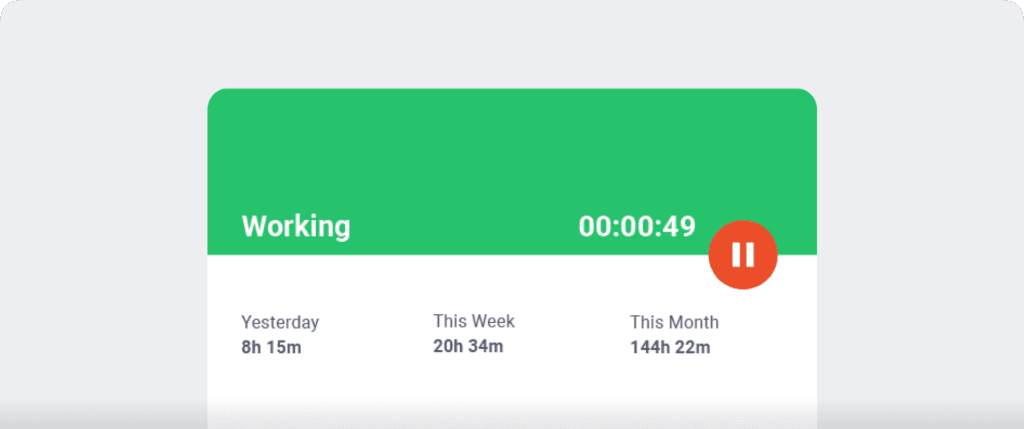
With Time Doctor, employees always see when they’re being tracked. Timers and task selections are visible, so there’s no hidden activity in the background.
This helps businesses stay compliant with labor laws that require transparency, especially in the U.S., EU, and Canada.
Screen monitoring with consent controls
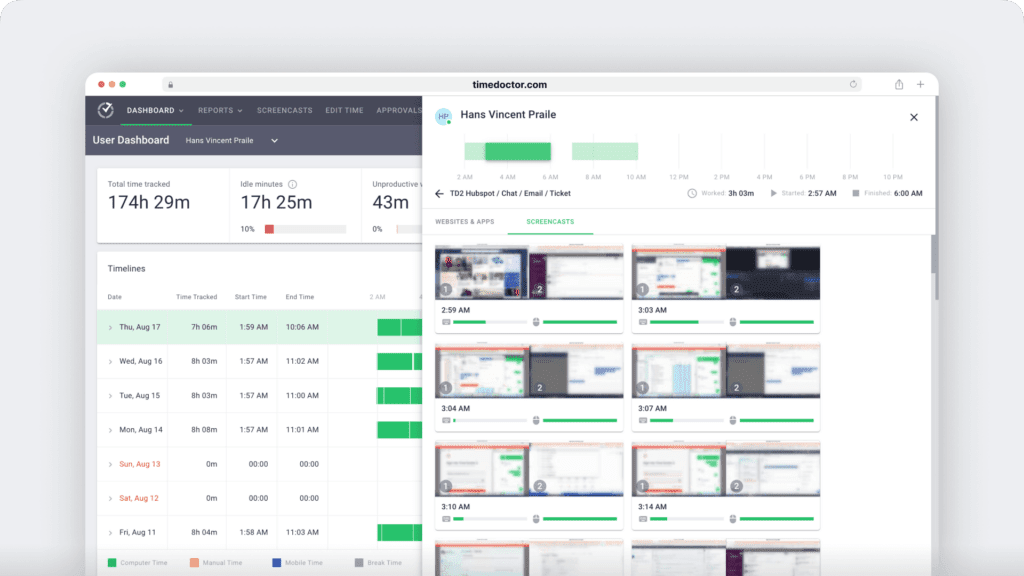
Screen monitoring is optional and fully customizable. Employees can pause tracking, and screenshots can be turned off or blurred to protect their privacy.
These features help meet compliance standards in countries where consent is required for screen activity, such as Quebec and South Korea.
Attendance tracking and time clock features
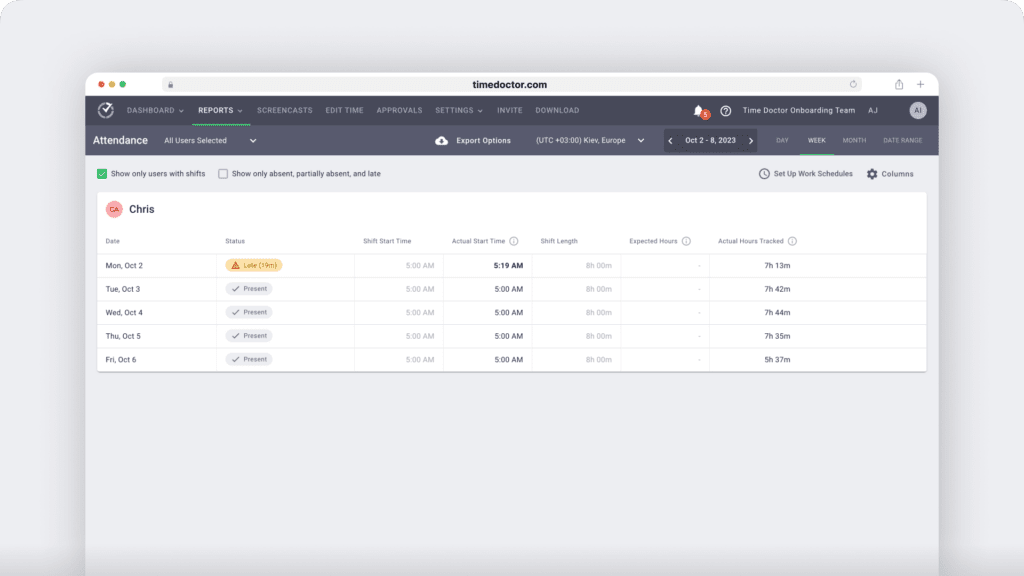
Time Doctor records clock-in and clock-out times with complete visibility, helping teams monitor employee attendance. You can also track idle time, breaks, and shift duration.
These logs support accurate record-keeping and align with compliance needs regarding time clock documentation, DCAA (Defense Contract Audit Agency) audits, unusual activity report triggers, and attendance verification.
Audit-friendly record keeping for payroll
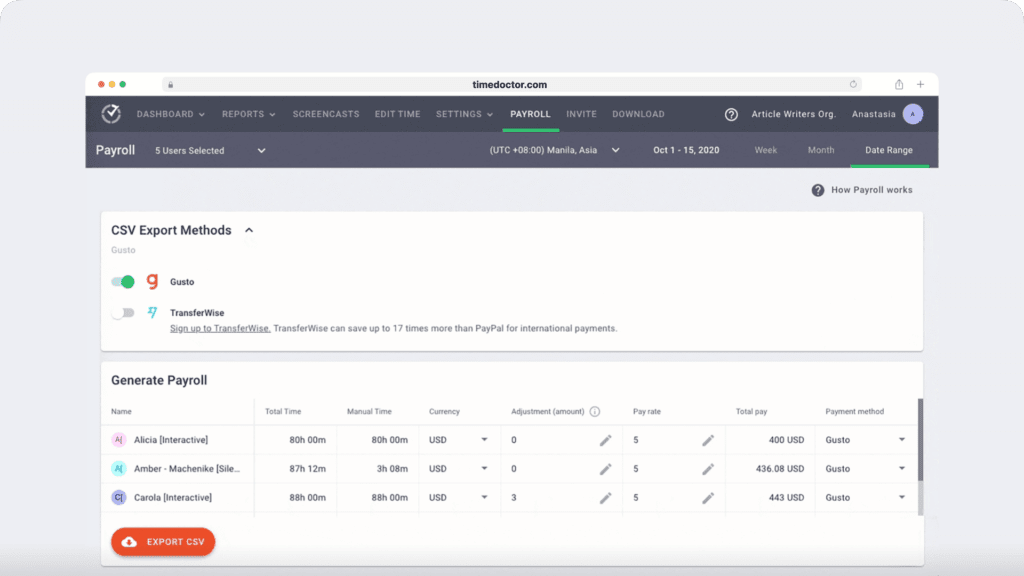
The platform stores all time records securely and provides export-ready reports. You’ll have what you need if your business faces an audit or review, especially for documenting overtime pay, team availability, or project tracking.
Global time-tracking system for remote teams
If your team works across borders, Time Doctor lets you customize tracking settings by location, while offering scalable pricing that fits both small businesses and global teams.
You can adjust privacy features for different countries, disable specific tools like GPS, or align with regional states’ laws.
It’s an ideal solution for managing a distributed workforce without risking noncompliance.
Final thoughts on time tracking compliance
If your time tracking system can’t prove compliance, then it’s not just weak, it’s also dangerous.
Think about it. One misstep in your record keeping, one missing consent form, or one silent clock-in could trigger more than just a correction. It could cost you thousands, damage your reputation, or even lead to the shutdown of your business under the weight of legal pressure.
Most teams won’t see it coming. Not until there’s an audit. Or a lawsuit. Or an employee finally says, “I didn’t agree to this.”
So ask yourself:
Are you still relying on spreadsheets and disconnected time-tracking tools to protect your company from real-world risks?
Because labor laws aren’t getting simpler, and employee expectations aren’t getting softer.
If your current setup isn’t built for time tracking compliance, then how is it protecting your team members or supporting your business?
It’s time to stop patching holes.
It’s time to stop gambling with compliance.
It’s time to stop assuming trust will carry you through.
Time Doctor isn’t just another tool. It’s the line between doing it right and hoping you won’t get caught.
So the real question is this:
How long are you willing to risk everything you’ve built just to avoid making a switch?
Get a demo for a compliance check. Find out what legal risks are hiding in your time tracking system.



Liam Martin is a serial entrepreneur, co-founder of Time Doctor, Staff.com, and the Running Remote Conference, and author of the Wall Street Journal bestseller, “Running Remote.” He advocates for remote work and helps businesses optimize their remote teams.