Quick overview
Leaders monitor employees to gain clear visibility into how work gets done, not to micromanage daily activity. That visibility explains why monitoring employees has become a leadership question about clarity rather than control. With the right approach, real data replaces assumptions, helps boost productivity, and allows workload risks to surface before they turn into burnout or disengagement. When handled ethically, employee monitoring strengthens trust, consistency, and decision-making across teams.
This article explains why organizations monitor employees by breaking down seven practical reasons behind that choice, what happens when workforce visibility is missing, how ethical workforce analytics differ from surveillance, and how Time Doctor supports leading distributed teams with clarity instead of control.
How do you stay responsible for your team’s performance when you can’t clearly see how employees work?
With teams working in different ways, including remote teams, hybrid setups, entirely in the office, and flexible schedules, performance becomes harder to measure consistently.
The usual metrics no longer tell the full story, making meaningful productivity tracking harder to achieve. It becomes difficult to know whether employees are working on the right things, whether expectations are clear, or whether performance is being measured fairly across different work setups.
Over time, this lack of clarity can also lead to overload and burnout, especially when extra effort goes unnoticed.
Without the right approach to monitoring employees, attempts to stay informed can drift into micromanagement. Trust starts to weaken, stress increases, and burnout becomes more likely.
Team members are left unsure how their work is evaluated or whether their effort is truly seen, even when they are doing the right work.
Table of Contents
- What’s employee monitoring?
- 6 types of employee monitoring
- How does employee monitoring change with workforce analytics?
- Why do we monitor employees? 7 key reasons
- Is employee monitoring legal?
- 3 key ethical principles for monitoring employees without micromanagement
- An employee-friendly time tracking tool: Time Doctor
- Final thoughts
- Frequently asked questions (FAQs)
Let’s get started!
What’s employee monitoring?
Employee monitoring traditionally focuses on observing employee activity to confirm that work is happening. The goal is often to verify attendance, track time through timesheets, or understand employee performance based on visible activity.
At this level, monitoring provides a clear view of presence and participation. When paired with broader workforce analytics, this activity data can also be viewed alongside workload patterns, focus, and time allocation.
That added context will help you to interpret activity more accurately, support balanced workloads, and guide your team members with clarity rather than micromanagement.
6 types of employee monitoring
Employee monitoring can take different forms depending on how work is done and what an organization needs to understand.
Below are 6 common types of employee monitoring, ranging from the most widely used to more specialized or situational methods.
1. Computer activity monitoring
Computer activity monitoring looks at how work devices are used throughout the day, using core functionality to provide clear, high-level visibility into work patterns. It shows which applications are used and when focus shifts or idle periods appear.
This helps you understand general work patterns and tool usage, including periods of idle time, across remote work, hybrid, and in-office setups.
2. Internet and email monitoring
Internet and email monitoring looks at how browsers and email systems are used during work hours to understand communication and focus patterns. It shows which websites support daily work, how time is spent across them, and how email fits into regular collaboration, helping you track employee activity at a high level without focusing on individual behavior.
This visibility helps you set clear usage guidelines, identify common distractions, and support compliance in a way that feels consistent and transparent.
3. Location or GPS tracking
Location or GPS tracking shows where work takes place, most often in field-based or mobile roles. It helps confirm attendance, verify service locations, and provide clarity around schedules and coverage. In industries such as logistics, delivery, or maintenance, this visibility supports more accurate planning, fair time tracking, and smoother day-to-day operations.
4. Telephone monitoring
Telephone monitoring involves recording or reviewing work-related calls, typically for quality assurance or training. This approach is common in customer support and sales teams, including remote workers, where call reviews help improve service quality and ensure consistent communication standards.
5. Video surveillance
Video surveillance uses cameras to observe physical workspaces. It’s most common in offices, retail locations, and facilities where safety, security, or asset protection matters. While it helps confirm presence or incidents, it offers limited insight into how work is performed or how time is spent.
6. Keystroke logging
Keylogging is a form of computer monitoring that records keystrokes typed on a keyboard and may capture screenshots based on specific triggers. While this approach was more common in the past, many organizations now avoid it due to privacy concerns and its limited value for understanding real work patterns or performance.
How does employee monitoring change with workforce analytics?
Employee monitoring looks very different when viewed through workforce analytics.
Instead of simply monitoring employee activity, workforce analytics provides real-time visibility into how work is actually done across tasks and project management workflows.
You can see how employee time is spent across tasks, how workloads are balanced, and where early signs of burnout may appear. The focus shifts from checking activity to understanding performance in context through data-driven insight.
Workforce analytics also make benchmarking possible, so performance is viewed fairly across different roles, teams, and work setups. This helps surface bottlenecks, avoid one-size-fits-all expectations, and support more consistent evaluation, whether work happens remotely, in hybrid environments, or on-site.
With this approach, monitoring supports clearer ways to track team performance. You can see where effort goes, where work slows down, and where expectations may not match reality. When applied transparently and with clear boundaries, employee monitoring becomes a tool for clarity rather than control.
Why do we monitor employees? 7 key reasons
Here are seven reasons why employee monitoring software benefits both businesses and employees.
1. Reward employee strengths
When work is visible, strengths become easier to recognize and reward the right employee, even when teams operate across different locations and schedules.
This clarity supports stronger employee engagement over time. It also helps maintain employee morale by ensuring strong performance is recognized based on real contribution rather than proximity or perception.
2. Helps tackle distraction
Distractions rarely show up as one big problem. They appear as fragmented focus, constant switching between tools, social media, and time spent on low-impact tasks, especially for remote employees who manage work across digital environments.
Better visibility shows where attention moves away from meaningful work. This allows distractions to be addressed without hovering and helps employees better understand their own habits.
3. Prevent employee burnout
Burnout builds quietly through sustained overload, uneven workloads, and pressure that goes unnoticed until performance drops.
Monitoring helps surface early signs of burnout by showing changes in workload patterns and time distribution, which supports healthier performance and stronger retention. With that visibility, it becomes easier to rebalance work sooner and support sustainable performance.
4. Reduce supervision
When visibility is limited, check-ins increase because updates become the only way to stay informed in the work environment.
When work is visible, constant supervision becomes unnecessary. Managers focus on coaching instead of status checks, and employees stay autonomous while remaining aligned.
5. Pay employees accurately
Fair pay depends on reliable visibility into work time across the workday. Monitoring helps you track time consistently using time tracking software, reduce disputes, and support compliance. It also strengthens trust because compensation aligns more closely with recorded work.
6. Minimize software expenditure
Tool sprawl creates waste when it’s unclear what’s actually being used. Clear visibility highlights patterns in app usage and time spent across tools. This makes it easier to spot underused software, streamline workflows, and make smarter decisions about renewals and licenses.
7. Improve data protection
Teams handle sensitive information every day, especially in regulated or client-facing work. Monitoring supports accountability by making work activity more transparent and consistent, which helps organizations meet requirements such as GDPR.
With clear policies and boundaries, this visibility reduces risk and protects data without creating a culture of suspicion.

Is employee monitoring legal?
Workplace monitoring is legal in many regions, including the US, UK, EU, Canada, and others, as long as it follows applicable privacy laws and employment regulations. Common practices include video surveillance, internet usage, and call monitoring, but organizations need clear policies to avoid legal issues.
Most regulations require transparency about what’s monitored, how data is used, and why it’s necessary. Monitoring should focus only on work-related activity and be limited to company systems. In regulated industries such as healthcare or customer service, employee monitoring tools are often used to support compliance with industry-specific laws, provided employee privacy is respected. They must comply with HIPAA (Health Insurance Portability and Accountability Act) to protect patients’ health data.
Because requirements vary by region and continue to evolve, understanding employee monitoring laws helps organizations apply monitoring responsibly and stay compliant.
3 key ethical principles for monitoring employees without micromanagement
Here are three vital things to remember while monitoring employees, so visibility doesn’t turn into surveillance.
1. Focus on metrics that explain work, not behavior
Ethical monitoring starts when you choose metrics that help you understand how work actually flows, not when you scrutinize individual actions. By focusing on work patterns, workload balance, and how employee time is distributed, employee monitoring supports workforce analytics that explain performance instead of policing activity.
This approach keeps conversations grounded in outcomes, capacity, and progress. It also allows you to use productivity analytics to spot bottlenecks, rebalance workloads, and support team performance, without creating a work environment that feels watched or controlled.
2. Be transparent with employees
Transparency builds trust when employees know what’s being tracked, why it matters, and how the data is used. Monitoring feels more ethical when employees can see the same information you rely on through shared dashboards and understand how it connects to expectations and performance.
Clear communication during onboarding and ongoing conversations sets the right context. When employees understand how monitoring supports fairness and clarity, and how data security is protected, they can use the data for self-awareness, improvement, and better alignment with their work.
3. Set clear boundaries that protect privacy and focus
Ethical monitoring respects limits by keeping tracking focused on work-related activity and clear business outcomes. You monitor only what’s necessary to understand performance, avoid personal devices, and limit visibility to employees’ computer activity that directly supports employee productivity and accountability.
Clear boundaries help productivity monitoring stay purposeful instead of intrusive. When access to data is controlled and policies are well defined, attention stays on meaningful work rather than constant observation. This approach builds confidence across teams and reinforces trust in how monitoring is used.
An employee-friendly time tracking tool: Time Doctor
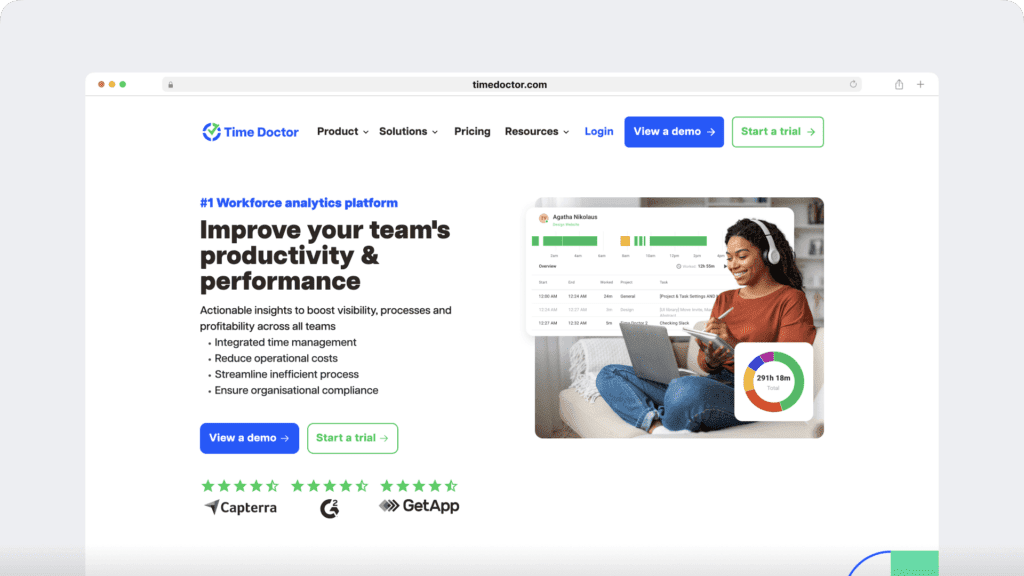
Time Doctor helps you monitor employees by turning everyday work activity into clear, actionable workforce analytics. Instead of tracking data for the sake of oversight, you gain visibility that supports fair performance management, healthier workloads, and better decisions across your teams.
Here are some features of Time Doctor
- Employee time tracking gives you a reliable view of work hours across remote, hybrid, and in-office teams, so expectations stay consistent no matter where employees work.
- Productivity analytics show how time is distributed across tasks, tools, and the workday, helping you understand real work patterns instead of relying on assumptions.
- Meeting Insights reveal how much time teams actually spend in meetings, how meetings affect focus, and where collaboration may be crowding out productive work, making it easier to rebalance schedules and protect focus time.
- Screen monitoring and app usage insights add context to performance by showing how tools support or slow down work, without turning monitoring into surveillance.
- Unusual Activity Reports surface early signals of overload, disengagement, or workflow issues, helping you act before burnout or performance drops occur.
- Benchmarks AI puts individual and team performance in context by comparing work patterns across similar roles and work setups, supporting fair evaluation across a distributed workforce.
- Software Cost Insights show which tools are actively used and which licenses sit idle, helping you reduce waste while keeping teams equipped with the software they actually need.
- Payroll and attendance data connect recorded work directly to compensation, improving accuracy, reducing disputes, and supporting compliance, especially in regulated environments like Healthcare.
- Integrations fit monitoring into existing workflows, so Technology Companies and Agencies can scale workforce visibility without adding operational complexity.
Final thoughts
Employee monitoring works best when it gives you clarity instead of control. When you use workforce analytics to understand how employees work, decisions become grounded in data rather than assumptions. Time management improves, performance conversations feel fairer, and early signs of burnout or disengagement are easier to address.
When monitoring supports visibility into employee time tracking, attendance, and real work patterns, it stops feeling like surveillance and starts working as a shared source of truth. Employees gain insight into their own work and support a healthier work-life balance, while you gain confidence that expectations stay consistent across remote, hybrid, and in-office teams.
So, does your approach to employee monitoring help you lead with trust and actionable visibility through clear productivity reports, or does it still rely on guesswork and constant check-ins?
Get a demo to see how Time Doctor helps you monitor employees using workforce analytics that support clarity, fairness, and better performance.
Frequently asked questions (FAQs)
Time Doctor tracks work-related activity to help you understand how work gets done. This includes employee time tracking, task and project activity, app and website usage, attendance, productivity analytics, and signals like idle time. The focus stays on work patterns and outcomes, not personal behavior.
Time Doctor can identify unusual activity patterns that don’t align with normal work behavior, including activity designed to simulate presence without real work. These signals help you spot inconsistencies in productivity data so decisions rely on accurate information rather than assumptions.
Time Doctor is a workforce analytics platform that helps you monitor employees with clarity, not control. It turns everyday work data into actionable visibility so you can manage performance fairly, balance workloads, and support teams across remote, hybrid, and in-office environments.
The best software focuses on workforce analytics and productivity analytics, not constant oversight. Tools like Time Doctor emphasize trends, time management, and shared dashboards, helping you understand performance without micromanagement or invasive monitoring.
Employee monitoring software helps you replace guesswork with data. Benefits include clearer productivity reports, fairer performance evaluation, better workload balance, early burnout signals, accurate attendance and payroll data, and consistent visibility.
Monitoring work activities gives you visibility into how time, tools, and effort are used across the workday. When applied ethically, it helps improve productivity, support work-life balance, reduce bottlenecks, and strengthen trust by making expectations and performance more transparent.
Project management tools show what work is planned and assigned, while employee monitoring and workforce analytics show how time and effort are actually spent. Together, they provide clearer visibility into progress, workload balance, and performance without micromanagement.
A time tracking tool helps turn everyday work activity into clear records of time spent across tasks and projects. When paired with workforce analytics, it supports fair pay, better time management, and visibility without micromanagement.


Liam Martin is a serial entrepreneur, co-founder of Time Doctor, Staff.com, and the Running Remote Conference, and author of the Wall Street Journal bestseller, “Running Remote.” He advocates for remote work and helps businesses optimize their remote teams.