Quick overview: To monitor employees working from home without losing their trust, set expectations and capture only the data each role needs. Then let employees see the same data you do. Time Doctor, used by 10,000+ distributed teams, shows the time, tasks, and tools behind each workday as it happens. This guide covers six steps: expectations, what to capture, one live view, results, check-ins, and well-being. It also covers trust controls, such as role-based permissions and screenshot blurring. Finally, it shows how to roll out monitoring openly, starting with a pilot team.
Knowing how remote work is going is one of the harder parts of leading a distributed team. You need visibility, but not at the cost of the trust your team runs on.
Most leaders of distributed teams aren’t looking for a camera. Instead, they want a clear answer to a simple question: what is my team working on today? A green status dot in a chat app doesn’t answer it. Similarly, a Friday report tells you about last week, but not this morning.
This guide walks through six practical steps, the features worth looking for, and how to roll out monitoring so your team sees it as support, not surveillance.
Table of contents
- What does it mean to monitor employees working from home?
How to monitor employees working from home in 6 steps - What to look for in software to monitor employees working from home
- How to roll out a plan to monitor employees working from home
- How Time Doctor helps you see the work without surveillance
- Final thoughts
- Frequently asked questions (FAQs)
What does it mean to monitor employees working from home?
Monitoring employees working from home means using agreed work data, such as hours, tasks, and the apps and websites used for work, to understand how remote work gets done. If used well, it replaces guesswork with shared facts. It shouldn’t mean capturing more than the work requires.
The same approach applies to fully remote and hybrid teams. For hybrid setups, comparing office and remote workdays side by side also helps you spot real patterns instead of assumptions.
The steps below move from expectations to tools to day-to-day habits. Together, they help you build visibility your team can trust.

1. Set clear expectations for hours and results
Some remote employees struggle to structure their day without clear guidelines. Others overwork and risk burnout. In both cases, clear expectations are the best place to start.
Before you look at any data, spell out what success looks like:
- Define core hours and response times across time zones, so everyone knows when to be available.
- Agree on what “done” means for each role, such as tickets closed, projects delivered, or deadlines met.
- Discuss performance regularly, so individual work stays tied to team goals.
As Laura Spawn of Virtual Vocations noted in a Forbes Human Resources Council article, expectations and metrics built for remote work help managers and employees alike feel productive. When people know the target, they can manage their own time with less stress.
2. Decide what to capture, and tell your team
Next, decide which data each role actually needs. For example, a support team may need hours and active time, while a design team may only need time on projects and tasks. Start with the least you need, then add more only if a real question requires it.
Then, tell your team before anything goes live. Explain what you’ll capture, why you need it, who can see it, and how you’ll use it. After that, put it in writing in an employee monitoring policy.
Finally, check local rules before you start to monitor employees working from home. Notice and consent requirements vary by state and country, so review employee monitoring laws for your locations.g flexibility. These tools support business goals and a healthier remote work environment when used correctly.
3. See time, tasks, and tools in one live view
Once expectations are clear, you need a view of the workday itself. The most useful view shows the time, tasks, and tools across every team member, project, and location, as the day happens.
This matters because a long day and a productive day can look the same in a timesheet. When hours land on the project and task they belong to, with the apps and websites behind them, the picture changes. For instance:
- A support queue running long can get help before the deadline moves.
- A project burning twice its estimated hours can be re-scoped in week two, not in the post-mortem.
- Software nobody uses can be flagged, so you can retire those licenses.
In other words, you get a picture of today, not a report about last week. Software usage tracking adds the tool side, showing which apps actually support the work. This is also how many companies track remote workers without breaking trust.

4. Focus on results, not just activity
Would you rather know how long someone sat at a desk or what they finished? The second question matters more. Activity data is useful, but it works best as context for outcomes.
So pair the two. Look at tasks completed, deadlines met, and quality alongside hours and app usage. If something looks off, use the data to start a conversation, not to reach a verdict. Simple signals, such as missed deadlines or slow replies, also help you know if remote employees are working.
When employees meet expectations and deliver quality work, it matters far less when or where the work happens. That’s the core idea behind a results-only work environment.
5. Stay connected with check-ins
Remote employees often feel disconnected. Without hallway conversations, small problems can grow quietly. Regular, predictable contact fixes much of this.
- Schedule daily or weekly check-ins in Slack, Zoom, or Microsoft Teams.
- Use project management tools such as Trello, Asana, or Monday.com to assign tasks and share progress. Time Doctor integrates with many of them.
- Open one-on-ones with the same data your employee sees, so the conversation starts from shared facts.
As a result, check-ins become shorter and more useful. Employees also feel supported rather than checked on.
6. Use the data to support well-being
Remote work can blur the line between work and home. In a distributed team, overload is often invisible until someone resigns.
Data can help you spot the pattern earlier. For example, look for signs of overworking, such as people who regularly work late, skip breaks, or carry far more hours than their peers. Then rebalance the load while it’s still an easy conversation. Time Doctor’s workload view shows who’s stretched and who has capacity. For HR teams, these signals are an early, plain-language view of burnout risk.
Beyond the data, encourage real breaks, offer mental health resources, and protect time off. When people feel supported, they stay engaged longer.
What to look for in software to monitor employees working from home
The right work-from-home monitoring software helps you monitor employees working from home and gives them clear controls. Use this table as a checklist when you compare tools.
| Capability | What it shows you | Trust control to ask about |
| Automatic and offline time tracking | Hours worked, without timesheets filled in from memory | Manual time entry, with approvals |
| Projects and tasks | Where hours land, by project and task | Employees see their own time |
| Web and app usage | The tools behind each workday, and unused software | You decide what counts as work-related |
| Real-time dashboards and timelines | Who is working on what today | Role-based permissions |
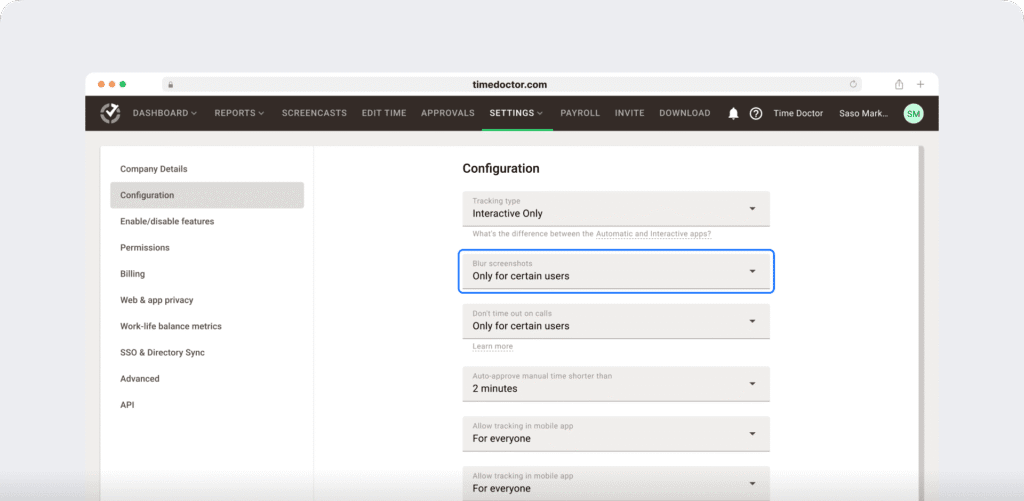
| Optional screenshots | Extra context when a role needs it | Turn on or off per role; screenshot blurring |
| Reports and payroll integrations | Approved hours that flow to your payroll system | Approval history for every change |
| AI connection | Plain-language answers about your team’s workday | Read-only access that follows each user’s role |
| Security certifications | How the vendor protects your data | ISO 27001, SOC 2 Type 2, GDPR, and HIPAA |
These criteria also make it easier to compare remote employee software side by side.
How to roll out a plan to monitor employees working from home
Even the best tool fails if the rollout feels like a surprise. Most teams trust each other until payroll, billing, or an audit needs a record. That’s why the best approach is simple: trust the people, and verify the numbers.
Follow these steps for a smooth rollout:
- Explain the problem you’re solving, such as uneven workloads or unclear project costs.
- Share exactly what you’ll capture and what you won’t.
- Give every employee access to their own data.
- Start with one pilot team and collect feedback.
- Review the data together in one-on-ones, not in a surprise meeting.
- Revisit your settings after 30 days and remove anything you don’t use.
Above all, employee access to their own data is what turns monitoring into shared visibility. When people see the same hours and activity their manager sees, the data becomes a tool they can use too. For example, they can show that flexible work is working.
How Time Doctor helps you see the work without surveillance
Time Doctor gives leaders one clear view of how their distributed team actually works. In short, you can know what your team is working on: the time, tasks, and tools across every team member, project, and location, as the day happens.

Here’s what that looks like in practice:
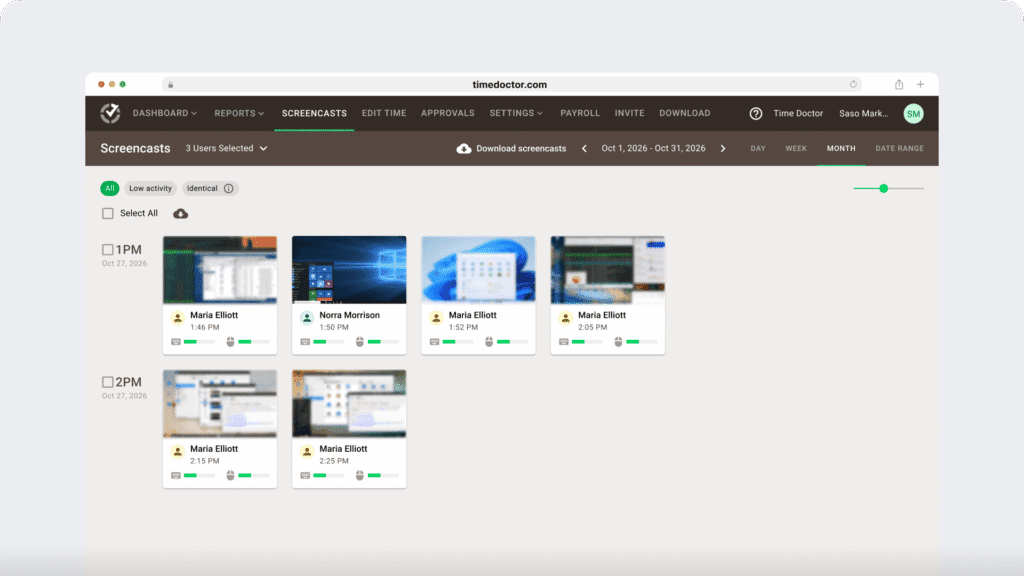
- Real-time dashboards show who is working and on which task.
- Time ties to projects, tasks, and the web and app usage behind it.
- Automatic, manual, and offline tracking means nobody rebuilds a timesheet from memory.
- Approved hours flow to your payroll system.
Time Doctor is built for verification without surveillance. You control what gets captured, and you can turn features on or off per role. Employees see their own data, and screenshot blurring is optional on every plan. Time Doctor also holds ISO 27001 and SOC 2 Type 2 certifications and supports GDPR and HIPAA requirements, with role-based permissions throughout.
You can also ask about your team’s workday in Claude, ChatGPT, or Gemini. For example, you can ask: “Show tracked vs active time for the Support team yesterday, per person.” The Time Doctor MCP is read-only, follows each user’s permissions, and never exposes screenshot content to AI tools. It’s included in every plan.
Final thoughts
Monitoring employees working from home works when it answers one question with data everyone can see: what is my team working on? Set expectations, capture only what you need, share the data, and use it to coach and support people.
When you get that right, visibility stops feeling like surveillance. Instead, it becomes the shared record your team and your leadership can both rely on.

Frequently asked questions (FAQs)
In many places, yes, but the rules vary. For example, New York requires private employers to give written notice of electronic monitoring and get employees’ acknowledgment. In the UK, the ICO expects monitoring to be transparent, necessary, and proportionate. Check the rules where your employees work and get legal advice before you start.
Focus on visibility, not control. Set clear expectations for hours and results, capture only the work data each role needs, and give employees access to their own data. Then use the data to coach, not to judge every minute.
Yes. Tell employees what you’ll capture, why, who can see it, and how you’ll use it. Put it in a written policy, and give them access to their own data. Transparency is what keeps visibility from feeling like surveillance.
Yes. Employees see the same data and reports their manager sees, including their own screenshots when that feature is on. In addition, you decide which features are on for each role, and screenshot blurring is optional on every plan.
Most employers combine time tracking, project management, and communication tools. Many also use remote employee software, such as Time Doctor, to see time, tasks, and tools in one place.
Yes. With the Time Doctor MCP, owners, admins, and managers can ask Claude, ChatGPT, or Gemini about hours, activity, and attendance in plain language. Access is read-only, follows each user’s role, and never includes screenshot content. The connection is included in every Time Doctor plan.


Leigene Llave is a digital marketing strategist specializing in SEO, content, and operations, helping businesses boost search visibility and drive growth.