
Quick overview
Companies track remote workers or hybrid teams without compromising trust by focusing on visibility into work patterns, not surveillance of people. The goal is to understand how work flows, where teams need support, and when risks like burnout or bottlenecks appear, without watching every action.
In this article, you’ll see how organizations approach remote work tracking responsibly, which methods support trust instead of control, and how modern workforce analytics help leaders manage remote teams with clarity rather than micromanagement.
If you manage a remote team, how can you see their work without feeling like you are spying? How can you understand what’s working, where teams need support, while still protecting trust, team morale, and effective workforce management?
Think about a sports coach watching from the sidelines. The coach steps in only when needed. Remote work tracking works the same way. You want to know what is happening without hovering over every move.
The truth is that remote work changed how businesses manage employees. As teams spread across time zones, leaders can no longer rely on physical presence or informal check-ins to stay aligned.
Instead, they need clear visibility into how work flows across the day, how time is used, and where teams need support to stay productive without pushing work-life balance out of bounds.
Without a clear way to track remote employees, your team could face missed deadlines, poor communication, and burnout.
Table of Contents
- Why do companies track remote workers?
- How do I know if my employees are actually productive?
- Common ways you can track remote workers
- How do I manage remote employees without micromanaging?
- What metrics should you track that will not cross the line?
- How do companies prove employees actually worked their hours?
- Where remote work tracking often goes wrong
- How Time Doctor helps track remote work while building trust
- Final thoughts
- Frequently asked questions (FAQs)
Why do companies track remote workers?
Remote teams, which became more common during the pandemic, rely on trust. However, tracking remote employees plays a big role in building successful teams.
1. Accountability
Managers can struggle to keep projects on track without regular visibility into tasks and work hours. Tracking employee activity helps ensure that every team member contributes to shared goals.
2. Productivity
Remote work offers flexibility, but it also makes it harder to see where work gets stuck. Productivity monitoring tools provide visibility into work patterns and time use, helping leaders spot issues early, support teams proactively, and boost productivity before performance slips.
3. Data security
When your team accesses company files and tools remotely, security risks increase. Clear visibility into system usage matters more than assumptions. Employee monitoring software and productivity tracking help you streamline oversight, reduce shadow IT, and protect sensitive data by turning everyday work signals into actionable security insights.
4. Employee well-being
Remote workers often experience blurred boundaries between work and personal life. Workforce analytics clarify the work environment by revealing patterns in idle time, overtime, and daily schedules, helping you protect well-being and sustain strong team performance.
How do I know if my employees are actually productive?
Productivity is not the same as busyness. Hours online, frequent messages, or constant meetings do not always translate into meaningful output. True productivity reflects progress toward business goals and measurable outcomes.
To assess real productivity, organizations need visibility into three areas:
- How time is spent across tasks and tools
- What work is being completed
- Whether that effort contributes to strategic priorities
Warning signs often appear as repeated deadline delays, uneven workload distribution, overloaded managers, or teams reporting they are busy while results remain flat.
Low productivity is rarely about lack of effort. It often signals hidden workflow issues, unclear priorities, excessive meetings, or capacity imbalance. Workforce analytics and employee time tracking help uncover patterns such as context switching, meeting overload, or misaligned tasks.
When you gain clear visibility into where effort actually goes, then you can adjust priorities, rebalance workload, and remove blockers. The objective is clarity, not surveillance, so performance improves through better systems rather than assumptions.
Common ways you can track remote workers
If you lead a remote or distributed team, you need visibility into how work actually happens so you can optimize performance and support teams effectively. The challenge is choosing approaches that give you clarity without damaging trust.
Below are the most common ways to track remote work, grouped by their impact on trust and decision-making.
Methods that give you visibility into work patterns
These approaches focus on understanding how work flows, not watching individuals.
1. Employee time tracking software
You use this to understand how work hours are distributed across your team. It helps you view workload balance, capacity constraints, and time allocation to improve time management without relying on manual timesheets. This is especially useful if you’re planning staffing or trying to prevent burnout.
2. App and web usage tracking
This shows you which tools your team relies on during work hours. For operations, it helps you spot inefficiencies or unnecessary tool switching. For an IT leader, it helps you identify shadow IT and reduce software sprawl.
3. Real-time activity and idle time patterns
Instead of judging individual moments, you can look at trends in active and idle time. This helps you identify disengagement, overload, or burnout risk early, so you can provide support rather than waiting for employee performance to decline.
4. Attendance tracking
Tracking start and end times helps you maintain fair attendance practices and understand progress against key milestones. It gives you consistency without requiring constant check-ins.
5. Project and task tracking
Linking time and effort to projects helps you see whether work aligns with priorities. This makes bottlenecks, delays, and misalignment easier to spot and fix.
6. Productivity insights and trend analysis
Looking at work patterns over time helps you set realistic expectations and make informed decisions. HR leaders use these insights to support fair performance conversations, while operations leaders rely on them to improve processes, throughput, and overall team productivity.
7. Payroll integrations
Connecting tracked time to payroll and invoicing reduces errors and administrative effort across full-time employees, contractors, and distributed teams.
Methods that require stronger safeguards to protect trust
These approaches can provide context, but they carry a higher risk if you rely on them too heavily.
8. Screenshots
Periodic screen captures can help clarify how work is being done during work time, but only when you’re transparent about their use and give employees appropriate privacy controls.
9. Screen monitoring
Continuous screen visibility may help investigate specific workflow issues, but frequent use can quickly feel intrusive if it replaces outcome-based management and overreliance on dashboards instead of meaningful results.
10. Keystroke logging
Tracking every keystroke is widely seen as high risk. It can capture sensitive information and rarely reflects real productivity, impact, or meaningful work habits.
11. Webcam monitoring
Using webcams to verify presence is often viewed as invasive and unnecessary. Most leaders avoid this approach because it undermines trust without improving results.
12. Mobile activity tracking
If your team works on mobile devices, tracking app usage can help you understand work patterns. Clear boundaries are essential to separate work activity from personal use.
13. Broad employee monitoring software
Some platforms bundle multiple tracking features together. Whether they help or hurt depends on how selectively you use the data and how clearly you explain its purpose.
14. Monitoring programs
Highly comprehensive tracking setups may promise full visibility, but without limits, they often create fear rather than clarity and distract leaders from using timelines and trends to guide better decisions.
These methods only build trust when they’re paired with the right metrics and leadership approach, which is where many organizations struggle.
How to choose the right approach?
Tracking remote work is most effective when it focuses on patterns and outcomes rather than individual actions. The difference lies in what you measure and how you use the data.
How do I manage remote employees without micromanaging?
Managing remote teams effectively means leading with trust while maintaining clear accountability.
As a leader, you set defined goals, shared expectations, and transparent workflows so remote and hybrid teams stay aligned without constant supervision.
Instead of relying on frequent check-ins, you review employee time tracking data, workload distribution, and productivity analytics to understand how work moves across projects and tools.
This visibility into work patterns helps HR leaders spot burnout risk early, gives operations leaders clarity into bottlenecks, and allows IT leaders to maintain secure oversight without crossing privacy lines.
When accountability is supported by workforce analytics and measurable outcomes, coaching replaces interruption. Teams gain autonomy and confidence, while leadership maintains reliable insight into performance, time allocation, and overall well-being.
And that clarity still depends on choosing the right metrics to measure.
What metrics should you track that will not cross the line?
It starts with choosing the right metrics. The goal isn’t to collect everything you can, but to focus on signals that explain how work gets done while protecting employee privacy and respecting personal boundaries.
Trust stays intact when you track work-related patterns rather than personal behavior.
Here’s how you can do that.
1. Be clear and transparent about the metrics
You build trust when employees understand what data is collected, how it’s used, and why it matters. Clear explanations turn tracking into shared visibility rather than hidden oversight, which is critical for remote or hybrid
2. Track work-related metrics only
Privacy-respecting workforce analytics focus on a small set of work signals that explain productivity without exposing personal activity. These typically include:
- Work hours and attendance patterns
- Time spent across tasks, projects, and tools
- App and software usage during work hours
- Idle time trends viewed over time, not minute by minute
- High-level productivity signals tied to delivery and outcomes
Avoid collecting data outside working hours or anything unrelated to job performance.
3. Focus on patterns, not individual moments
Single data points can be misleading. Looking at trends over time helps you spot burnout risk, workload imbalance, or inefficiencies without judging isolated behavior or normal breaks.
4. Set clear boundaries and review them regularly
Metrics that make sense today may not make sense later. Regular reviews help ensure what you track stays aligned with employee privacy expectations, changing work models, and real feedback from your teams.
5. Limit invasive data collection
Metrics that rely on constant screen watching, webcam access, or keystroke capture often cross the line. Most teams achieve better results by tracking outcomes, time use, and workflow patterns.
6. Protect access to the data
Workforce data should be secured, limited to appropriate roles, and handled with care. Strong access controls and data protection practices reduce risk and reinforce trust across the organization.
How do companies prove employees actually worked their hours?
Remote and hybrid work make accurate documentation more important for payroll, audits, and client billing. To verify work, organizations keep clear records of work hours, tasks completed, and project involvement.
Instead of relying only on manual timesheets, many companies use digital employee time tracking and workforce analytics to create reliable records of when work happened and what it supported. These records help prevent payroll errors, resolve disputes, meet compliance requirements, and confirm billable hours.
Work verification is about clear documentation, not surveillance. Transparent records protect both employers and employees by providing objective proof of work performed. They also give leaders a clearer view of how time and resources are used across projects, which supports better planning and decision-making.
Where remote work tracking often goes wrong
Even well-intentioned tracking can backfire when it focuses on control instead of clarity. Without clear boundaries and shared understanding, time tracking tools and other visibility systems can create more problems than they solve.
Common issues include:
- Eroded trust when the time tracker feels hidden or overly granular, especially when notifications are excessive, unclear, or tied to constant screen monitoring
- Coordination breakdowns across time zones when visibility is inconsistent or disconnected from real workflows
- Burnout risk when activity data is used to pressure employees to stay “always on.”
- Micromanagement behaviors occur when leaders focus on individual actions instead of patterns and outcomes
As Microsoft CEO Satya Nadella says,
“Trust is the foundation for everything we do. If we lose trust, we lose everything.”
This is where Time Doctor helps you put these principles into practice by giving you clear, actionable visibility into how work gets done, without turning tracking into control.
How Time Doctor helps track remote work while building trust
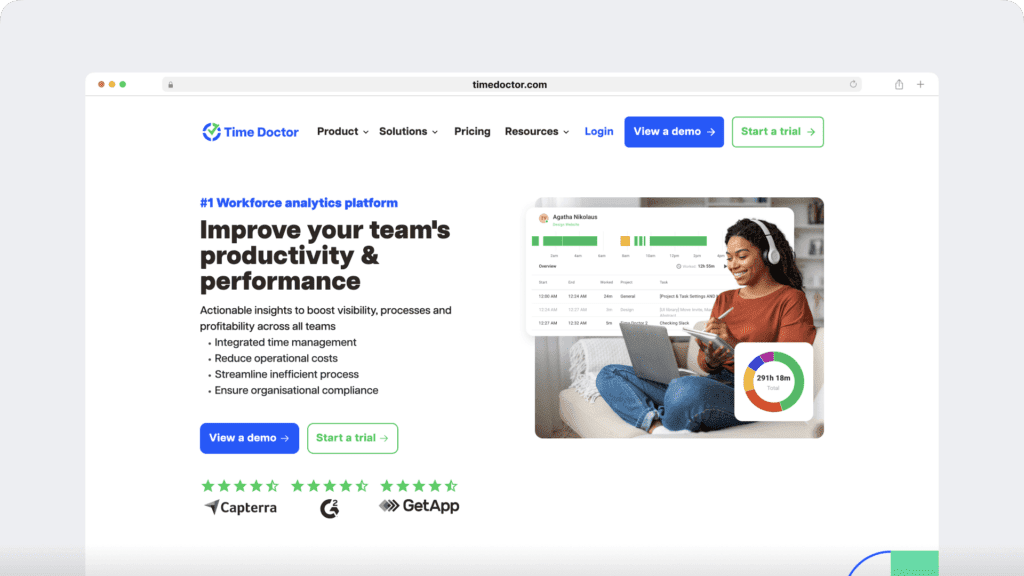
Time Doctor is a workforce analytics platform that gives you clear, shared visibility into how work gets done, so you can lead with trust, not control. Instead of watching people, it turns everyday work data into AI-enhanced, actionable insights that support better planning, earlier intervention, and smarter decisions.
Across remote, hybrid, and in-office teams, productivity data stays transparent and accessible, helping leaders focus on outcomes rather than assumptions.
Actionable visibility into how work happens
Time Doctor connects time, tools, and tasks from everyday work and project management tools into a clear view of execution, without micromanagement.
- Employee time tracking and attendance reveal workload balance and capacity
- Project and task insights link effort to outcomes and surface bottlenecks
- App and website usage data highlights inefficiencies and shadow IT
- Activity patterns over time show how work flows, not isolated moments
This level of visibility provides HR, Operations, IT, and executives with clarity rather than noise.
AI-enhanced insights that highlight what matters
Time Doctor applies AI to surface trends and risks that are easy to miss in raw data.
- Benchmarking insights show how productivity patterns compare across teams or roles
- Meeting insights reveal how collaboration impacts focus and delivery
- Software cost insights show which tools are actually used, helping reduce waste and make smarter licensing and pricing decisions.
These insights help leaders act early, not after problems escalate.
Designed for focus, balance, and privacy
Sustainable performance depends on healthy work patterns and clear boundaries.
- Work-hour and idle time trends surface an imbalance without pressure
- Weekly summaries help teams self-manage and stay accountable
- Privacy-first controls like optional screenshots, role-based access, and secure audit trails protect trust and support compliance
Easy to adopt, easy to scale
Time Doctor delivers value quickly, with minimal IT overhead.
- Intuitive onboarding and UI
- Seamless integrations with payroll, project management tools like Trello and Asana, and collaboration platforms such as Slack, so teams stay connected without extra work
- 24/7 multilingual support
Final thoughts
Are you still wondering how you can monitor employee productivity, protect privacy, and support your remote team’s well-being all at once? It becomes clear that tracking remote work isn’t the problem, but tracking it the wrong way is.
The right tools give you clarity without control. Time Doctor supports remote or distributed teams by turning everyday work data into actionable workforce analytics, so you can manage performance, support well-being, and lead with trust across every workday.
Get a demo of Time Doctor to see how employers track remote work with clear, trustworthy workforce analytics, so you can support remote workers, improve execution, and lead without breaking trust.
Frequently asked questions (FAQs)
Yes, employers can track aspects of remote work by focusing on work-related signals such as work hours, task progress, and tool usage during scheduled time. When handled transparently with clear boundaries, this approach supports accountability, consistency, and trust.
Companies rely on work signals instead of physical presence. Time Doctor’s workforce analytics provide clear visibility into work hours, task progress, and tool usage, helping leaders stay aligned and support teams early with clarity and confidence.
Productivity in remote teams is driven by clear expectations, outcome-focused metrics, and shared visibility. Workforce analytics help teams spot trends, balance workloads, remove bottlenecks, and address burnout risks early, while regular check-ins and data-informed coaching support consistent performance.
Employee monitoring software provides leaders with clear insight into how work gets done, making it easier to plan capacity, improve processes, and consistently support teams. Time Doctor uses workforce analytics to turn everyday work data into actionable insights, helping leaders understand team patterns, strengthen decision-making, and support sustainable performance.
Employee monitoring laws vary by country and sometimes by state, but most focus on transparency and reasonable use. Monitoring is generally legal when employees are informed clearly, only work-related data is collected, and the information is used for legitimate purposes such as payroll accuracy, security, or performance management.
Legal issues arise when monitoring happens without disclosure or when excessive personal data is collected. Ethical monitoring ensures employees understand what is measured, how it is used, and how privacy is protected.
Many organizations document this in written remote work or monitoring policies. When implemented transparently, monitoring can strengthen trust because expectations are consistent and decisions rely on objective data.
Time Doctor supports responsible monitoring with privacy-first controls, role-based access, and customizable settings that help organizations stay aligned with compliance requirements while maintaining clear, shared visibility.
Organizations should always review local labor laws and communicate policies clearly before introducing monitoring practices.
Time Doctor provides clear, shared visibility into how work happens by focusing on time, tools, and task patterns. With privacy-first controls, optional features, and role-based access, it helps organizations use actionable workforce analytics to support productivity, well-being, accountability, and trust.


Carlo Borja is the Content Marketing Manager of Time Doctor, a workforce analytics software for distributed teams. He is a remote work advocate, a father and an avid coffee drinker.