Quick overview: An employee accountability template is a ready-made form that records who owns a task, rule or item, and what they agreed to deliver. This guide shares four free templates you can copy in Google Docs and Google Sheets: an employee accountability form, a task completion form, a RACI chart and an equipment responsibility form. You’ll also learn when to use each one, how to roll them out with a distributed team and how Time Doctor adds a verified record of the work behind each commitment.
Holding people accountable is one of the hardest parts of managing. It feels even harder if you were just promoted or recently started your own business. And when your team works across homes, offices and time zones, you can’t simply walk over and ask how things are going.
The good news is that accountability rarely fails because people don’t care. More often, expectations were never written down. In fact, fewer than half of U.S. employees say they know what’s expected of them at work, according to Gallup’s ongoing engagement tracking.
That’s where an employee accountability template helps. It turns a quick “I’ll handle it” into a written commitment that everyone can see and revisit. Below, you’ll find four free templates, practical tips for using them and six strategies to build accountability into everyday work.
Table of contents
- What is employee accountability?
- 4 free employee accountability template downloads
- Which employee accountability template do you need?
- What happens when accountability breaks down?
- How to roll out an employee accountability template with a distributed team
- How technology turns accountability forms into verified records
- 6 strategies to increase employee accountability
- Final thoughts
- Frequently asked questions (FAQs)
What is employee accountability?
Employee accountability means each person owns their actions, decisions and results at work. When an accountable employee commits to a goal, they deliver it on time or flag problems early. They don’t pass the responsibility to someone else.
This matters because team members depend on one another. One missed handoff can delay an entire project. On the other hand, when everyone follows through, the team moves faster and trusts each other more.
Four areas shape how well accountability works on a team.
1. Communication
Clear communication is the starting point. Agree on which channels to use for what, such as chat for quick questions and a project tool for decisions. As a result, commitments don’t get lost in scattered messages.
2. Productivity
Accountable employees take ownership of their own output. For example, they plan their day, use the right team productivity tools and protect time for focused work. Managers support this by removing blockers instead of adding more check-ins.
3. Clear processes and workflows
Accountability needs a clear path from request to delivery. So document how work moves, who approves each step and what “done” looks like. Setting performance expectations early gives everyone the same target, even before you have baseline data.
4. Visibility without micromanagement
Managers need to know how work is progressing. However, constant check-ins and hovering signal distrust. In fact, Gallup’s guide to micromanagers traces micromanaging to a missing relationship of trust and support between manager and employee. A better approach is shared visibility. When managers and employees see the same facts, conversations start from data instead of suspicion. That’s how you get performance visibility without micromanagement.
4 free employee accountability template downloads
Once expectations are clear, written templates help you and your team track who owns what. Each employee accountability template below is free. To use one, open the link and choose File > Make a copy, then customize it for your company. Need a printable version instead? Choose File > Download, then pick PDF.
1. Employee accountability form template
An employee accountability form records an employee’s formal agreement to follow specific company rules. Most companies use it during onboarding, alongside their employee handbook.
Our template covers common commitments, such as:
- Keeping login credentials confidential
- Taking responsibility for all activity under their ID
- Logging out of company systems when away
- Protecting confidential information and internal discussions
- Not using company data or property for personal purposes
The employee then signs and dates the form. Because these rules apply wherever people work, the form is especially useful for remote and hybrid teams.
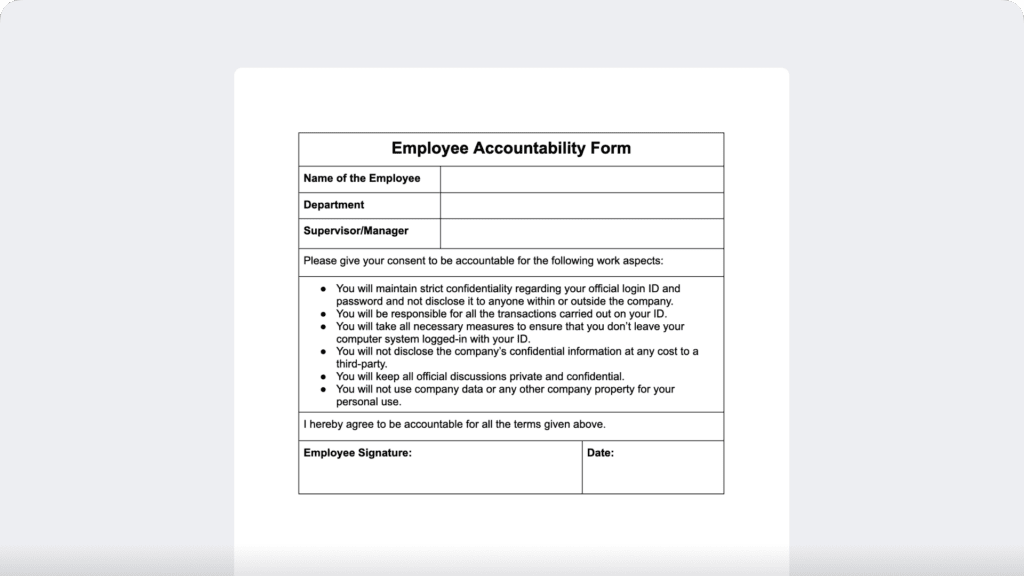
Download it here: Employee Accountability Form Template (Google Docs)
Disclaimer: This employee accountability form template is meant to be a general guide only and should be used only as a reference. The template may not necessarily include all local, state, or federal laws and other applicable laws, and hence, it should not be considered a legal document. Neither the author nor Time Doctor shall be responsible for any legal liability that may result from the use of this sample employee accountability form.
2. Task completion template for employee accountability
The task completion form breaks company goals into team goals, then shows each person’s share of the work. For instance, the sample sheet turns a company goal of 30 new topics into a team goal of 10 topics for one client. It then lists each team member’s contribution.
As a result, everyone can see how their work connects to the bigger goal. Gaps also become visible early, before a deadline slips. If you need the hours behind each line, task-level time tracking adds that detail.
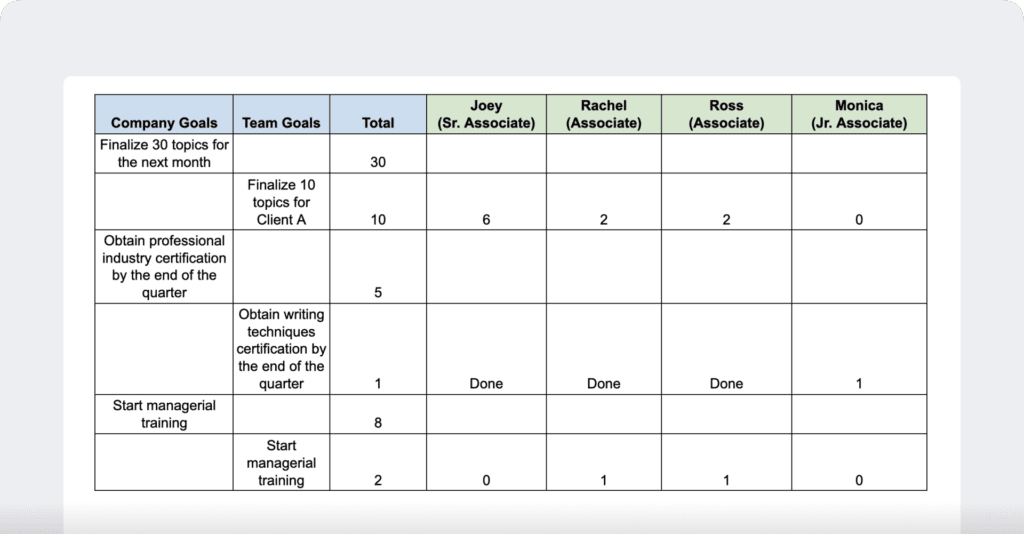
Download it here: Task Completion Form Template (Google Sheets)
3. RACI chart template for employee accountability
When nobody is sure who owns a task, accountability falls apart and blame becomes easy to pass around. A RACI chart, also called a responsibility assignment matrix, prevents this. It gives every person a defined role for each task.
RACI stands for:
- Responsible: The people who do the work. A task can have more than one.
- Accountable: The single person who owns the outcome and signs off on it.
- Consulted: People whose input you need before the work is done.
- Informed: People who get updates on progress or decisions.
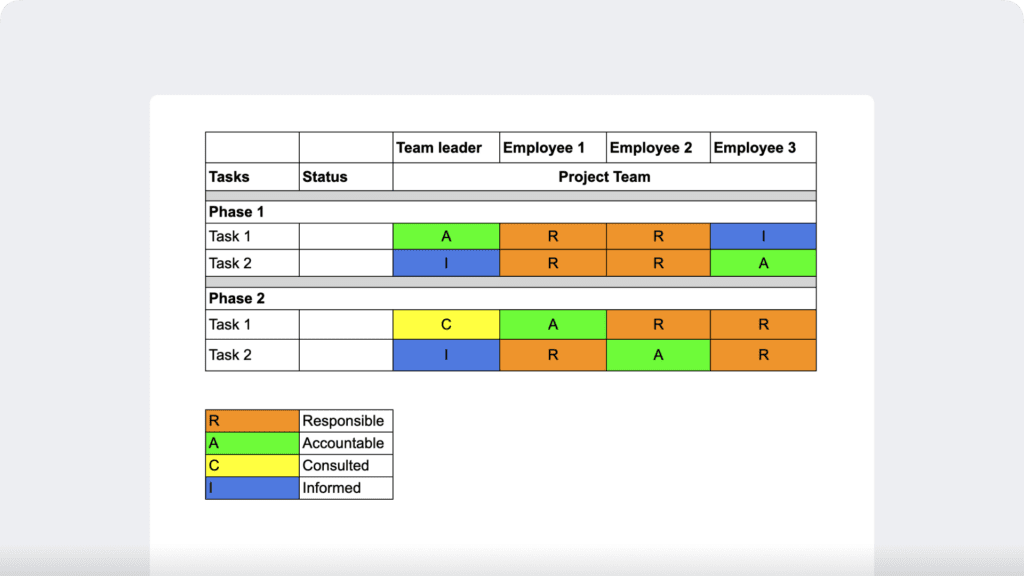
The Project Management Institute sums up the central rule: one Accountable owner per outcome. Our template follows that rule. It groups tasks by project phase and assigns an R, A, C or I to each team member.
Download it here: RACI Chart Template (Google Sheets)
4. Employee equipment responsibility form template
Tracking company equipment gets harder as your team grows, especially when laptops and headsets ship to home offices. The equipment responsibility form records which items each employee received, including model and serial numbers. Both the employee and the supervisor sign it.
The form also sets rules for using and returning company equipment. Providing equipment for remote workers raises extra questions about shipping and returns, so settle those before you send the form.
Before you use it, ask your HR or legal advisor to review the wording on damage and final pay. In the United States, the Department of Labor explains that deductions for tools or damage to employer property can’t reduce pay below minimum wage or required overtime. State laws may add further limits.
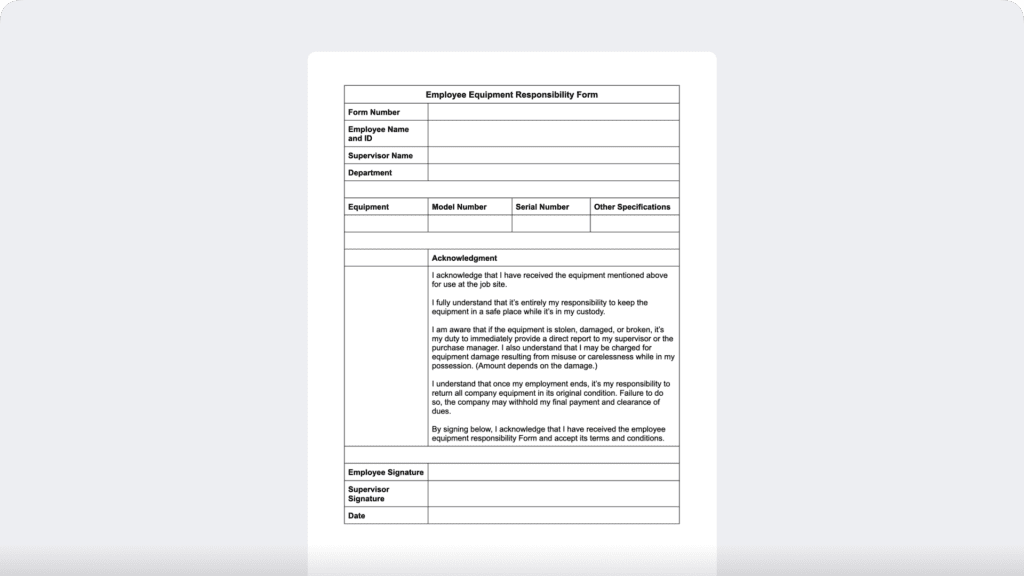
Download it here: Employee Equipment Responsibility Form Template (Google Docs)
Disclaimer: This employee equipment responsibility template is meant to be a general guide only and should be used only as a reference. The template may not necessarily include all local, state, or federal laws and other applicable laws, and hence, it should not be considered a legal document. Neither the author nor Time Doctor shall be responsible for any legal liability that may result from the use of this sample employee equipment responsibility form.
Which employee accountability template do you need?
Each template solves a different accountability problem. Use this table to pick the right employee accountability template for your situation.
| Template | Best for | When to use it | Who completes it | Format |
| Employee accountability form | Agreeing to company rules | Onboarding and policy updates | Employee signs, manager files | Google Docs |
| Task completion form | Tracking goals and progress | Weekly or monthly planning | Team lead updates, team reviews | Google Sheets |
| RACI chart | Clarifying who owns each task | Project kickoff and cross-team work | Project lead, with the team | Google Sheets |
| Equipment responsibility form | Recording issued equipment | When equipment is issued or returned | Employee and supervisor sign | Google Docs |
Most teams start with the accountability form during onboarding. After that, they add a RACI chart for each new project.
What happens when accountability breaks down?
Many managers avoid holding people accountable because confrontation feels uncomfortable. They’re not alone. In a March 2026 analysis, Gallup called accountability leadership’s greatest weakness. Only 46% of leaders rated themselves outstanding or exceptional at creating it, and just 30% of managers rated their own leaders that highly.
Yet tolerating missed deadlines, unfinished work or lateness sends a clear message: these habits are acceptable. Over time, that hurts the team in three ways:
- Reliable employees pick up extra work and start to resent it.
- Deadlines slip, because every handoff depends on the person who is behind.
- Trust in the manager drops, since standards seem to apply to some people but not others.
Uneven workloads make this worse. Learning how to manage the workload of your employees keeps extra work from always landing on the same people. To increase accountability in the workplace, start with the problem your team can see: unclear ownership, missing records or uneven workloads.
How to roll out an employee accountability template with a distributed team
An employee accountability template only works if people understand why it exists. Follow these steps to introduce it without making anyone feel watched.
- Start with the why. Explain that the forms make expectations clear for everyone, including managers.
- Pick one template first. For example, add the accountability form to your remote employee onboarding checklist before you introduce a RACI chart.
- Fill it in together. Review each line with the employee, so the commitments are agreed rather than imposed.
- Store forms where people can find them. Use a shared drive or your HR system, so employees can revisit what they signed.
- Review them regularly. Revisit task completion forms and RACI charts in weekly check-ins, and update them when roles change. A few simple signals will help you measure employee accountability over time.
- Pair the forms with shared data. Then compare commitments with how work actually happens, using records employees can see too.
Accountability for remote workers depends on this kind of consistent process. After all, you can’t rely on quick hallway catch-ups.
How technology turns accountability forms into verified records
An employee accountability template captures what people agreed to do. However, it can’t show whether the work happened as planned. That gap is where most accountability problems hide, especially on distributed teams.
Workforce analytics closes that gap by turning everyday work data into clear patterns. Instead of relying on status updates, you get a shared set of facts for every accountability conversation.
| Accountability question | What templates show | What work data adds |
| Who owns the task? | The RACI chart names one accountable owner | The hours logged against that task, and by whom |
| Are we on track? | The task completion form shows targets | Time spent on each project as the day happens |
| Were the paid hours worked? | Not covered | A verified record behind every tracked hour |
| Is anyone overloaded? | Not covered | How work is spread across people and projects |
Time Doctor
Time Doctor helps leaders see the work behind each commitment, without turning accountability into surveillance. It gives you three views:
- Activity: Employee activity tracking shows the time, tasks and tools across every team member, project and location, as the day happens. Automatic tracking also replaces timesheets filled in from memory.
- Records: Time records tie every hour to the work behind it. Managers approve and adjust hours in one place, with manual entries flagged and every adjustment logged. That way, payroll and billing hold up.
- Workload: Workforce capacity planning shows who’s stretched and who has capacity. As a result, you can rebalance work before a deadline slips.
Trust is built in, too. You control what gets captured, employees see their own data, and Time Doctor holds ISO 27001 and SOC 2 Type 2 certifications.
You can also connect your data to Claude, ChatGPT or Gemini through the Time Doctor MCP. Then ask questions in plain language, such as “Show tracked vs active time for the Support team yesterday, per person.” It’s included in every plan.
Trello
Trello organizes work on visual boards. Teams create a card for each task, assign members and set due dates. This makes it easy to see who owns each item and where it stands.
Asana
Asana helps teams plan projects, set goals and assign tasks with clear owners and due dates. Managers can then follow progress across projects and teams.
Project tools like these pair well with time data. The wider category of employee accountability software includes other options worth comparing.
6 strategies to increase employee accountability
An employee accountability template works best alongside good management habits and the right tools. These six strategies will help you build accountability into everyday work.
1. Hold yourself accountable first
Your team will follow your lead. If you miss deadlines or arrive late to meetings, people will assume that’s acceptable. So model what you expect: keep your commitments, admit your mistakes and follow the same rules as everyone else.
2. Don’t delay difficult conversations
Address issues as soon as you notice them. Waiting only lets frustration build and the problem repeat.
During the conversation, focus on the behavior and its impact, not the person. Next, find the root cause. Is it motivation, training, unclear priorities or something outside work? Recognize what the employee does well before you move to the problem area. Finally, agree on a specific next step. The same approach works when you need to manage employee behavior that affects the wider team.
3. Be considerate of your employees’ feelings
Employees don’t always see how their actions affect others. For example, a new hire may not realize that joining calls late holds up the whole team. In other cases, personal issues may be behind a drop in performance. Stay patient, ask open questions and look for the root cause before you decide what to do next.
4. Set SMART goals
Vague goals make accountability impossible to measure. SMART goals fix this:
- Specific: The goal states exactly what needs to happen.
- Measurable: You can count or check progress.
- Attainable: The goal is realistic with the time and resources available.
- Relevant: It supports team and company priorities.
- Time-bound: It has a clear deadline. Some versions call this “timely.”
For example, “Complete 50% of Client A’s project in two weeks” is specific, measurable and time-bound. You can then track it in your task completion form or alongside your team’s OKRs. Meaningful productivity KPIs also help you decide what to measure.
5. Make accountability a habit
Accountability grows through small, regular routines, not one big meeting. Hold regular one-on-one meetings and team check-ins, and try questions like these:
- What did you commit to last week, and where does it stand?
- Is anything blocking you?
- Would you like more guidance on any part of your work?
- How can we improve the way we work together?
- Is the feedback you get useful?
Afterward, follow up on what you agreed. Over time, these routines build a culture of accountability where people hold themselves and each other to the same standard. Regular, two-way employee feedback keeps that culture going.
6. Give opportunities for skill development
Sometimes people miss commitments because they lack the skills, not the will. Offer training, mentoring and stretch assignments, so employees can take on more responsibility with confidence. A continuous learning program also keeps skills current as roles change.
Final thoughts
Accountability isn’t about watching people more closely. Instead, it’s about making commitments clear, writing them down and checking them against facts everyone can see. Each employee accountability template above covers a different need: an accountability form for rules, a task completion form for goals, a RACI chart for ownership and an equipment form for company property.
As your team grows, however, forms alone won’t show whether work happens as planned. That’s when a verified record of the work helps. Time Doctor gives leaders of distributed teams one clear view of activity, records and workload, so you can trust the people and verify the numbers.
Frequently asked questions (FAQs)
An employee accountability form is a signed document in which an employee agrees to follow specific company rules, such as protecting login details and confidential information. Companies usually use it during onboarding and when policies change.
At a minimum, include the employee’s name, department and manager, the specific commitments, and space for signatures and a date. For task-based templates, also add owners, deadlines and a status column.
It depends on where you operate and how you write the form. Generally, a signed form shows that the employee received and acknowledged the rules. However, it can’t override employment law. So have an HR or legal professional review your forms before you use them.
Set clear expectations, agree on goals together and review progress in regular one-on-ones. Then use shared data that employees can also see, so conversations focus on facts rather than suspicion.
The responsible person does the work, and a task can have several. The accountable person owns the outcome and signs off on it, and each task should have only one.
Time Doctor shows leaders what their distributed team is working on and ties every tracked hour to a verified record. It also shows how work is spread across people and projects. Employees see their own data, and you control what gets captured.


Leigene Llave is a digital marketing strategist specializing in SEO, GEO, content strategy, and operations, with a focus on SaaS businesses. With over a decade of experience in sales and marketing and a background in digital marketing since 2019, she develops and executes strategies that improve organic growth, strengthen search visibility, optimize content performance, and help businesses adapt to evolving AI-powered search technologies.