Quick overview
Workflow bottlenecks happen when one step in your process slows everything else down.
You can identify them by spotting where work piles up, approvals stall, or workloads become uneven. Fixing them starts with clear visibility into how work actually moves from one stage to the next.
When teams can see the flow clearly, they can optimize the process proactively instead of constantly reacting to delays.
This article shows how workforce analytics reveals where delays occur, helps redistribute work more evenly, supports smarter automation, and prevents the same problems from recurring.
Think of your operations like a highway. Traffic moves smoothly across multiple lanes, then suddenly narrows into one. The cars behind keep pressing forward, engines running, and drivers trying to move faster.
However, no matter how hard they try, everything slows to a crawl. Because that single narrow point controls the speed of everyone.
A workflow bottleneck works the same way. One overloaded approver, one delayed handoff, one missed follow-up, or one reporting gap can quietly stall progress across the entire system.
As a result, team members stay busy and effort remains high, yet results fall behind expectations.
The hardest part is that the slowdown often goes unnoticed until deadlines slip, costs rise, or frustration spreads across the team.
According to MIT Sloan Management Review in Improve Workflows by Managing Bottlenecks, “bottlenecks are a common source of frustration in organizations.”
So what exactly is a workflow bottleneck, and how do you detect it before it disrupts performance?
Table of Contents
- What is a workflow bottleneck?
- How to identify and resolve workflow bottlenecks in your team?
- Why do workflow bottlenecks hurt performance and keep coming back?
- How can workforce analytics fix workflow bottlenecks fast?
- A practical framework to fix workflow bottlenecks
- Eliminate workflow bottlenecks with Time Doctor
- Final thoughts
- Frequently asked questions (FAQs)
What is a workflow bottleneck?
A workflow bottleneck is a stage in a process where work piles up because capacity can’t keep up with demand. It becomes problematic when task dependencies prevent downstream stages from moving forward.
In simple terms, it is the point at work where tasks pile up and slow everything else down.
When that happens, cycle time increases, deadlines feel tighter, and overall throughput drops. Even if other steps operate efficiently, the slowest point controls operational performance.
Workflow bottlenecks can be short-term or long-term:
- Short-term bottlenecks happen when there is a temporary spike in workload that slows one part of the process. Once demand stabilizes, workflow returns to normal and operations gradually recover their pace.
- Long-term bottlenecks persist because of deeper structural issues such as uneven workload distribution, unclear handoffs, heavy reliance on manual processes, or limited capacity at key stages. These constraints continue to restrict workflow over time.

Why workflow bottlenecks matter
Bottlenecks weaken overall workflow management and affect the entire operating system.
- They increase cycle time across workflow stages
- They reduce overall throughput
- They raise operational costs through rework and overtime
- They destabilize SLA commitments
- They increase burnout risk when pressure shifts unevenly
Without structured visibility, these effects compound quietly.
How to identify and resolve workflow bottlenecks in your team?
Start by looking beyond activity and focusing on visibility into how work actually flows. Busy teams can still experience workflow bottlenecks when delays remain hidden between stages.
1. Map the workflow process end-to-end
Document each step, including handoffs and approval points. A clear process flow increases operational visibility and reveals where tasks accumulate. When work consistently pauses at the same stage, that point likely limits throughput.
2. Monitor cycle time and queue buildup
Track key metrics like average cycle time, wait time between stages, and backlog volume. Rising queues, declining throughput, or missed SLA targets signal that demand exceeds capacity. Without measurable data, constraints remain difficult to detect early.
3. Evaluate workload distribution
Make workload distribution part of your review process. When responsibilities are uneven across roles and teams, hidden capacity shortages can develop even if productivity appears steady. But clear visibility helps surface these issues early.
4. Analyze time allocation and task patterns
Examine how time is divided between execution, coordination, and rework. Frequent manual corrections, repetitive approvals, or stalled tasks often indicate structural inefficiencies. Pattern-level insight provides stronger signals than isolated incidents.
5. Address the constraint at its source
Once the limiting stage becomes visible, focus attention there first. Adjust capacity, simplify approval layers, or streamline process design. Because the slowest step controls workflow performance, improving that stage increases throughput across the system.
Why do workflow bottlenecks hurt performance and keep coming back?
Performance suffers because output becomes unpredictable. As a result, cycle time stretches, backlogs grow, and SLA targets start to feel fragile.
Meanwhile, costs rise due to overtime and rework, while teams face more pressure and strategic initiatives lose momentum.
Over time, burnout risk rises and performance becomes unstable. And instead of driving improvement, leaders spend more time reacting to delays.
However, bottlenecks keep recurring because most fixes focus only on the obvious delay, not on the root cause within the broader workflow.
When there is no clear view of how work moves across teams, how time is spent, and where capacity limits exist, new slowdowns quietly appear elsewhere.
In other words, the pressure does not disappear. It simply shifts to another stage.
So what creates that visibility in a way that is measurable, consistent, and actionable across teams?
That is where workforce analytics provides the clarity your team has been missing.

How can workforce analytics fix workflow bottlenecks fast?
You need clear visibility into how work actually flows across roles, stages, and teams.
Unlike manual data entry or periodic reporting reviews, workforce analytics provide continuous, real-time visibility instead of delayed snapshots.
This helps you fix workflow bottlenecks fast by:
Making delays visible in real time
Cycle time, queue buildup, throughput rate, and backlog trends show exactly where the workflow slows. This real-time visibility helps teams respond early, before SLA risk escalates and performance becomes unstable.
Exposing workload imbalance
Clear workload visibility highlights uneven task distribution, overloaded specialists, and underused capacity. As a result, resource allocation improves more quickly and accurately.
Connecting time allocation to operational performance
Project, task, and time tracking data reveal where effort concentrates and where rework occurs. They also highlight approval layers that create unnecessary friction in the workflow.
Surfacing performance pattern shifts early
Changes in throughput, idle time, or coordination load signal emerging constraints before delivery become unstable.
Supporting proactive, trust-first leadership
Structured data helps managers act early, coach with clarity, and strengthen accountability without invasive oversight.
Reducing reporting friction across tools
Integrated workflow data removes manual consolidation and fragmented visibility. As a result, teams and IT leaders operate from a unified system that supports scalable performance without added complexity.
The opportunity now is to turn these insights into consistent, organization-wide visibility across workload distribution, time allocation, and throughput in remote, hybrid, and in-office environments.
But, how do you turn visibility into something consistent and actionable across teams?
Time Doctor brings workforce analytics into daily operations, so workflow bottlenecks stop hiding inside busy work.
A practical framework to fix workflow bottlenecks
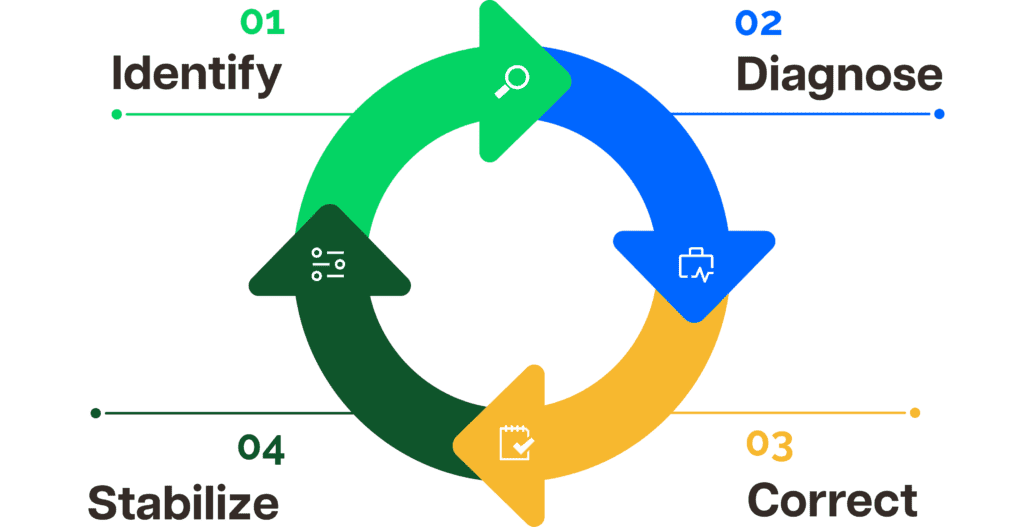
IDENTIFY – DIAGNOSE – CORRECT – STABILIZE
Fixing workflow bottlenecks becomes more structured when you follow a clear progression:
- Identify where work accumulates using cycle time and backlog metrics
- Diagnose whether the constraint is workload imbalance, coordination friction, or capacity limits
- Correct the limiting stage by reducing unnecessary or time-consuming steps
- Stabilize performance with ongoing validation of improvement efforts
When this cycle becomes continuous, bottlenecks stop returning in new forms.
Eliminate workflow bottlenecks with Time Doctor

Time Doctor is the workforce analytics platform that gives managers the clarity to lead with trust,not control.
Instead of relying on fragmented reports or assumptions, leaders gain AI-enhanced, actionable insight that they can confidently share with stakeholders.
When workflow slows, you can see it immediately
With Time Doctor, those signals surface early through:
- Workforce Analytics functionalities turn time-tracking and productivity data into real-time insights. This will make it clear where the workload builds up and where the workflow slows.
- Benchmarks AI compares productivity and time-use patterns within similar roles and teams to ensure fair benchmarking. It surfaces meaningful deviations that may signal a developing workflow bottleneck.
- Meeting Insight tracks real meeting time and engagement patterns across teams. It helps you see when rising meeting load starts to limit focused execution and contribute to workflow bottlenecks.
- Unusual Activity Reports detect sudden shifts in idle time or productivity trends. These shifts can signal the early stages of a workflow bottleneck.
Instead of wondering where work is stuck, the constraint becomes visible.
When the workload becomes uneven, you can correct it quickly
Time Doctor makes workload distribution easier to evaluate through:
- Employee Time Tracking and Productivity Analytics show how time and effort are distributed across projects and tasks. This makes it easier to see where workload builds up and where capacity remains underused.
- Time Management and Attendance data provide a clear view of actual work hours and team availability. This supports more accurate planning and balanced capacity across the workflow.
- Employee Monitoring and Screen Monitoring, applied transparently, provide visibility into how work actually moves from one stage to another. This helps identify repeated rework or slow handoffs that may be contributing to workflow bottlenecks.
When workload aligns with capacity, pressure drops, and throughput stabilizes.
When systems work together, visibility becomes complete
Time Doctor strengthens workflow visibility through:
- Integrations support more consistent automated workflows, ensuring tasks move across systems without manual delays. This allows workload, task flow, and performance data to move together rather than live in silos.
- Payroll alignment that ensures tracked time reflects actual work allocation. Accurate time data supports better resource planning and steadier workflow execution.
- Software Cost Insight that highlights which tools actively support productivity and which add unnecessary complexity. Simplifying the tech stack reduces hidden friction inside the workflow.
With connected systems and aligned data, decision-making becomes faster and more confident, and workflow bottlenecks become easier to prevent.
When teams work across locations, coordination requires clearer visibility
Time Doctor strengthens cross-location workflow clarity through:
- Distributed Workforce insights displayed through centralized dashboards show workload distribution across roles, teams, and time zones in one structured view. This keeps capacity and task flow visible regardless of location.
- Time allocation tracking that reveals how work hours are spread across environments, helping teams maintain steady execution across shifts and regions.
- Continuous productivity and performance data that ensure workflow patterns remain transparent as work transitions between remote and in-office contributors.
With consistent visibility across environments, coordination improves and workflow bottlenecks become easier to prevent.
Final thoughts
Workflow bottlenecks:
- Restrict throughput at the system level
- Increase cycle time and backlog pressure
- Reappear when visibility is fragmented
- Require continuous analytics, not one-time fixes
Time Doctor turns that visibility into structured, daily operational control.
When workload, time allocation, and throughput remain transparent, performance stabilizes. Decisions become intentional. Teams move with alignment instead of friction. Progress finally reflects the effort being invested.
So here’s the real question.
Are hidden bottlenecks still slowing your workflow, or is it time to take control with real visibility?
View a demo and see how Time Doctor’s workforce analytics help you eliminate workflow bottlenecks and operate with clarity, confidence, and sustained momentum.
Frequently asked questions (FAQs)
A workflow bottleneck is the stage in a process that limits overall output because it cannot keep up with incoming demand. When work accumulates at that point, cycle time increases and throughput slows across the system.
Even if other stages operate efficiently, the slowest step determines performance. Workforce analytics like Time Doctor help make that limiting stage visible before delays escalate.
At work, a bottleneck is any constraint that limits how quickly tasks move through a process. It may appear as delayed approvals, uneven workload distribution, limited capacity, or coordination gaps between teams.
When one part of the workflow cannot keep pace, the entire operation slows. Clear operational visibility makes these constraints easier to detect early.
A common example is a single approver responsible for reviewing multiple projects. As requests accumulate, downstream teams wait, and deadlines slip.
Another example is uneven workload allocation, where one specialist absorbs most tasks while others remain underutilized, slowing overall throughput. But Time Doctor helps surface these imbalances by showing workload distribution and time allocation patterns across roles.
Bottlenecks often return when only the visible slowdown is addressed instead of the system behind it. Removing one constraint can shift pressure to another stage.
Without continuous visibility into workload distribution, time allocation, and throughput patterns, new constraints quietly form. But Time Doctor’s workforce analytics provide ongoing, structured visibility, so performance stabilizes rather than cycling through recurring bottlenecks.
Start by tracking measurable performance indicators such as:
• Cycle time
• Backlog volume
• Throughput rate
• Queue buildup between stages
Once the constraint is clear, adjust capacity or rebalance workload. Workforce analytics with Time Doctor sustains visibility and drives continuous improvement.
Yes. Teams often use process maps, constraint analysis worksheets, and cycle time tracking templates to identify bottlenecks.
However, static templates provide point-in-time snapshots. Continuous workforce analytics provide real-time insight into how workflow constraints evolve across teams.
No. Bottleneck analysis applies to any environment where work moves through defined stages, including operations, finance, HR, construction, support, and distributed teams.
Any system with handoffs, approvals, or capacity limits can develop workflow bottlenecks. In modern distributed environments, structured visibility tools such as Time Doctor make it easier to manage these constraints across remote, hybrid, and in-office teams.
Process management ensures that work moves efficiently across defined stages. When performance metrics, workload distribution, and time allocation remain visible, constraints become easier to detect early. Workforce analytics platforms like Time Doctor support process management by providing continuous operational visibility.

