Do you see how much operational efficiency breaks down when you can’t see how work actually happens? This is exactly where AI for operational efficiency makes an impact.
Quick overview
AI for operational efficiency helps organizations understand how work truly flows across teams and systems. It delivers real-time visibility and early detection of friction so leaders can act before performance declines.
Key points
- AI improves workflow visibility and bottleneck detection
- AI enhances capacity planning and workload balance
- AI reduces manual work with automation and smarter task routing
- AI strengthens forecasting and predictive decision-making
- AI improves resource utilization and cost efficiency
- AI supports consistent performance across teams, shifts, and locations
- AI strengthens compliance, auditability, and risk management
Hidden delays, uneven workloads, rising complexity, and constant context switching slow your operations long before any report shows a problem.
Over time, you and other operation leaders reach the same realization. Efficiency doesn’t break down because your teams lack skill. Instead, it breaks down because you cannot clearly see how work actually moves across your workflows.
When teams are remote, hybrid, or in the office, you rarely get visibility into task transitions, delays, idle time, or the moments when workload pressure quietly builds inside your business processes.
Rising demand and fragmented business operations make it harder to maintain stable processes and prevent unexpected disruptions.
Since traditional reports only show historical snapshots, they often miss early signs of bottlenecks. AI tools can detect these issues much sooner, helping teams make timely, data-driven decisions before cycle times, throughput, or SLA performance are affected.
Without real-time visibility, these slowdowns compound quietly, long before you have a chance to intervene.
This is the gap AI is meant to address for operational efficiency.
Table of Contents
- Why does AI for operational efficiency matter more than ever?
- 7 ways AI improves operational efficiency
- How do AI and workforce analytics work together?
- What Time Doctor reveals about workflow efficiency
- How can leaders put AI-powered workforce analytics into action?
- Final thoughts
- Frequently asked questions (FAQs)
Why does AI for operational efficiency matter more than ever?
AI for Operational efficiency is your ability to turn time, effort, and resources into predictable, consistent output.
But as IBM notes, “the most effective approach often combines AI capabilities with human expertise to help leaders see what they cannot see manually.”
It reflects how smoothly your workflows run and how reliably your teams can perform under growing demand.
When operational efficiency is strong, organizations see:
- Stable SLA performance
- Predictable cycle times and throughput
- Lower operational costs
- Fewer escalations and less reactive firefighting
- More balanced workloads across shifts and sites
But when efficiency breaks down, the impact shows up quickly. These issues include slow handoffs, uneven task distribution, constant tool switching, meeting overload, and redundant data entry.
Although each one seems small on its own, together they quietly disrupt momentum, increase cycle times, and make performance harder to stabilize.
This friction leads to:
- Rising cycle times
- Missed SLAs
- Unpredictable throughput
- Increasing labor costs
- Fatigue and burnout from workload pressure
The challenge is that most of these issues stay hidden, especially within complex supply chain workflows where delays or missed predictive maintenance signals aren’t always visible.
Traditional reports offer historical snapshots but not the real-time visibility you need to understand why performance varies across teams.
This is why operational efficiency matters because it determines whether your organization can maintain consistent performance, handle growing complexity, and respond to change steadily.

7 ways AI improves operational efficiency
As demand rises and workflows grow more complex, it becomes harder for operations leaders to see where time goes or why tasks slow down.
1. AI improves workflow visibility and bottleneck detection
Most bottlenecks start quietly, showing up as slow handoffs, delayed task transitions, unexpected idle time, or scattered communication. These small issues rarely appear in traditional reports, yet they are often the real reason cycle times get longer and throughput drops.
By using AI systems, teams can see friction in real time by analyzing workflow patterns and operational signals.
For example, if a team spends too long switching between tools or waiting on approvals, AI systems highlight the delay early so you can address it before it grows into a backlog.
This level of workflow visibility gives operations leaders a clearer picture of how work actually flows, improving decision-making and supporting continuous operational efficiency.
2. AI enhances capacity planning and workload balance
AI-enabled analytics will help you see how much work each person has, so you can quickly tell who has too much, who has room for more, and where the team may be slowing down.
This creates early awareness of workload pressure, reducing burnout risk and supporting fairer resource allocation across shifts, sites, and teams.
You might notice one team working at full capacity while another has long idle periods. AI makes these patterns easy to see, helping you rebalance the workload before they affect performance or customer commitments.
AI-supported capacity planning to give you a clear view of workload levels that traditional reports cannot provide. This helps improve operational efficiency and maintains steady execution as demand changes.
3. AI reduces manual work with automation and smarter task routing
AI helps you reduce repetitive manual work by identifying the tasks that slow your teams down and showing where automation or smarter routing can keep work moving. This creates efficiency gains by cutting the time your teams spend on low-value steps such as data entry, status updates, or repeated handoff checks.
A common scenario is when employees switch between multiple systems just to complete simple tasks—an inefficiency that machine learning can help identify and reduce.
AI recognizes these patterns and highlights where process optimization or RPA can eliminate unnecessary effort. This reduces human error and keeps workflows more predictable.
It also helps operations leaders streamline processes, reduce manual friction, and improve overall operational efficiency and scalability.
4. AI strengthens forecasting and predictive decision-making
AI technologies will give you earlier awareness of what is likely to happen next by analyzing workflow patterns, cycle-time trends, and communication content through natural language processing (NLP) and generative AI.
You might notice that certain workflows slow down at the same time every week. If you do not address these patterns, they can quietly weaken your competitive advantage.
AI surfaces these patterns automatically so you can rebalance workloads or adjust staffing levels with confidence.
This kind of predictive analytics helps you reduce operational risks, stabilize performance during volatile periods, and support smarter, data-driven planning across teams and sites.
5. AI improves resource utilization and cost efficiency
AI helps you understand how your resources are actually being used in real time. It highlights underutilized capacity, high-cost workflows, and time lost to low-value activities. With this clarity, you can align your people, tools, and processes with the work that matters most.
You might discover that a process you believed was efficient is actually taking longer and costing more due to hidden delays or frequent rework within certain functions.
AI surfaces these inefficiencies early so you can reallocate effort, streamline workflows, and reduce operational waste before they affect budgets or customer expectations.
This level of resource optimization improves utilization, strengthens profitability, and helps you run your operations with greater predictability and control, enabled by real-time support from AI agents.
6. AI supports consistent performance across teams, shifts, and locations
AI gives you a clearer view of how performance varies across your teams, shifts, and sites. So, instead of relying on assumptions or delayed reports, you can see real-time differences in cycle times and workflow patterns.
This helps you determine whether a specific team, a client process, a shift schedule, or a broader workflow issue is causing a slowdown.
With this insight, you can standardize best practices, fix inconsistencies earlier, and keep operations running smoothly across your distributed workforce.
Your teams also benefit from more fairness and clarity, because your decisions are based on consistent performance signals rather than guesswork or outdated information.
7. AI strengthens compliance, auditability, and risk management
AI strengthens your ability to stay compliant by providing real-time visibility into how work occurs across regulated workflows. Chatbots help maintain consistency by guiding employees through the correct communication paths.
Instead of waiting for end-of-month audits or manual checks, you can see early signs of inconsistent processes, documentation gaps, or unusual activity.
This allows you to catch risks sooner, maintain audit-ready records, and support stronger quality control across banking, finance, healthcare, and other compliance-heavy environments.

How do AI and workforce analytics work together?
Implementing AI gives you signals that show what is changing inside your operations, along with clearer insight into how those shifts may affect your customer experience. Workforce analytics helps turn those signals into clarity you can act on.
Together, they help you understand how work actually moves across your teams, tools, and environments.
This combined view highlights several important operational use cases, such as:
- Where time is going during daily work
- Where workflow bottlenecks start to form
- How does the workload change throughout the day
- Where interruptions reduce productive work
- How meeting load affects throughput
- Which teams, tools, or clients introduce operational friction
AI detects patterns and early indicators using advanced AI algorithms, while workforce analytics gives you the real-world context behind those patterns. When you combine them, you see trends that would be invisible in static reports, making your AI implementation far more impactful.
A simple example shows how this leads to operational cost savings. Imagine your team is struggling with unpredictable cycle times. AI detects rising idle spikes and slow task transitions, giving you the insight you need for continuous improvement.
Workforce analytics then reveals the root cause by showing that constant app switching and a heavy meeting load during peak hours are creating delays. These findings come from clear activity datasets that make the patterns easy to understand.
With this level of visibility, you can shift from reacting to delays to anticipating them with confidence. Bots can alert your teams to early signs of workflow slowdowns, giving you time to act before the problem spreads.
This approach creates a strong foundation for modern operational efficiency. It provides the high-quality insights needed to improve workflow visibility, reduce friction, fairly support teams, and maintain consistent performance across shifts, sites, and client accounts.
What Time Doctor reveals about workflow efficiency

Time Doctor works alongside artificial intelligence to give you the workforce visibility you need to support teams with trust, not to micromanage. You get real-time insight into how work actually flows across shifts, sites, and client accounts, helping you make faster, smarter decisions at every level.
Each insight is powered by privacy-first data collection, real-time activity signals, and AI-enhanced analysis. This shows you the true power of AI by turning raw work data into clear, actionable intelligence that helps you coach, support, and guide your teams effectively.
Here is what Time Doctor helps you uncover:
1. Focus time vs. interruptions
Time Doctor shows how much uninterrupted focus time teams get and when their momentum breaks.
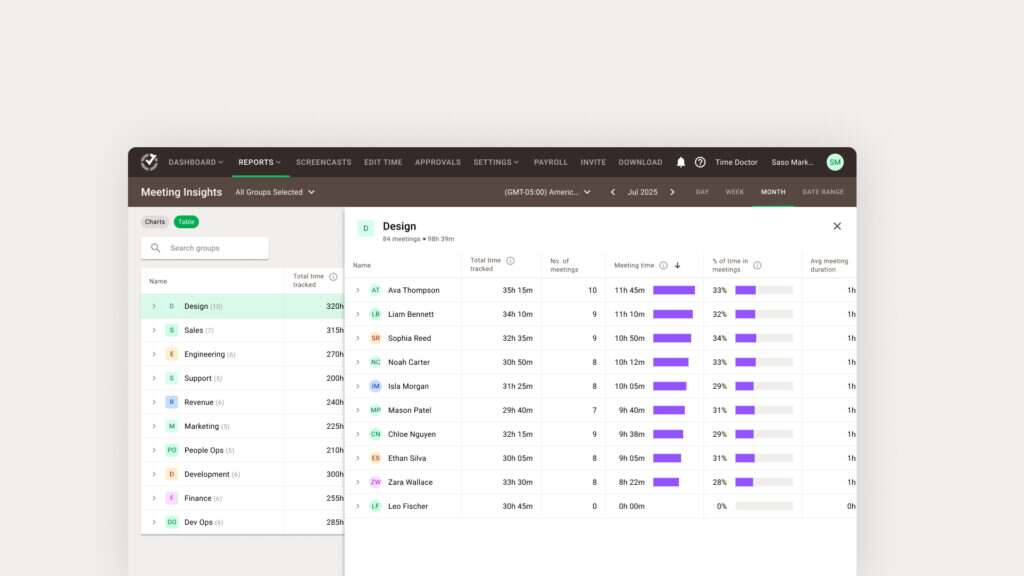
Features like app and web usage tracking, activity timelines, and Meeting Insights reveal interruptions from notifications, tool switching, and meeting overload, helping organizations identify exactly where they can streamline operations.
This helps leaders identify patterns that adjust workflows before performance slows, boosting productivity across their teams.
2. Cycle time and task completion patterns
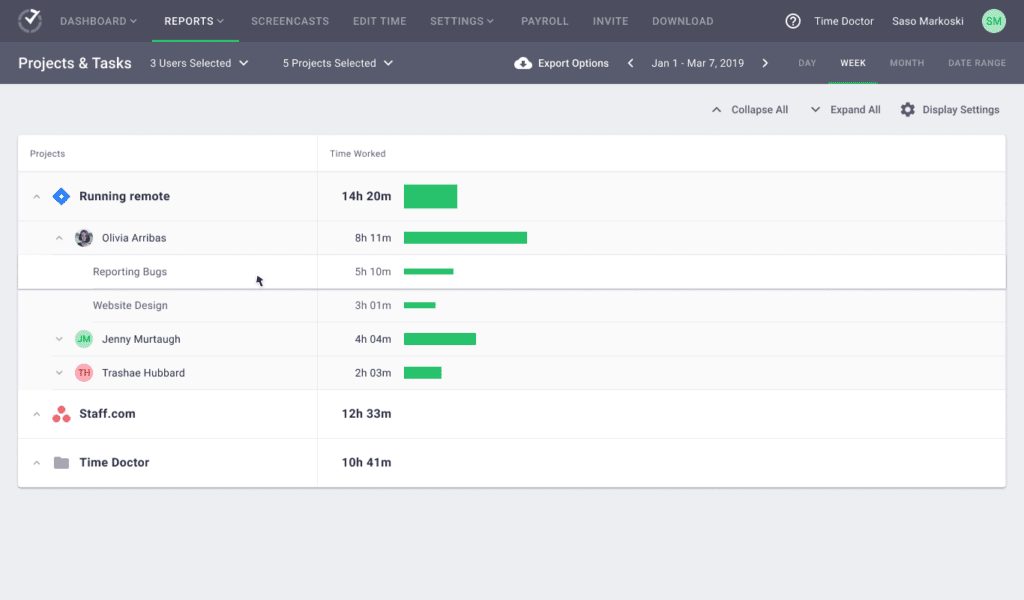
Using time tracking, task-level data, and project breakdowns, Time Doctor reveals how long workflows actually take across shifts, teams, and client accounts and uncovers repetitive tasks that are ideal candidates for robotic process automation.
Operations leaders use this visibility to compare cycle times, spot inefficiencies, and identify where specific steps in a process are creating delays.
3. Idle time and delayed workflow stages
Time Doctor shows you idle spikes and long gaps between tasks through timelines, activity tracking, and AI-enhanced patterns. These signals help you quickly spot friction in multi-step processes by interpreting vast amounts of data.
For example, you can see when approvals take too long or when handoffs slow down across distributed teams.

4. Utilization and workload balance
Capacity signals, such as workload distribution, active hours, and idle patterns, help you identify who is overloaded and who still has available capacity.
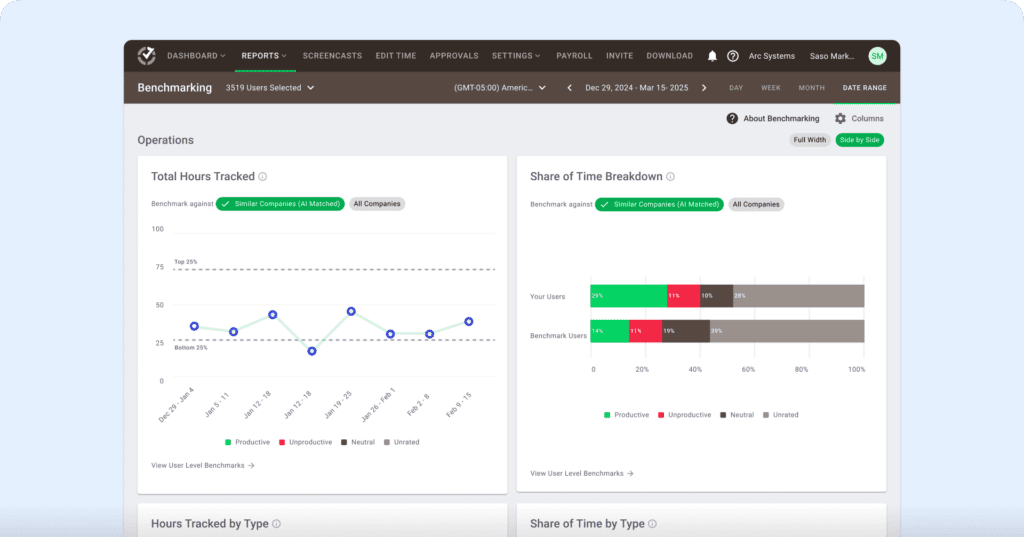
Features like daily activity reports, workload trends, and Benchmarks AI help you prevent burnout and maintain healthier, more balanced operational pacing. They also give you the clarity you need to adjust pricing models more effectively.
5. Workflow pinch points
Time Doctor reveals repeated slowdowns in specific workflow stages. Signals from app usage, task timelines, and cycle-time analysis show where tasks consistently get stuck.
This will help you remove friction earlier and maintain predictable throughput across teams and client accounts by reducing the risk of equipment failures that interrupt workflow.
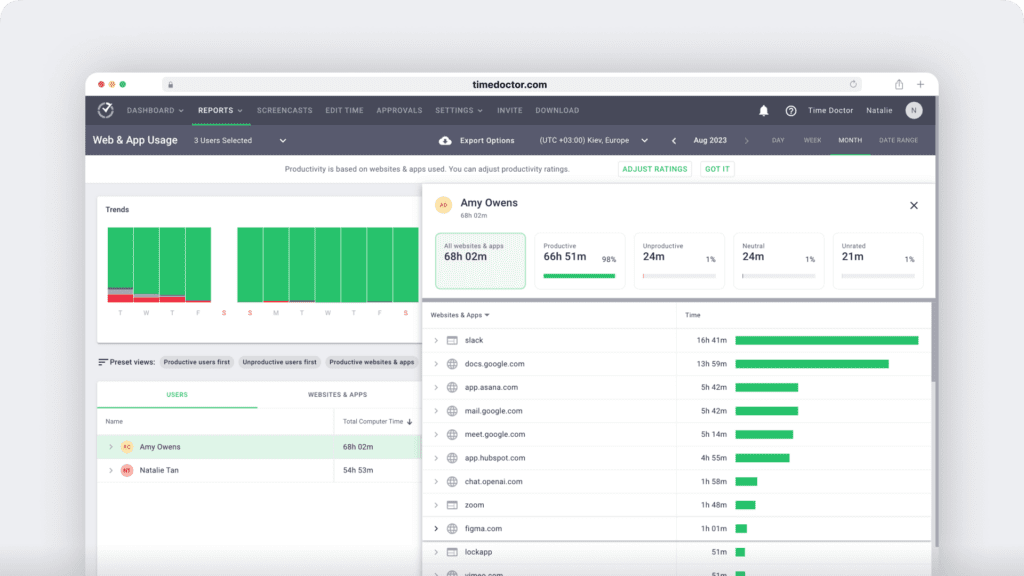
6. Low-value activity and redundant tool usage
Using app and web usage analytics, Time Doctor surfaces which tools support productive work and which ones consume time without contributing to output.
This insight helps reduce unnecessary software costs, streamline tech stacks, and eliminate habits that drain efficiency.
7. Performance variance across teams or sites
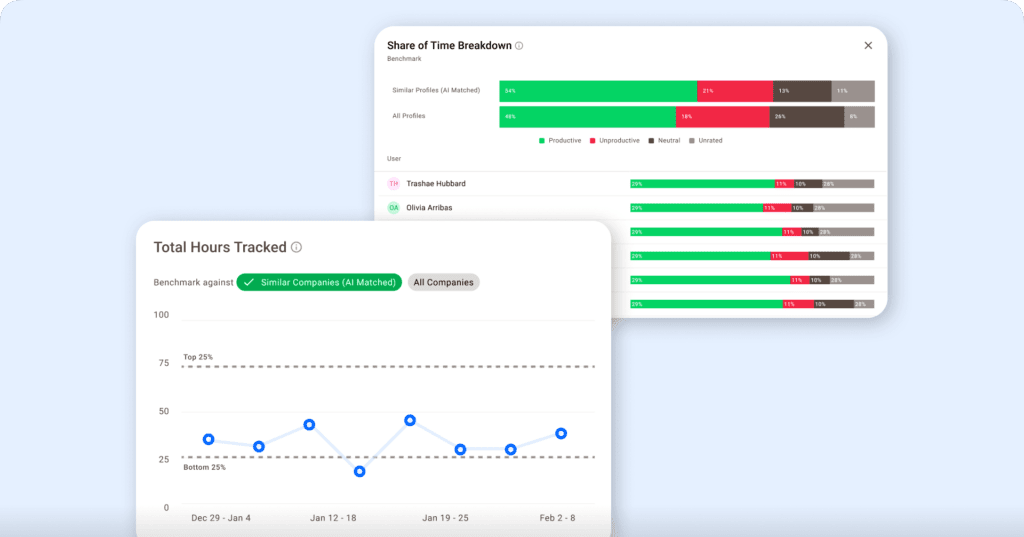
Benchmarks AI compares performance signals across teams, shifts, and locations, and shows where execution is strong and where workflow friction increases.
Operations leaders use this to standardize best practices, coach teams reasonably, and identify where support or training is needed.
8. Meeting and communication patterns
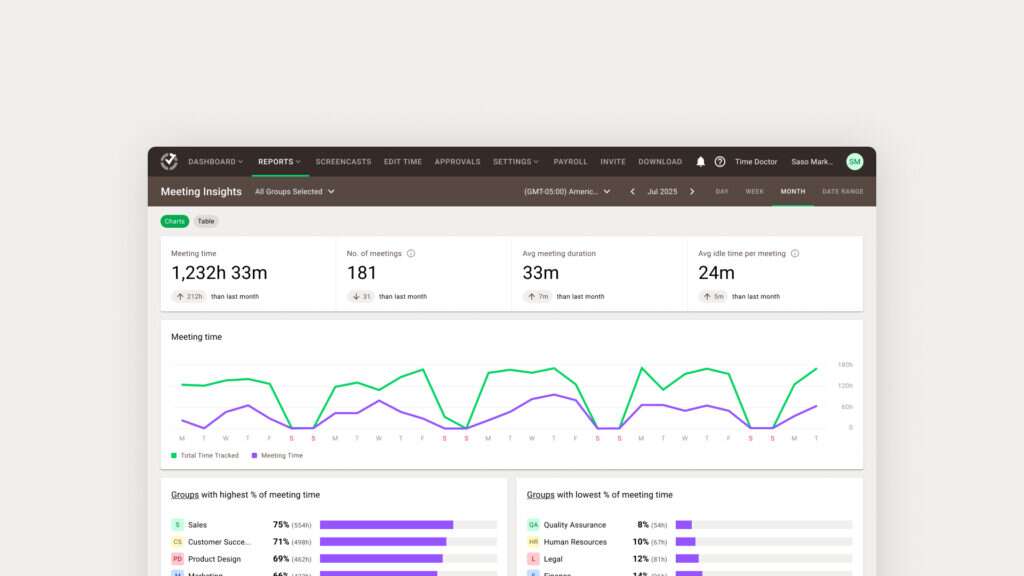
Meeting Insights shows how meeting load affects focus time, attention, and overall execution. It highlights idle time during meetings, meeting-to-meeting transitions, and collaboration habits that cut into productive work.
These signals help teams rebalance live calls, shift work to asynchronous channels, and protect more uninterrupted work blocks.
9. Client-specific delays
Time Doctor’s project and client-level breakdowns show how many hours each client or workflow requires, including time-intensive supply chain processes that contribute to delays or margin pressure.
This is especially valuable in industries like healthcare, banking, finance, BPO, and technology, where client complexity creates operational drag and affects SLA performance.
How can leaders put AI-powered workforce analytics into action?
Here are the steps leaders follow when they turn real-time visibility into more stable, consistent operational performance.
- Step 1: Identify workflow bottlenecks early with real-time signals that expose delays before they escalate into downtime that affects cycle times.
- Step 2: Rebalance workloads using accurate utilization and capacity data to prevent overload and protect throughput.
- Step 3: Protect focus time by spotting interruptions, meeting overload, and context-switching patterns that slow execution.
- Step 4: Standardize performance across teams and locations by leveraging benchmarking insights to reveal execution gaps.
- Step 5: Strengthen SLA performance by acting on early indicators of rising workload pressure or emerging bottlenecks.
- Step 6: Maintain audit-ready, compliant operations with transparent workflow data across shifts, sites, and clients.
Final thoughts
Operational efficiency is not just about getting more done in less time. It is about understanding how work truly flows across your teams and knowing where hidden friction slows down throughput, cycle time, and overall performance.
AI helps you see the early signals, and workforce analytics enables you to interpret those patterns with clarity so you can reduce bottlenecks, protect team well-being, and maintain consistent execution.
Real improvement starts when leaders shift from guessing to knowing. When you replace assumptions with workflow visibility and actionable insights, you make faster and more confident decisions that support both people and outcomes.
This helps you build a healthier, more stable environment where teams can stay focused, engaged, and aligned with operational goals.
Also, organizations can pair these insights with AI-powered chatbots to automate basic support tasks.
Here is something worth thinking about.
If so many of your daily issues come from delayed insight, are you fully aware of where time is actually going and which workflow patterns are quietly affecting your operational efficiency?
Ready to turn workflow visibility into stronger operational efficiency?
Get a demo and see how workforce analytics supports AI-driven operations.
Frequently asked questions (FAQs)
Time Doctor works alongside your existing systems and turns everyday work activity into clear workforce insights, helping teams experience the real benefits of AI without disrupting workflows. AI-enhanced signals highlight patterns like delays, workload pressure, and bottlenecks, so teams can take action without adopting a complicated new tech stack or changing how they work.
Yes. Time Doctor’s productivity metrics, enhanced by AI solutions, give you an early view of capacity limits. These insights help you adjust staffing or redistribute work before demand spikes impact cycle times or SLA performance.
Time Doctor includes built-in privacy controls, including role-based permissions, blurred screenshots, and configurable data access settings. Leaders see workflow patterns and performance signals without exposing sensitive information or engaging in invasive employee monitoring.
Yes. App and web usage data help you see which tools actually support productive work and which ones rarely contribute to meaningful output. IT and operations teams can use this visibility to reduce shadow IT, consolidate overlapping tools, and optimize software spend.
Time Doctor’s Benchmarks AI shows how similar groups perform across locations, shifts, or client accounts. These comparisons help leaders spot outliers, standardize workflows, and establish a more consistent baseline to support higher customer satisfaction.
Insights such as rising idle minutes, frequent interruptions, shrinking focus time, and heavy meeting load via Meeting Insights rely on strong data analysis to help HR and managers see strain forming earlier. This allows for balanced workload changes, healthier pacing, or better support before signs of burnout.
Yes. While Time Doctor is not an inventory platform, its workflow visibility and productivity insights help reveal delays, bottlenecks, and process gaps that affect inventory management. With clearer insight into task transitions, workload pressure, and real-time activity patterns, operations leaders can identify where inventory-related workflows slow down and make smarter adjustments that improve accuracy, speed, and overall operational efficiency.



Carlo Borja is the Content Marketing Manager of Time Doctor, a workforce analytics software for distributed teams. He is a remote work advocate, a father and an avid coffee drinker.