
Quick overview
Employee productivity can be tracked without micromanaging by providing clear, shared visibility into how work gets done, rather than by closely monitoring individual actions. The focus is on outcomes, workload patterns, and how time and tools are used across teams.
This article explains how to track employee productivity in a trust-first way, why traditional monitoring often backfires, and how modern workforce analytics supports effective leadership.
Is your team as productive as it should be, or do you often wonder where your work hours go?
Whether you manage an in-office team, remote teams, or freelancers, staying on top of employee productivity can feel overwhelming.
You want to trust your team, but missed deadlines, low engagement, and constant distractions can make it hard to see who is genuinely productive and who is just busy.
Some employees thrive with minimal supervision, while others struggle with unclear expectations, clear goals, and efficient workflows. Without the right approach, productivity dips, workloads pile up, and burnout becomes real.
The solution is to understand how work hours are spent, identify performance trends, and make informed decisions that help your team work smarter.
So, how can you approach monitoring employee productivity without creating a stressful work environment?
The right tools, strategies, and best practices can help managers improve accountability, streamline workflows, and boost engagement without committing unnecessary surveillance.
Table of contents
- What is employee productivity?
- Why should you track employee productivity?
- 6 best ways to track employee productivity without micromanaging
- Ethical considerations in employee productivity tracking
- 3 common mistakes to avoid when tracking productivity
- How do you track employee productivity across leadership roles and industries?
- How can you start tracking employee productivity?
- How does Time Doctor measure employee productivity?
- Final thoughts
- Frequently asked questions (FAQs)
What is employee productivity?
When employees are busy, does that mean they are productive? Not necessarily.
Employee productivity measures how effectively an individual or a team completes tasks and contributes to business goals within a given timeframe. It’s assessed by the quality and quantity of work produced, not simply by the number of hours worked.
In a business setting, productivity is influenced by several factors, including employee performance, time tracking, and workload management.
Clear workflows help employees focus and work efficiently, while unclear processes often lead to wasted time and frustration.
As a study published on ResearchGate states, “Employee productivity, however, is the measure of output per unit of input economically.”
Without clear visibility into these patterns, productivity becomes difficult to measure consistently across distributed teams and roles. That’s where clear productivity metrics come in.
What is an employee productivity metric?
An employee productivity metric is a measurable indicator of how effectively work time translates into meaningful output.
Common metrics include time spent on tasks, task completion rates, workload balance, and alignment between effort and outcomes. The most useful metrics focus on patterns over time, not on isolated activity, and are often supported by AI-powered analysis.
Why should you track employee productivity?
Tracking employee productivity helps you understand how work gets done, balance workloads fairly, and measure productivity to support better results across teams.
Here’s why tracking employee productivity matters for effective leadership:
1. Identify workflows that need improvement
Tracking how employee time is spent helps pinpoint inefficiencies, redundant processes, and delays. This allows managers to refine workflows, eliminate bottlenecks, and ensure smoother task execution.
2. Improve work hours tracking
Understanding how much time employees spend on different tasks ensures that work hours are used effectively. It helps managers see whether time is being allocated to high-impact activities or if adjustments are needed.
3. Reduce distractions
Social media, unproductive meetings, and non-work-related activities can consume significant time during the workday. Visibility into work patterns helps surface recurring distractions, so focus issues can be addressed without policing day-to-day activity.
4. Optimize workloads and prevent burnout
Overworked employees tend to experience stress and decreased productivity, while underutilized employees may feel disengaged. Tracking workload patterns helps you balance tasks more fairly, reducing the risk of burnout while keeping teams productive.
5. Support remote workers and freelancers
Remote employees and freelancers need clear expectations and consistent visibility into how work progresses. Productivity insights help you track outcomes, workload patterns, and deadlines so remote work stays aligned without relying on constant check-ins or supervision.
6. Enhance employee engagement and decision-making
Productivity insights help you recognize strong performance, spot areas for support, and make more consistent, data-informed decisions. This data helps managers provide targeted support, promote career growth, and make informed decisions that benefit employees and the organization.
So, how can you track employee productivity effectively?
6 best ways to track employee productivity without micromanaging
1. Use time tracking software
Tracking how work time is used provides a baseline for understanding productivity and workload patterns. Time tracking software provides the core functionality businesses need to monitor work patterns and ensure tasks are completed within designated timeframes.
- Records work hours automatically – Eliminates the need for manual time logs and improves accuracy.
- Provides detailed timesheets – Helps businesses use a tracking system to monitor attendance and total hours worked.
- Captures work activity – This can include features like screenshots or activity tracking to show engagement trends without requiring constant oversight.
- Identifies distractions – Highlights time spent on non-work-related employee activities to help employees stay focused.
On its own, time tracking shows where time goes. When combined with other signals, it helps reveal how work actually gets done.
2. Monitor Key Performance Indicators (KPIs)
Time data alone doesn’t tell the whole story. Productivity becomes clearer when it’s viewed alongside performance and outcomes. This is where key performance indicators (KPIs) help businesses gain a clearer picture.
By monitoring the right KPIs, companies can evaluate work quality, task completion, progress against milestones, and boost productivity where it matters most.
- Task management — Tracking completed tasks in tools helps measure performance and workload. Completed tasks keep workflows running smoothly, while incomplete ones may indicate unclear priorities or inefficiencies.
- Project deadlines – Meeting deadlines shows strong time management and productivity. Consistently meeting them reflects efficiency, while frequent delays may signal workflow issues, poor planning, or workload imbalances.
- Work performance – Work performance isn’t just about hours worked. It’s about accuracy, quality, and meaningful results. Tracking this helps recognize top contributors and provide support where needed.
- Team productivity – Team productivity depends on collaboration, communication, and coordination. When teams work well together, projects finish faster, and engagement improves. Weak collaboration can cause delays and frustration.
Workforce management improves when KPIs are reviewed with time and workload data, making productivity easier to assess across teams.
3. Use workforce-level productivity insights
Workforce productivity insights show how work actually happens by focusing on patterns rather than individual behavior. Activity monitoring, including keystroke data, provides helpful context when used through tracking apps.
- Activity and focus trends – Seeing patterns in active and idle time helps highlight focus issues, overload, or disengagement early, before they affect performance.
- Software and website usage – Understanding which tools support productive work and which ones create distraction makes it easier to streamline workflows and reduce wasted time, without policing individual behavior.
- Work patterns and productivity trends—Analyzing when teams are most focused, where work consistently stalls, and how workloads shift provides clarity for better scheduling, prioritization, and resource planning.
When these signals are viewed together in a shared dashboard, productivity tracking moves beyond basic monitoring.
4. Conduct regular check-ins
Regular check-ins work best when they’re informed by clear productivity and workload data, not just gut feel, and avoid micromanagement.
When managers check in consistently, employees feel supported, leading to better performance and stronger teamwork.
- Encourage open discussions about challenges – Employees may struggle with unclear expectations, workload imbalances, or project roadblocks. Frequent check-ins provide a space to discuss concerns and find solutions before issues escalate.
- Align work goals between co-workers and management – Teams perform better when everyone understands priorities. Regular conversations ensure employees stay focused on business objectives while feeling empowered to contribute effectively.
- Provide feedback to enhance employee performance – Employees perform best when they receive timely feedback. Ongoing discussions allow managers to recognize achievements, address areas for improvement, and keep employees motivated.
5. Use project management and productivity monitoring software
Keeping track of projects and tasks is essential for employee productivity and team performance. Without proper organization, deadlines can be missed, workloads can become unbalanced, and collaboration can suffer.
Project and task data add essential context to productivity, especially when shared through integrations that show how time and effort translate into progress.
- Streamline workflows by organizing tasks – Managing tasks, deadlines, and progress in one place keeps projects on track. Clear responsibilities help employees prioritize work efficiently.
- Ensure team productivity through tracking tools – Tracking task completion and workload helps identify productivity gaps. Managers can see which tasks run smoothly and which need support.
- Improve performance management by monitoring deadlines and deliverables – Keeping track of deadlines ensures that work stays on schedule. Monitoring progress allows managers to provide timely feedback and make adjustments if needed.
When project data is combined with time and activity insights, leaders gain a continuous feedback loop for improving how work flows.
6. Other tracking methods (Self-reports, peer reviews, automated reports)
Combining self-reports, peer reviews, and automated reports provides businesses with a comprehensive view of productivity, enhancing transparency and accountability.
- Encourage self-reports where employees log their daily tasks – Employees log completed tasks, challenges, and progress, fostering accountability and helping managers assess workload distribution.
- Use peer reviews to assess teamwork and collaboration – Co-workers give feedback on contributions, communication, and problem-solving. Peer assessments highlight strengths, areas for improvement, and promote team productivity.
- Analyze automated reports from tracking tools to gain deeper insights – Monitoring tools generate reports on work hours, task completion, and productivity trends, helping businesses optimize workload and performance management.
When qualitative feedback is combined with quantitative data, productivity becomes easier to understand and easier to improve.
Ethical considerations in employee productivity tracking
Tracking employee productivity works best when it supports better ways of working and helps teams stay aligned.
Lead with trust, not surveillance
Productivity tracking works best when it provides managers with reliable data rather than estimates. Workforce analytics shows real work patterns, making it easier to coach employees, give better feedback, and set clear expectations, especially during performance reviews.
Focus on visibility that drives action
Effective productivity tracking focuses on insights you can act on. By reviewing time tracking, workload, and task completion, you can identify risks such as burnout early. When tied to results, productivity data supports continuous improvement and smarter data-driven decisions.
Create transparency and consistency
Employees should know what data is collected, how it’s used, and why it matters, whether they work in offices, at home, or on personal laptops. Clear communication builds trust, and consistent standards across roles and work environments support fair and transparent productivity tracking.e involves excessive tracking that risks privacy. Clear policies and fairness foster an engaged, productive work culture.
3 common mistakes to avoid when tracking productivity
Some companies misuse productivity tracking software, leading to frustration, disengagement, and inaccurate results. To make monitoring effective, businesses must avoid these common mistakes.
1. Over-reliance on monitoring tools without real-time analysis
Data alone does not tell the whole story. Relying only on tracking tools without reviewing work patterns and productivity insights can lead to poor decision-making.
2. Using tracking as a punishment rather than a coaching tool
Productivity tracking should support improvement, not create pressure. Employees perform better when tracking is used to provide feedback and encourage growth.
3. Ignoring work-life balance and employee well-being
Productivity levels should not be measured by hours worked alone, as this can negatively impact work-life balance. If employees are overloaded with tasks, their work quality and engagement will suffer.
How do you track employee productivity across leadership roles and industries?
You track employee productivity by using workforce-level insights that connect time, tasks, and workloads across teams, rather than focusing on isolated activity or hours worked. Here’s how this approach works across different roles and industries.
For HR and people leaders
Workforce analytics helps you see workload balance, time use, and productivity trends across teams so that you can make fair, consistent decisions about your team members.
For example, if one team is logging longer hours with lower output, productivity data helps you identify a workload imbalance early and adjust staffing or expectations in time.
For operations and process leaders
Productivity insights show how work moves across tasks, tools, and teams. Visibility into utilization, handoffs, and focus patterns helps you improve efficiency and throughput.
In day-to-day operations, task data helps you identify recurring delays at specific handoff points, making it easier to refine workflows with clarity rather than guesswork.
For executives and business owners
Workforce-level productivity data shows you where time and resources are going, so you can prioritize better and scale with confidence.
From a leadership perspective, productivity trends help you see when high effort goes into low-impact work, making it easier to redirect resources toward initiatives that drive measurable results.
For IT and governance leaders
Productivity tracking works best when it is consistent, transparent, and easy to manage across teams and systems. Workforce analytics helps you standardize reporting and maintain secure visibility across distributed teams.
In a typical setup, centralized productivity reports help ensure data consistency across locations while supporting compliance with internal policies.
When productivity tracking aligns with leadership needs and industry realities, it becomes a shared source of truth. Expectations stay clear, decisions improve, and teams perform at a high level without micromanagement.ed on role-specific expectations, businesses can create fair and effective performance management systems that help teams succeed.

How can you start tracking employee productivity?
You can start tracking employee productivity effectively by following a clear, structured approach that focuses on outcomes, fairness, and visibility into how work gets done.
Step 1: Define what productivity means for your teams
Start by clarifying what employee productivity looks like in your organization. Define it around completed work, quality, and meeting expectations, not just time spent online or total work hours. Clear definitions help you measure employee performance consistently across roles, teams, and distributed work environments.
Step 2: Choose tools that support workforce analytics
Different tools reveal different productivity signals. Time tracking shows how work hours are used, project and task data show progress, and workforce analytics connects those signals into a single view. Selecting tools that work together gives you visibility into productivity without overwhelming employees or creating unnecessary friction.
Step 3: Communicate expectations clearly
Productivity tracking works best when expectations stay transparent. Explain what data is collected, how it’s used, and how it supports fair workloads and consistent decisions. Clear communication helps employees understand that productivity data exists to support better planning, not constant oversight.
Step 4: Track and analyze productivity data over time
Review employee work data in patterns rather than isolated moments. Analyzing work hours, task progress, software usage, and workload distribution over time helps you identify bottlenecks, capacity issues, and workflow inefficiencies early, especially in remote and distributed teams.
Step 5: Adjust workflows and workloads proactively
When productivity insights highlight imbalance or friction, take action. Rebalancing workloads, refining processes, or adjusting timelines helps maintain strong employee performance, supports sustainable work habits, and reduces burnout risk.
Step 6: Use productivity insights to guide feedback
Employee productivity tracking becomes more valuable when it informs regular conversations. Use data to support coaching, reinforce strong performance, and clarify expectations. Ongoing feedback helps teams stay aligned and focused on outcomes that matter.
Step 7: Review and refine your approach regularly
Productivity tracking isn’t a one-time setup. Revisit your tools, reports, and processes as work patterns change. Employee feedback helps you improve accuracy, adoption, and long-term effectiveness while keeping productivity tracking relevant and trusted.
This approach gives leaders clear visibility to support performance and accountability across teams.
So how do you put this level of visibility into practice across your organization?
How does Time Doctor measure employee productivity?
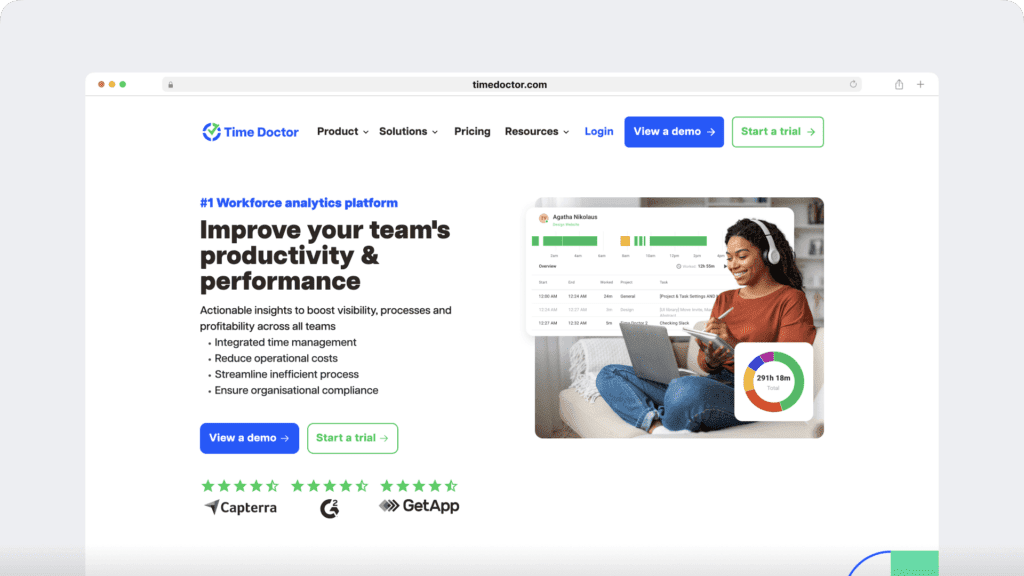
Time Doctor measures employee productivity by turning real work data into clear, actionable workforce analytics that show how time, effort, and outcomes connect. This gives you the visibility to lead with trust, make better decisions, and support performance across teams without relying on control or guesswork.
1. Create a clear, shared view of work time
Time Doctor provides reliable employee time tracking for remote, hybrid, and in-office teams. This makes it easier to understand how work hours align with priorities, ensuring planning and expectations remain consistent across roles.
2. See productivity patterns across your distributed workforce
With workforce and productivity analytics, Time Doctor helps you understand how work flows across a distributed workforce. You can see focus trends, collaboration rhythms, and workload patterns that support better team performance.
3. Understand how tools support productive work
Time Doctor’s employee monitoring and screen monitoring surface high-level activity signals that explain how applications and websites support day-to-day work. This visibility helps teams improve workflows while keeping the focus on outcomes.
4. Support balanced workloads and sustainable performance
Attendance insights and the Unusual Activity Report in Time Doctor help you spot workload shifts and time-use patterns early. This makes it easier to support employee well-being and maintain steady performance over time.
5. Add context to productivity decisions
Benchmarks AI within Time Doctor provides context around productivity data, helping you compare performance fairly across teams and roles. This supports consistent decisions in environments such as healthcare, technology companies, and agencies.
6. Connect productivity data with existing systems
Time Doctor integrates with payroll, attendance, and project tools, bringing productivity data into a single view. This provides a clearer view of how time, effort, and outcomes are connected without adding manual work.
7. Grow productivity tracking at your pace
With flexible pricing and a broad set of Time Doctor features, productivity tracking scales with teams as they grow or change. This makes it easier to support evolving work models without disrupting operations.
Final thoughts
Are you tracking productivity in a way that genuinely helps your team perform, or are you just collecting data without clear direction?
Understanding how work gets done isn’t about watching activity. It’s about gaining meaningful visibility into time, workloads, and work patterns so you can support focus, balance effort, and drive real outcomes.
Your teams need clarity, flexibility, and fair expectations. As a leader, you need timely insights to make confident decisions across remote, hybrid, and in-office teams. Workforce analytics bridges that gap by turning everyday work data into actionable insight.
When organizations shift from oversight to empowerment, productivity and well-being improve together.
Ready to take a smarter approach to tracking employee productivity?
See how Time Doctor’s workforce analytics helps you lead with trust and clarity. Get a demo today.
Frequently asked questions (FAQs)
Time Doctor measures employee productivity by turning real work data into actionable workforce analytics. It connects employee time tracking, productivity analytics, workload patterns, and task activity to show how effort translates into outcomes. This gives you clear visibility to lead with trust, support performance, and make informed decisions without micromanaging.
Time Doctor tracks team productivity by focusing on patterns across time, tools, and workloads rather than isolated activity. Workforce analytics reveal how work flows through teams, where focus is strong, and where friction appears, so productivity reflects how work actually gets done.
Effective productivity improvement starts with clear expectations and consistent visibility into work patterns and outcomes. Time Doctor supports this by combining employee time tracking, productivity analytics, attendance insights, and benchmarking, enabling you to coach with data, refine workflows, and sustain performance without constant oversight.
Most organizations use a combination of employee time tracking, project and task management, and workforce analytics. Time Doctor brings these together by connecting work hours, activity signals, and productivity insights into a single view that supports clarity, accountability, and better leadership decisions.
The best employee monitoring software focuses on workforce analytics rather than surveillance. Time Doctor prioritizes transparency, outcome-based visibility, and ethical employee monitoring, helping you understand how work happens while maintaining trust, consistency, and engagement across teams.
Large organizations rely on workforce analytics platforms that integrate time tracking, productivity analytics, attendance tracking, and cross-team reporting. Time Doctor supports this approach by providing scalable visibility that helps leaders make consistent decisions across roles, locations, and industries without adding operational friction.
Asana and ClickUp handle task planning and progress, while Time Doctor integrates with both to link tasks to time tracking and productivity insights. Together, they show not just what work gets done, but how time is spent, without micromanaging.
Yes. Time Doctor integrates with Slack to support visibility into work patterns without monitoring messages or conversations. Slack activity is treated as a contextual signal alongside time tracking and productivity analytics, so you can understand how collaboration fits into employee work while maintaining employee privacy and trust.


Liam Martin is a serial entrepreneur, co-founder of Time Doctor, Staff.com, and the Running Remote Conference, and author of the Wall Street Journal bestseller, “Running Remote.” He advocates for remote work and helps businesses optimize their remote teams.