Quick overview
Capacity modeling improves planning and forecasting by helping operations leaders understand available capacity and how much work team members can realistically handle using operational data about real-time, resources, and workloads.
In this article, you’ll learn what capacity modeling is and how it supports better operational decision-making.
How much work can your team actually handle?
Without clear visibility into current capacity, planning quickly becomes reactive. Work keeps coming in, deadlines pile up, and teams slowly slide into overwork and burnout.
When this happens, the business impact can be significant.
Research from McKinsey suggests that “organizations without strong workforce planning can lose 20–30% of productivity during workforce transitions, which may also lead to 10–15% losses in annual revenue.”
This is where capacity modeling becomes critical.
With a clear capacity model, you can answer important operational questions:
- How much work can the team realistically complete this week?
- Do current resources support upcoming demand?
- Which teams are already overloaded?
- Where will bottlenecks appear if workload increases?
Think of it like pouring water into a glass without knowing its size. At first everything seems manageable, but eventually the glass overflows. The same thing happens in operations when the available capacity of team members is unclear.
Table of Contents
- What is capacity modeling?
- What are the 4 types of capacity planning?
- Why does capacity modeling matter for operations?
- How do you build a capacity model?
- What metrics are commonly used in capacity modeling?
- Capacity modeling vs capacity planning
- What are the signs your capacity model needs improvement?
- Workforce analytics for accurate capacity modeling
- Why choose Time Doctor to improve operational planning and forecasting
- Final thoughts
- Frequently asked questions (FAQ)
What is capacity modeling?
Capacity modeling estimates how much work team members, departments, or systems can realistically handle. It evaluates available capacity, resources, time, productivity patterns, and required skill sets to determine those limits.
It helps forecast workload demand and strengthen capacity management, allowing organizations to align resources across operations, project management, and service delivery.
This clarity helps teams allocate work efficiently and prevent bottlenecks that could delay important initiatives.
What are the 4 types of capacity planning?
Organizations typically rely on four main capacity planning model to balance available resources with changing demand. Each approach determines when to add or adjust capacity depending on how demand is expected to grow.
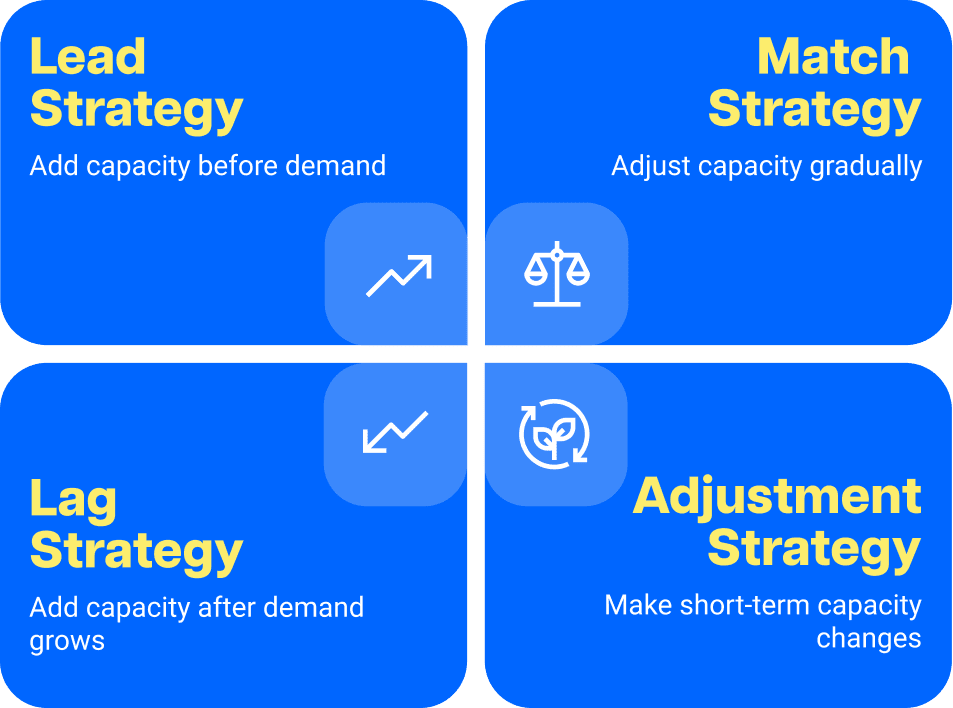
1.
A lead strategy means adding capacity before demand actually increases. Organizations hire staff, expand infrastructure, or increase production early so they are ready for future growth. This helps teams scale quickly, though it may leave some resources temporarily underused.
2. Lag strategy
A lag strategy means waiting until demand grows before increasing capacity. Teams add staff or resources only when the workload starts to rise. This helps avoid excess capacity, although it may cause temporary delays while the organization catches up with demand.
3. Match strategy
A match strategy adjusts capacity gradually as demand changes. Instead of making big increases or waiting too long to add resources, organizations make smaller adjustments over time to keep capacity closely aligned with workload demand.
4. Adjustment strategy
An adjustment strategy focuses on making small, short-term changes when demand shifts quickly. Teams may redistribute workloads, reassign resources, or adjust schedules to keep operations running smoothly.

Understanding these strategies is helpful, but their real value appears when capacity modeling improves how operations run every day.
Why does capacity modeling matter for operations?
Capacity modeling matters because it will help you run operations more predictably as demand changes. When workload expectations, staffing levels, and team capacity stay aligned, operations remain stable even during periods of growth or shifting priorities.
Capacity modeling helps organizations:
Prevent overload and burnout
Identify when teams operate beyond sustainable workload levels and rebalance work before pressure affects performance or morale.
Improve operational planning
Support more accurate planning when launching projects, scaling teams, hiring new hires, or preparing for higher demand.
Reduce workflow delays
Detect pressure points across workflows and address them before delays spread across teams or departments.
Optimize resource management and allocation
Reveal where work concentrates in the organization and shift tasks toward teams with available capacity.
Support data-driven decision-making
Provide operational insight that helps leaders communicate capacity needs to stakeholders, justify staffing changes, adjust timelines, and prioritize work more confidently.
How do you build a capacity model?
Building a capacity model takes more than estimating headcount. You need operational data that shows how work actually happens across teams and workflows.
By analyzing workload patterns, productivity metrics, available capacity, and demand forecasts, organizations can plan resources more accurately.
Most capacity models follow a structured process, whether they are built in Excel or spreadsheets or supported by workforce analytics software.
Step 1: Define the work and demand
Start by identifying the types of work your teams handle and the expected demand within a given period. This may include project pipelines, service requests, production tasks, or support tickets.
Demand forecasting helps estimate how much work the organization must handle and which teams or roles will be involved.
Step 2: Identify resources, skills, and available capacity
Next, catalog the resources available to complete the work. This includes employees, roles, skill sets, tools, or systems that contribute to operational output.
Then calculate the actual available capacity by accounting for:
- working hours
- meetings and administrative tasks
- training or onboarding
- vacation or leave
- operational interruptions
This step ensures capacity estimates reflect real working conditions rather than theoretical headcount.
Step 3: Analyze historical data and productivity patterns
Historical data from past workloads helps build accurate capacity models. Looking at task completion times and productivity patterns helps estimate how long similar work may take in the future.
Workforce analytics strengthens this process through productivity analytics dashboards that show how time is distributed across tasks and workflows. This helps you understand real productivity patterns.
Step 4: Calculate utilization and workload distribution
Evaluate how work is currently distributed across teams and roles. Some groups may operate near their capacity limits while others may still have available capacity.
Utilization analysis helps leaders rebalance workloads, improve resource allocation, and identify where additional capacity may be required.
Step 5: Compare capacity with demand
Once demand and capacity are estimated, compare the two to identify potential gaps.
For example, imagine a support team that handles 500 tickets per week.
Capacity modeling may reveal:
- Each agent resolves 25 tickets per day
- Each agent works 5 productive hours daily
- The team includes 8 agents
The estimated weekly capacity becomes:
25 tickets × 5 days × 8 agents = 1,000 tickets per week
If demand suddenly rises to 1,200 tickets, the capacity model immediately reveals a capacity gap before service levels decline.
You can then respond early by:
- adding temporary staff
- redistributing workload across teams
- automating repetitive tasks
- adjusting service-level expectations
Instead of reacting after performance drops, capacity modeling allows operations teams to plan ahead.
Step 6: Incorporate variables and operational assumptions
Capacity models should also account for variables that affect real-world operations, such as:
- employee ramp-up time
- seasonal demand fluctuations
- employee turnover
- operational disruptions
- changing project pipelines
Including these factors improves forecasting accuracy and prevents unrealistic planning assumptions.
Step 7: Run scenario analysis and update the model regularly
Capacity modeling is not a one-time calculation. It works best when teams regularly test demand scenarios and update the model as operations change.
Scenario analysis uses forecasting and modeling functionality to simulate workload increases, staffing changes, or operational improvements before decisions are made.
This helps teams maintain clear visibility into capacity limits and future workload needs.
What metrics are commonly used in capacity modeling?
Capacity models rely on measurable operational data to estimate how much work teams can realistically complete. The most reliable models use metrics that reflect how work actually flows through the organization.
Common capacity modeling metrics include:
- Productive hours – The amount of focused work time available within a given period.
- Task completion rate – How many tasks or tickets teams resolve within a specific timeframe.
- Average turnaround time – The typical time required to complete a task or project.
- Utilization rate – The percentage of available time actively spent on productive work.
- Workload distribution – How work is spread across teams, departments, or roles.
- Queue volume – The number of incoming tasks or requests awaiting completion.
- SLA completion rate – The percentage of work completed within service-level agreements.
These metrics allow organizations to estimate true operational capacity, not theoretical capacity based only on headcount. They also help leaders compare performance patterns across teams using tools such as Benchmark AI.
Capacity modeling vs capacity planning
Capacity modeling and capacity planning are closely related but serve different purposes.
| Concept | Purpose | Example |
| Capacity modeling | Simulates workload demand and operational limits based on available resources, time, and productivity patterns | An operations leader analyzes historical ticket resolution time and available work hours and runs what-if scenarios to estimate how many support requests the team can realistically handle each week. |
| Capacity planning | Determines how resources should be allocated or adjusted to meet demand | After identifying that demand will exceed team capacity, leadership adjusts staffing levels and workloads as part of operational and workforce planning decisions. |
What are the signs your capacity model needs improvement?
Even well-designed capacity models can lose accuracy as demand, teams, and workflows change. When model assumptions no longer reflect real productivity patterns, planning becomes less reliable and teams may start experiencing unexpected workload pressure.
Recognizing these signs early will help you update your models, rebalance resources, and keep operations stable.
Common signals that a model needs improvement include:
- Teams frequently working overtime even though forecasts suggest capacity should be sufficient
- Recurring workflow bottlenecks in certain teams or stages of work
- Demand forecasts consistently underestimating incoming work
- Uneven resource utilization, where some teams are overloaded while others have idle capacity
- A capacity planning process that relies on estimates instead of real operational data
In many cases, the problem is not the strategy itself but the lack of reliable data behind it. Effective capacity planning depends on accurate operational data that reflects real productivity patterns and workload distribution.
When planning relies on assumptions instead, forecasts quickly lose accuracy.
So how can organizations build capacity models that reflect how work flows across your teams?

Workforce analytics for accurate capacity modeling
Many organizations estimate capacity using headcount or rough productivity averages.
However, models based on a simple capacity planning template often fail to reflect how work is truly distributed across teams and processes.
This is where workforce analytics becomes valuable. It provides visibility into real productivity patterns, workload distribution, and operational activity across the organization.
Instead of guessing how much work teams can handle, you can see how time is spent and how work flows across your team members.
Workforce analytics can reveal:
- productive work hours available across teams
- workload distribution across employees and roles
- task completion rates and turnaround times
- idle and active work patterns that affect capacity
A workforce analytics platform like Time Doctor helps you model capacity based on real working patterns instead of assumptions.
Why choose Time Doctor to improve operational planning and forecasting

With Time Doctor’s AI-enhanced, actionable insights into workload patterns and productivity trends, you can plan capacity better, make smarter decisions, and lead with trust, not control.
Here are some ways it supports better operational planning and forecasting:
- Workforce Analytics and Productivity Analytics help you understand how work is distributed across teams so you can model realistic capacity.
- Employee Time Tracking and Attendance show how much working time is actually available, which helps you estimate true operational capacity.
- Meeting Insights reveal how meetings affect available work hours, allowing you to account for collaboration time in your capacity models.
- Benchmarks AI helps you compare productivity patterns so you can evaluate whether your team’s capacity aligns with typical performance levels.
- Employee Monitoring and Screen Monitoring give you visibility into application usage and work activity that influence productivity patterns.
- Unusual Activity Report helps you spot irregular behavior that could distort productivity data used in capacity modeling.
- Software Cost Insights show how software usage affects operational efficiency and resource allocation.
- Integrations, Payroll, and support for a Distributed Workforce connect these insights with the systems you already use to manage operations.
This helps you forecast demand, rebalance workloads faster, and maintain healthier operational capacity across remote, hybrid, and in-office teams.
Final thoughts
Capacity modeling gives your team something incredibly valuable: clarity. You have to understand how much work your team can realistically handle to plan with confidence, maintain balanced workloads, and support both operational and strategic decisions.
Time Doctor provides that visibility, helping you understand your team’s true capacity and make more informed planning decisions.
Ready to see how workforce analytics can strengthen your capacity planning?
View a demo of Time Doctor to see how it works.
Frequently asked questions (FAQ)
Capacity models are analytical frameworks used to estimate how much work teams, systems, or departments can realistically handle. They analyze available resources, working time, productivity patterns, and workload demand to determine operational limits and support better planning and forecasting.
A resource capacity model focuses on the workforce, skills, and time available to complete work. It helps organizations understand whether current staffing levels and resources can support upcoming demand without creating overload, delays, or operational bottlenecks.
Capacity planning determines how much work teams can realistically handle based on available time and productivity patterns. Resource planning focuses on assigning specific employees, tools, or roles to complete that work.
In simple terms, capacity planning defines the limits of what teams can handle, while resource planning decides how those resources should be allocated.
Capacity modeling improves operational efficiency by helping leaders understand how much work teams can realistically handle before overload occurs. By analyzing workload demand, productivity patterns, and resource availability, organizations can distribute work more effectively, prevent bottlenecks, and make better operational decisions.
Accurate capacity modeling requires reliable operational data that reflects how work actually happens across teams. Organizations typically analyze:
• Available working hours
• Historical productivity patterns
• Task completion rates
• Workload distribution across teams
• Average turnaround time for tasks or projects
• Incoming demand or request volume
When these metrics are analyzed consistently, organizations can build capacity models based on real working conditions rather than assumptions.
Workforce analytics is the practice of analyzing operational and productivity data to understand how work happens across teams, roles, and workflows. Instead of relying on estimates, workforce analytics uses real activity data to reveal productivity patterns, workload distribution, and operational trends.
This visibility helps leaders better understand staffing needs, capacity planning requirements, and operational efficiency.
Workforce analytics platforms such as Time Doctor transform daily work activity into AI-enhanced, actionable insights, allowing managers to understand how work gets done across remote, hybrid, and in-office teams. With this visibility, leaders can model capacity using real productivity patterns rather than assumptions, helping them plan more accurately and lead with trust, not control.
Capacity modeling estimates how much work teams or systems can realistically handle based on available resources and productivity patterns. Forecasting focuses on predicting future demand, such as incoming projects, tasks, or service requests.
Together, these approaches help organizations compare expected demand with available capacity so leaders can plan staffing levels, adjust workloads, and prevent operational pressure before it impacts performance.

