A practical guide to understanding what to track, how to interpret real-time signals, and how to act on them across your workforce.
Quick overview
Executive dashboards help HR leaders turn productivity benchmarks into real-time decisions through clear data visualization and live insights. They highlight workload, performance, and early burnout signals so you can act quickly.
In this guide, you’ll learn what to include, which metrics matter, and how to use these insights to improve planning and decision-making.
Sometimes a team looks productive but is quietly burning out. Other times, performance drops without an obvious reason. And by the time the issue becomes visible, it’s already affecting results or retention.
So decisions become reactive instead of proactive.
It’s like driving while only looking in the rearview mirror. You can see where you’ve been, but not what’s coming next.
Not because there’s no data, but because the data doesn’t show what actually matters in real time.
This challenge isn’t just operational, it’s also about how leaders interpret data in the first place.
As highlighted by Harvard Business Review, “many executives are still uncomfortable using business data and often find it difficult to apply in everyday decisions.”
Table of Contents
- Why do most productivity dashboards fail HR leaders?
- What is an executive productivity dashboard?
- The missing link: From benchmarks to real-time decisions
- What metrics should HR leaders focus on in executive dashboards?
- What real-time decision-making actually looks like
- Key features to look for in an executive dashboard tool
- Dashboards vs reports: Why HR needs both but uses them differently
- How to implement dashboards without creating distrust
- How do you turn dashboard insights into action?
- How Time Doctor executive dashboards support real-time decisions
- Final thoughts
- Frequently asked questions (FAQs)
Why do most productivity dashboards fail HR leaders?
Most dashboards show data, but they don’t help you identify bottlenecks or tell you what to do next.
For HR leaders, that gap shows up in everyday decisions.
Even with tools that automate data collection, you might see that a team logged more hours this week, but it’s not clear if they’re overloaded or just handling a temporary spike.
Another team may look “fine” on paper to stakeholders, but a drop in output or rising idle time isn’t obvious until performance starts slipping.
By the time issues appear in reports, they’ve already impacted deadlines, engagement, retention, and overall financial health.
This leads to familiar challenges:
- You can’t clearly tell which teams are stretched too thin versus underutilized
- Performance issues surface too late to fix early
- Managers rely on their own judgment, which creates inconsistency
- Hiring decisions feel reactive instead of planned
Without real-time visibility, decisions often rely on assumptions instead of actual work patterns.
And when decisions are based on incomplete data sets, fairness becomes harder to maintain across teams.
That’s why traditional dashboards fall short. They pull from multiple data sources, such as HR tools and CRM systems, but focus on past reporting instead of giving HR leaders the actionable visibility to act in real time.
What is an executive productivity dashboard?
An executive productivity dashboard, sometimes called a CEO dashboard, is a high-level, role-based dashboard that gives HR leaders real-time visibility into workforce performance using clear data visualization.
As one Forbes contributor explains, “an executive dashboard… gives executives a quick and easy way to view their company’s performance in real-time.”
It combines productivity benchmarks and key performance indicators (kpis) from multiple data sources into a unified view. This helps you use performance metrics to make faster and more confident decisions.
Instead of just showing activity, it helps answer questions like:
- Which teams are at risk of burnout?
- Where is performance dropping and why?
- Do we need to hire, redistribute work, or adjust workloads?
It is designed for decision-making, not monitoring.
What makes it different?
- Brings together benchmarks, historical trends, and real-time insights in one view
- Uses data visualization, charts, and graphs to highlight what needs attention now
- Transforms raw data beyond basic dashboard functionality
- Supports consistent, data-driven decisions across teams
Instead of just looking backward, it gives you a high-level view so you can act in the moment.
Executive vs team dashboards and metrics
Executive dashboards and operational dashboards work together, but serve different purposes for leaders such as HR heads, COOs, and CMOs.
| Executive dashboards | Team or operational dashboards |
| Focus on strategic decisions | Focus on day-to-day execution |
| Use aggregated data across teams | Use detailed, task-level data |
| Highlight trends, benchmarks, and risks | Track tasks, activities, and outputs |
| Support hiring, planning, and workload decisions | Support task management and team productivity |
| Show what needs attention now | Show what is happening right now |
Strategic vs operational metrics
The same data supports both levels, but the perspective changes:
- Operational metrics focus on execution
Example: hours worked, tasks completed, activity levels - Strategic metrics focus on decisions
Example: workload imbalance, burnout risk, productivity trends across teams
Executive dashboards don’t replace operational dashboards.
They build on them by turning detailed data into actionable insights for HR leaders.
The missing link: From benchmarks to real-time decisions
Productivity benchmarks define what “good” looks like.
But on their own, they are static.
They give you a reference point, not direction.
Executive dashboards act as the dynamic layer that interprets those benchmarks using real-time data visualization and workforce signals. They help you see when performance shifts, where risks are emerging, and what needs attention now.
This is what turns benchmarks into decisions.
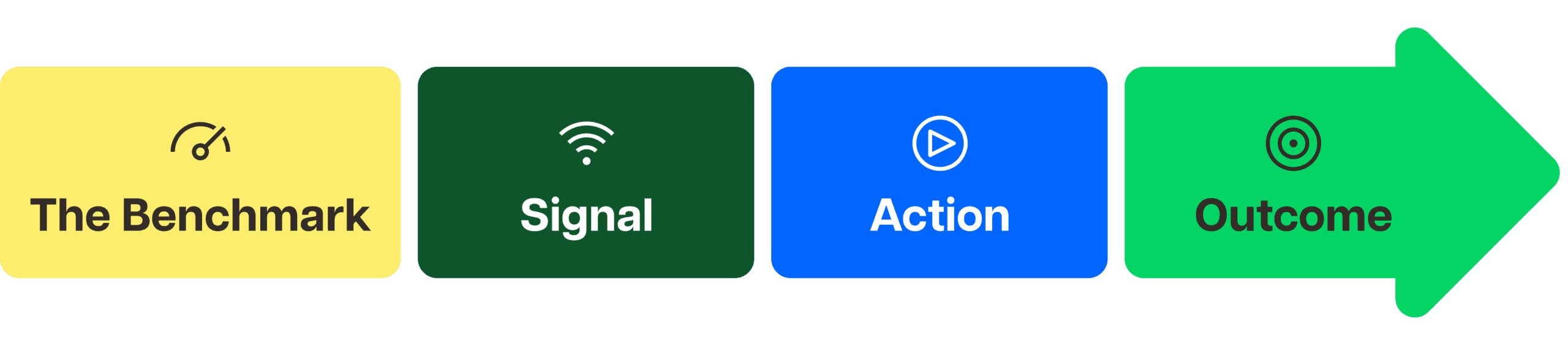
To move from insight to action, executive dashboards follow a simple framework:
Benchmark
Defines what “good” looks like based on role, team, or historical data
Signal
Detects deviations or trends in real time
Action
Guides intervention such as coaching, redistributing work, or adjusting resources
Outcome
Improves performance or prevents risks like burnout or disengagement
Here’s a simple executive dashboard example. Let’s say your benchmark for a team is 75% productive time, based on historical performance and role expectations.
Over the past five days, the dashboard shows a steady drop to 62%.
At first glance, this might look like a performance issue. But with the right dashboard, you can drill down into the data and see the context behind the change.
Benchmark: 75% productive time
Signal: Drops to 62% over five days
Instead of guessing, the dashboard reveals contributing factors, such as:
- Increased meeting time across the team
- Higher workload or tighter deadlines
- More time spent on non-core tools or context switching
Action: Based on these insights, you can:
- Rebalance workload across team members
- Reduce unnecessary meetings or introduce focus time
- Investigate tool or process inefficiencies
Outcome: Productivity stabilizes, workload becomes more sustainable, and potential burnout or disengagement is prevented before it impacts performance or retention.
Without executive dashboards, you only see the drop after it affects results.
With the right data visualization and real-time signals, you understand why it’s happening and can act immediately.
What metrics should HR leaders focus on in executive dashboards?
The most effective executive dashboards focus on early signals, not just outcomes.
They help HR leaders spot risks, understand trends, and make informed decisions before issues escalate.
Workload and capacity metrics
These metrics show how work is distributed across teams and support workload optimization by revealing how capacity is being used.
- Time allocation across teams
- Overutilization vs underutilization
- Hiring and capacity signals
This helps answer key questions like:
Do we need to hire?
Can we redistribute work more effectively to protect performance and profitability?
or How should we approach forecasting future capacity?
Productivity benchmarks
Benchmarks provide context for performance by showing what “good” looks like across roles and teams.
- Productive vs unproductive time
- Role-based comparisons
- Trends over time
With the right benchmarks, HR leaders move from guesswork to data-driven evaluation.
Engagement and burnout signals
These metrics surface early warning signs that are often missed in traditional reports.
- Idle time patterns
- Sudden drops in productivity
- Work-life balance indicators
Instead of reacting to disengagement, HR teams can launch the right initiatives to prevent burnout.
Manager effectiveness indicators
These metrics help identify how consistently teams are managed and supported.
- Team-level performance variance
- Consistency across teams
- Coaching and alignment gaps
This helps standardize performance management and improve business outcomes across the organization.

What real-time decision-making actually looks like
Real-time decision-making helps HR leaders act early using live signals, instead of reacting after issues appear in reports.
Scenario 1: Preventing burnout before it leads to attrition
You detect workload imbalance early through real-time visibility into hours, capacity, and work patterns.
Instead of waiting for resignations or disengagement:
- You identify which teams are consistently over capacity
- You understand what’s driving the overload
This allows you to rebalance workloads or adjust expectations before burnout becomes a risk.
Scenario 2: Fixing performance gaps across teams
You identify performance differences across teams using consistent, real-time data.
Instead of relying on subjective manager feedback:
- You spot where performance is dropping
- You identify manager-driven variance
This gives you the clarity to standardize coaching and support managers with data-backed insights.
Scenario 3: Planning headcount with confidence
You replace reactive hiring with data-backed workforce planning.
Instead of hiring based on pressure or assumptions:
- You see whether teams are overutilized or underutilized
- You understand if the issue is capacity, process, or workflow
This helps you decide whether to hire, redistribute work, or improve processes based on real data.
This is the shift from reactive HR to proactive workforce management.
Key features to look for in an executive dashboard tool
Not all dashboards are built for decision-making.
At the evaluation stage, HR leaders should look beyond basic reporting and focus on tools that turn data into clear, actionable insights.
Here’s what to look for:
- Real-time data, not delayed reporting
Insights should reflect what is happening now, not just past activity, so you can act before issues escalate - Role-based dashboards for HR and managers
Different roles need different views. HR leaders need high-level visibility, while managers need team-level context - Benchmark comparisons across teams
Performance should be measured against role-based benchmarks to provide context, not just raw numbers - AI-driven insights and pattern detection
The tool should surface trends, anomalies, and risks automatically, so you don’t have to dig through data manually - Clear, actionable data visualization
Dashboards should simplify complex data and highlight what needs attention, not overwhelm you with clutter
The goal is simple:
Make faster, more informed decisions without adding complexity.
This is where platforms like Time Doctor stand out by turning workforce data into actionable visibility that helps HR leaders make faster, more informed decisions.
The right executive dashboard should make it easier to spot trends, identify risks early, and understand what needs attention across teams in real time.
Dashboards vs reports: Why HR needs both but uses them differently
HR leaders need both dashboards and reports, but they serve different purposes.
Understanding how they work together helps you move from analysis to action faster.
Dashboards vs reports comparison
| Dashboards | Reports |
| Show what is happening now | Show what has already happened |
| Provide real-time visibility | Provide historical analysis |
| Designed for action and quick decisions | Designed for review and deeper evaluation |
| Highlight trends, risks, and signals as they emerge | Summarize performance over a period of time |
| Help detect issues early such as burnout or workload imbalance | Help validate trends and support reporting needs |
| Used daily or weekly by HR leaders and managers | Used monthly or quarterly for analysis and documentation |
How to implement dashboards without creating distrust
For HR leaders, visibility only works if people trust how it’s used.
If dashboards feel like surveillance, adoption will fail. Employees may disengage, and managers may avoid using the data altogether.
To make dashboards effective, the focus should be on clarity and support, not control.
Here’s how to build trust while improving visibility:
- Be transparent about what data is collected, how it is used, and why it matters for both the business and employees
- Focus on team-level insights instead of individual monitoring to surface patterns without creating unnecessary pressure
- Use data to support decisions, such as coaching and workload adjustments, not to penalize performance
- Align managers on how to interpret and apply dashboard insights consistently across teams
- Reinforce that dashboards provide actionable visibility to support better decisions, not to monitor behavior
The goal is simple: build trust while improving visibility.
When done right, executive dashboards strengthen transparency, support employees, and drive better decisions across the organization.
How do you turn dashboard insights into action?
Insights only matter when they lead to consistent action.
For HR leaders, this means turning real-time signals into clear, structured decisions across the organization.
Here’s how to make that happen:
- Use dashboards in regular decision cycles
Bring real-time insights into leadership reviews so actions reflect how work is happening now, not delayed reports - Translate insights into manager actions
Use visibility into workload, performance, and engagement to guide coaching, support teams, and address issues early - Apply insights to workforce and strategic planning
Use patterns in capacity and productivity to inform hiring, resource allocation, and process improvements - Standardize how actions are taken across teams
Align teams around shared data so outcomes are consistent, transparent, and fair
Time Doctor is a SaaS workforce analytics platform that empowers leaders with the visibility to lead with trust, not control.
By transforming day-to-day activity into AI-enhanced, actionable insights, Time Doctor helps leaders connect workforce data to real operational decisions. Its executive dashboards make it easier to track workload balance, compare team performance, and identify trends before they impact productivity or retention
It helps HR leaders act faster and with greater confidence. Productivity data becomes transparent and accessible, enabling better planning, stronger accountability, and more effective management across teams.
How Time Doctor executive dashboards support real-time decisions
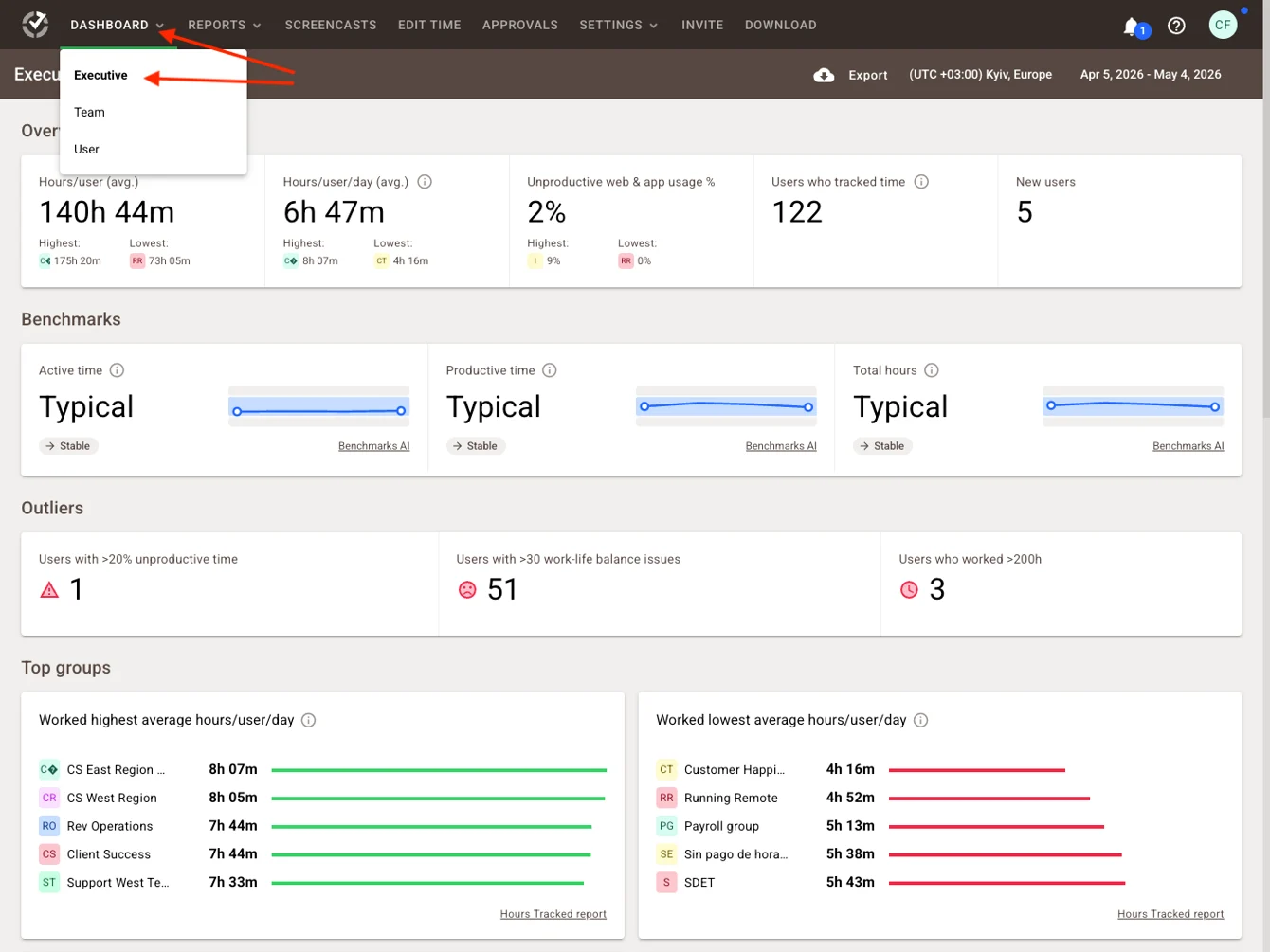
Time Doctor’s Executive Dashboard provides HR leaders and executives with a centralized, high-level view of workforce performance across the organization.
Instead of switching between spreadsheets, disconnected reports, or multiple tools, leaders can access real-time workforce analytics, productivity trends, workload distribution, attendance patterns, and team activity from one unified dashboard.
See Time Doctor’s executive dashboards in action.
Watch how leaders use real-time dashboards to monitor productivity and workload trends across teams.
This makes it easier to identify performance gaps, spot burnout risks early, and make faster, more informed workforce decisions at scale.
Key capabilities include:
- Organization-wide visibility into productivity, attendance, workload, and workforce activity
- Role-based dashboard access for executives, HR leaders, and managers
- Benchmark comparisons across teams to identify performance gaps and workload imbalance
- Customizable dashboard views and filters for drilling down into trends and workforce patterns
- Early detection of burnout risks, underutilization, and workflow bottlenecks through real-time workforce signals
Instead of waiting for monthly reports, leaders can monitor workforce trends in real time and quickly identify which teams may need support, workload adjustments, or operational changes.
The ability to drill down into team-level trends while maintaining a high-level executive view helps organizations improve planning, support managers more effectively, and act before issues impact engagement, productivity, or retention.
Final thoughts
Dashboards don’t drive change. Business decisions do.
The real shift happens when insights become part of how your organization operates, not just something you review.
That means embedding dashboards into:
- Weekly leadership reviews
- Manager 1:1s
- Workforce planning decisions
And most importantly, giving managers context, not just data, so they know what to act on and when.
This is where executive dashboards create real impact. Platforms like Time Doctor help turn workforce data into actionable visibility so leaders can make decisions with greater clarity and confidence.
They don’t just show what’s happening.
They help you act earlier, lead with clarity, and support long-term performance and revenue growth.
See it in action
See how real-time dashboards turn productivity data into actionable insights.
View a demo to explore executive dashboard capabilities.
Frequently asked questions (FAQs)
Executive dashboards are high-level dashboards that give HR leaders real-time visibility into workforce performance, workload, and engagement. They combine data visualization, benchmarks, and live insights to support faster, more informed decisions.
It is a role-based dashboard that helps HR leaders understand how work is happening across teams in real time, so they can manage performance, prevent burnout, and improve workforce planning.
An effective executive dashboard should include:
• Workload and capacity metrics
• Productivity benchmarks
• Engagement and burnout signals
• Business performance trends
• Real-time insights and alerts
Tools like Time Doctor surface these through activity data, timeline views, and role-based dashboards, helping leaders quickly identify what needs attention.
Executive dashboards provide real-time visibility into trends, risks, and performance. By combining benchmarks with live data, they help HR leaders act early and make informed decisions instead of reacting to past reports.
Dashboards surface early signals such as sustained overwork, workload imbalance, and declining productivity. With Time Doctor, work-life balance data and activity patterns help HR leaders intervene before burnout escalates.
Look for tools that offer:
• Real-time data
• Role-based dashboards
• Benchmark comparisons
• AI-driven insights
• Clear, actionable data visualization
Time Doctor combines these with AI-enhanced insights and customizable dashboards to highlight risks and opportunities early.
For example, Time Doctor’s executive dashboards allow leaders to monitor productivity trends, workload distribution, and team activity in real time through customizable visual reports and filters.
Executive dashboards help organizations:
• Make faster, data-driven decisions
• Improve workforce planning
• Detect risks early
• Align teams
• Maintain transparency and accountability
Focus on trends and team-level insights instead of individual monitoring. Time Doctor supports this with flexible visibility controls, helping leaders build trust while still gaining clarity.
Organizations use BI tools and workforce analytics platforms. Time Doctor is a workforce analytics platform that combines real-time tracking, productivity insights, and data visualization to deliver actionable visibility for HR leaders.
Executive dashboards are part of a broader business intelligence ecosystem. While BI tools focus on analyzing large data sets, executive dashboards present key insights in a simple, real-time view to support faster decision-making.

