If employee attendance isn’t accurate, how can you trust your staffing plans, workloads, or payroll?
Quick overview
Monitoring employee attendance for remote teams works best when clear expectations are paired with an easy digital clock-in/out system and real-time workforce analytics. Remote employees record their hours from anywhere, while leaders see reliable data on presence, overtime, and workload so they can support teams without micromanaging.
Tracking employee attendance shouldn’t feel like a guessing game.
Yet many businesses still rely on outdated, inefficient methods that lead to errors, time theft, and productivity declines. Manual timesheets consume too much time and leave room for mistakes, while biometric systems may not suit remote workers.So, how do you monitor attendance without micromanaging or creating extra work for HR?
Table of Contents
- What is the meaning of employee attendance monitoring?
- Why is it important to monitor employee attendance?
- Why should you monitor employee attendance?
- Traditional vs. modern attendance monitoring methods
- 4 best methods for monitoring employee attendance
- How can I improve employee attendance?
- The 3 key benefits of using employee attendance monitoring software
- What is the best employee attendance software?
- How Time Doctor helps businesses monitor employee attendance
- Why do businesses choose Time Doctor for employee attendance tracking?
- Frequently asked questions (FAQs)
What is the meaning of employee attendance monitoring?
Monitoring employee attendance means tracking when employees check in and clock out for their shifts. But it’s more than just knowing who’s at their desk—it ensures accountability, employee productivity, and compliance with labor laws.
A solid attendance tracking system allows businesses to:
- Keep accurate records for payroll and compliance
- Identify absenteeism trends, such as tardiness and frequent absences
- Measure employee productivity and optimize workflow
- Improve profitability by managing labor costs effectively
Some companies still use manual timesheets, but many now rely on real-time attendance management software to simplify work schedules, prevent errors, and track remote employees efficiently.
Why is it important to monitor employee attendance?
Have you ever struggled with unplanned absences throwing off project timelines? Or noticed payroll discrepancies that don’t quite make sense? Poor employee attendance tracking can lead to productivity losses, compliance risks, and unnecessary labor costs—all of which can hurt your business in the long run.
As Triton Benefits and HR Solutions highlights, time and attendance tracking is a key function of every HR department. Without a proper system, it becomes difficult to monitor attendance, and track vacation days, sick leave, and other absences while ensuring compliance with labor laws. Over time, these gaps can create payroll inconsistencies, operational inefficiencies, and even legal risks.
This is why accurate attendance tracking isn’t just about knowing who is present—it’s about keeping your business running smoothly, maintaining compliance, and ensuring employees are fulfilling their obligations.
But why does tracking employee attendance matter so much?
It’s not just about making sure employees show up. Monitoring employee attendance gives businesses real-time insights into workforce availability, labor costs, and productivity trends. When done effectively, it can improve efficiency, boost accountability, and prevent payroll errors before they become costly problems.
Here’s why accurate attendance tracking is a must-have for every organization:
- Plan staffing needs efficiently – By understanding workforce availability, businesses can schedule shifts effectively and ensure projects stay on track.
- Maintain compliance – Many labor laws require companies to keep precise attendance records to meet legal and tax regulations. Failing to do so can result in penalties or disputes.
- Reduce payroll errors and operational costs – Poor attendance tracking can lead to overpayments, unaccounted overtime, or undetected absenteeism, increasing labor costs.
- Promote workplace accountability – When attendance policies are consistently enforced, employees are more likely to be punctual, engaged, and productive.
- Identify underlying workforce issues – Chronic absenteeism may signal burnout, dissatisfaction, or management concerns. Early detection allows businesses to address issues proactively and improve retention.
Now that we’ve established why attendance monitoring matters, let’s explore the best ways to track employee attendance and improve workforce efficiency.
Why should you monitor employee attendance?
What happens when employees regularly show up late or take unexpected absences? How do you measure the impact of attendance on project deadlines and employee performance? Monitoring employee attendance isn’t just about tracking who is present—it’s about understanding work attendance patterns, preventing operational disruptions, and maintaining business efficiency.
Without a clear attendance tracking system, businesses risk payroll errors, compliance issues, and lost productivity. But with accurate attendance monitoring, companies can streamline operations, prevent time theft, and create a more accountable work environment.
1. Prevents employee time theft and buddy punching
Employees may log incorrect hours, punch in for absent coworkers, or extend breaks without proper tracking. These time theft issues cost businesses money and reduce productivity.
2. Helps manage overtime and labor costs
Untracked overtime leads to higher payroll costs. By monitoring attendance and work schedules, companies can reduce payroll errors and ensure fair and accurate compensation.
3. Boosts productivity and accountability
Employees work more efficiently when they know the system tracks their work hours. Managers can also spot workflow gaps and adjust resources to improve overall profitability.
4. Supports compliance with labor laws
Laws like the Fair Labor Standards Act (FLSA) require businesses to record employees’ hours accurately. A strong attendance tracking system helps companies stay compliant and avoid legal risks.
Traditional vs. modern attendance monitoring methods
How reliable is your current attendance tracking system? Have you ever had to sort through stacks of paper timesheets or manually verify work hours? Tracking employee attendance has changed significantly over the years, but many businesses still use outdated methods that leave room for errors, time fraud, and inefficiencies.
But as businesses grow, expand remotely, or embrace flexible work arrangements, these methods no longer provide the accuracy, efficiency, and real-time insights needed for effective workforce management.
The shift to modern attendance tracking
Today’s businesses need real-time employee attendance tracking that is automated, secure, and adaptable to both in-office and remote teams.
Key differences between traditional and modern attendance monitoring:
| Traditional Methods | Modern Methods |
| Manual punch cards & sign-in sheets | Biometric fingerprint scanners & facial recognition |
| High risk of errors and manipulation | Automated tracking for accuracy & security |
| No real-time insights into employee hours | Cloud-based dashboards with real-time data |
| Limited to on-site employees | Mobile and remote workforce compatibility |
By switching to modern attendance tracking methods, companies streamline operations, reduce administrative burdens, and gain real-time workforce insights.
Now that we’ve explored how attendance monitoring has changed let’s dive into the best modern tracking methods available today.
4 best methods for monitoring employee attendance
How do you know if your employees are actually working their scheduled hours? Are they arriving on time, taking unapproved breaks, or even buddy punching?
Businesses have several options for tracking attendance. The challenge is finding a solution that is accurate, secure, and practical for both in-office and remote teams.
Here are the four best methods for tracking employee attendance—each with its benefits and limitations.
1. Keycards and RFID systems
Keycard and RFID (Radio Frequency Identification) systems are widely used in corporate offices, manufacturing plants, and retail stores. Employees scan or swipe a card when checking in and out, and the system automatically logs their attendance.
Pros:
- Simple and familiar technology that requires minimal training.
- Can serve as an access control tool for enhanced workplace security.
- No privacy concerns compared to biometric tracking.
Cons:
- Employees can swap or steal keycards, leading to buddy punching and inaccurate records.
- Only tracks entry and exit times, not actual work hours or productivity.
- Not suitable for remote workers or businesses with multiple locations.
2. Manual attendance tracking (spreadsheets & paper logs)
Some businesses still rely on pen-and-paper sign-in sheets or spreadsheets to record attendance. While this method is simple and cost-effective, it often leads to inaccuracies and time theft.
Pros:
- Requires no technology or setup costs.
- Works for businesses with a small number of employees.
Cons:
- Prone to human errors, falsified entries, and manipulation.
- Time-consuming for HR teams to verify and process.
- Difficult to track remote workers or employees working flexible schedules.
- No real-time visibility, making absence management harder.
3. Biometric time clocks (fingerprint, iris, or facial recognition)
Biometric time tracking has become a popular method for businesses looking to prevent time fraud and enhance security. These systems use fingerprints, iris scans, or facial recognition to verify an employee’s identity before clocking in.
Pros:
- Eliminates buddy punching by ensuring only the registered employee can clock in.
- Offers high security and accuracy with minimal room for tampering.
- Reduces administrative workload by automating attendance records.
Cons:
- Expensive initial setup costs, making it less viable for small businesses.
- Some employees may have privacy concerns about biometric data storage.
- Not ideal for remote or field-based employees who don’t work in a central office.
4. Employee attendance tracking software
Cloud-based employee attendance tracking software is the most flexible and efficient solution for businesses of all sizes. These automated systems allow employees to check in from anywhere using mobile apps, geofencing, or web-based dashboards.
Pros:
- Works for both in-office and remote employees, making it ideal for hybrid work environments.
- Eliminates time theft with real-time tracking and automated reports.
- Integrates with payroll processing software, reducing errors in salary calculations.
- Supports geofencing, ensuring employees clock in from the correct location.
- Provides detailed valuable insights into employee productivity and attendance trends.
Cons:
- Employees must remember to clock in and out, though automated reminders can help.
- Some systems require training and adoption time for employees and HR teams.
- May involve subscription costs, but these are often offset by efficiency gains.
How can I improve employee attendance?
Does your team struggle with frequent absences? Have you noticed certain employees consistently showing up late or taking more unscheduled leave than others? The real challenge is finding ways to encourage better attendance without micromanaging or creating unnecessary stress.
Poor attendance can hurt team productivity, delay projects, and increase labor costs. That’s why businesses need a proactive approach to keep employees engaged, motivated, and present.
Here are 4 key strategies to improve employee attendance while fostering a positive work environment, because even the best attendance management system won’t help if employees frequently miss work.
1. Set clear expectations
Employees need to know what’s expected of them regarding attendance, punctuality, and time-off requests. An effective attendance policy should clearly outline:
- What qualifies as an excused vs. unexcused absence
- How to request time off in advance
- The consequences of chronic absenteeism or tardiness
Make sure the policy is easily accessible in your employee handbook and that new hires review it during onboarding.
2. Identify and address absenteeism causes
Frequent absences don’t always mean an employee is unreliable—sometimes, there are deeper issues at play. Businesses should investigate whether attendance problems stem from:
- Workplace burnout due to excessive workloads
- Low job satisfaction caused by lack of engagement
- Personal health or family issues that require flexibility
Rather than immediately enforcing disciplinary action, have open conversations with employees to understand their challenges. Offering wellness programs, counseling services, or flexible work arrangements can help reduce absenteeism while showing employees that you value their well-being.
3. Offer flexible work
Not every employee thrives under a rigid 9-to-5 work schedule. If your industry allows it, consider introducing flexible work options, such as:
- Hybrid work models (splitting time between office and remote work)
- Flexible start and end times
- Shift swapping and self-scheduling
By giving employees more control over their schedules, you can help them maintain a better work-life balance, reducing stress-related absences while still ensuring coverage for essential roles.
4. Create a positive work culture
Employees are more likely to show up consistently when they feel valued, engaged, and connected to their workplace. A toxic work environment, lack of recognition, or poor leadership can drive absenteeism.
Here’s how businesses can build a culture that encourages strong employee attendance:
- Recognize and reward good attendance with incentives or praise
- Encourage team collaboration to foster engagement
- Provide career development opportunities to keep employees motivated
- Conduct regular check-ins to gauge employee well-being and job satisfaction
By creating a supportive and engaging work culture, businesses can significantly improve attendance while increasing employee retention and satisfaction.
The 3 key benefits of using employee attendance monitoring software
What if tracking employee attendance could do more than just log work hours? What if it could actually boost productivity, enhance accuracy, and create a more flexible workforce? Businesses that switch to employee attendance monitoring software don’t just simplify tracking—they unlock new ways to streamline operations and improve efficiency. Here’s how:
1. Increases productivity and accountability
Tracking attendance manually often leads to inconsistent records and time fraud. With attendance software, employees know their work hours, logins, and absences are tracked in real time. This helps:
- Improve accountability by ensuring employees stay on schedule.
- Prevent time theft and buddy punching.
- Give managers a clear view of who’s working, when, and for how long.
It also makes it easier to approve time-off requests, track breaks, and monitor overtime, helping companies avoid burnout and inefficiencies.
2. Improves security and accuracy
Traditional attendance tracking methods, such as spreadsheets and manual logs, leave room for errors, lost data, and time fraud. Software-based attendance tracking eliminates these risks by:
- Recording accurate timestamps whenever an employee checks in or out.
- Reducing payroll errors by ensuring correct hour calculations.
- Keeping attendance data safe with cloud-based storage, so records never go missing.
With automated software, HR teams spend less time fixing timesheet errors and focusing more on business growth.
3. Enables remote work and flexible scheduling
More companies are moving toward remote and hybrid work models, making traditional attendance tracking ineffective. Employee attendance software solves this by:
- Allowing remote workers to check in from any location.
- Using geofencing to confirm employee locations when clocking in.
- Syncing with flexible work schedules to track different shifts and working hours.
With real-time tracking and automated reports, businesses can maintain strong attendance policies without restricting employees to a physical office.
What is the best employee attendance software?
Is there an easier way to track employee attendance without errors?
Manually tracking attendance can be frustrating, time-consuming, and full of inaccuracies. What if there was a smarter way to monitor work hours, reduce payroll mistakes, and improve workforce productivity—all in one platform?
To fix these attendance and productivity challenges at the source, you need more than a tracker. You need workforce analytics that show the whole picture. That’s what Time Doctor delivers.
Time Doctor gives operations leaders a clear view of how work happens across their teams. Instead of guessing where time goes or why tasks slow down, you get real-time workforce analytics that show patterns, workload pressure, and early signs of bottlenecks.
You see attendance, focus time, and activity trends in one place, so it’s easier to spot issues early, support people fairly, and keep projects moving. Whether your teams work remotely, in a hybrid setup, or on-site, Time Doctor makes productivity data transparent and actionable.
The result is simple. You make faster, smarter decisions, guide teams with clarity, and run a more efficient operation without adding extra layers of oversight.
How Time Doctor helps businesses monitor employee attendance

Tracking employee attendance is more than just logging hours—it’s about ensuring accountability, preventing time theft, and keeping teams productive. But how do you do that without micromanaging or slowing employees down with complicated tracking methods?
That’s where Time Doctor makes a difference. Time Doctor is a workforce analytics platform that provides teams with AI-powered insights into how work happens across remote, hybrid, and in-office environments. It brings time tracking, attendance, and productivity analytics together, so HR, operations, and business leaders can act sooner, support well-being, and make smarter decisions based on real data.
1. Attendance reports for real-time tracking

Time Doctor’s attendance report provides an overview of who is present, late, or absent on any given workday. It also allows managers to see reasons for absenteeism or tardiness, making it easier to address attendance issues proactively.
Generating an attendance report on Time Doctor:
- Select one or more employees to include in the report.
- Set the date range for the attendance period.
- Customize line items to match your attendance management needs.
- Review the report and edit it if necessary.
- Export the report as a CSV or XLS file for payroll processing or record-keeping.
Managers and employees can also directly add notes about attendance records within the platform by going to Payments > Edit Absent/Late Reasons on the Time Doctor web portal.s within the platform by going to Payments > Edit Absent/Late Reasons on the Time Doctor web portal.
2. Simple time tracking without disruptions
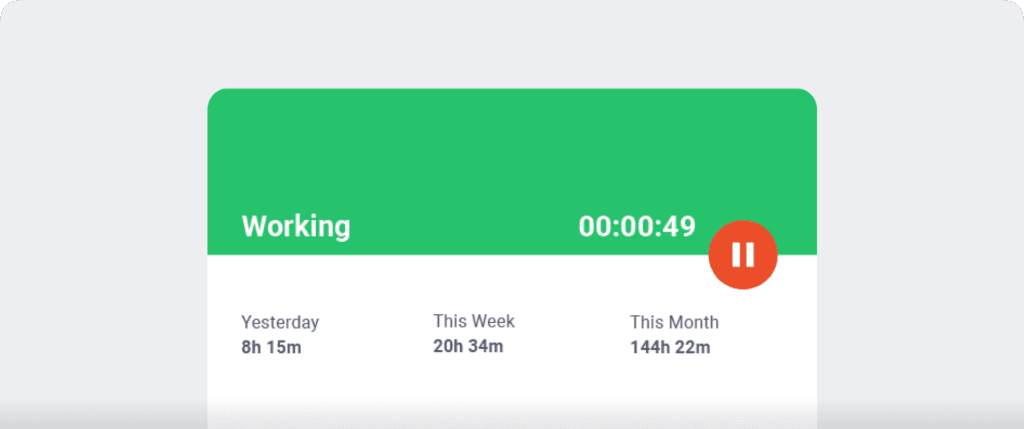
Many employees avoid time tracking tools because they find them complicated and intrusive. Time Doctor eliminates this issue with a simple and user-friendly employee attendance tracker that runs quietly in the background.
To start tracking work hours, employees simply:
- Enter their task and start the time clock.
- Work as usual while Time Doctor tracks real-time activity.
- Click stop when they finish the task.
This feature ensures employees log their actual work hours accurately without disrupting their workflow.This feature ensures employees log their actual work hours accurately without disrupting their workflow.
3. Inactivity tracker to prevent time theft
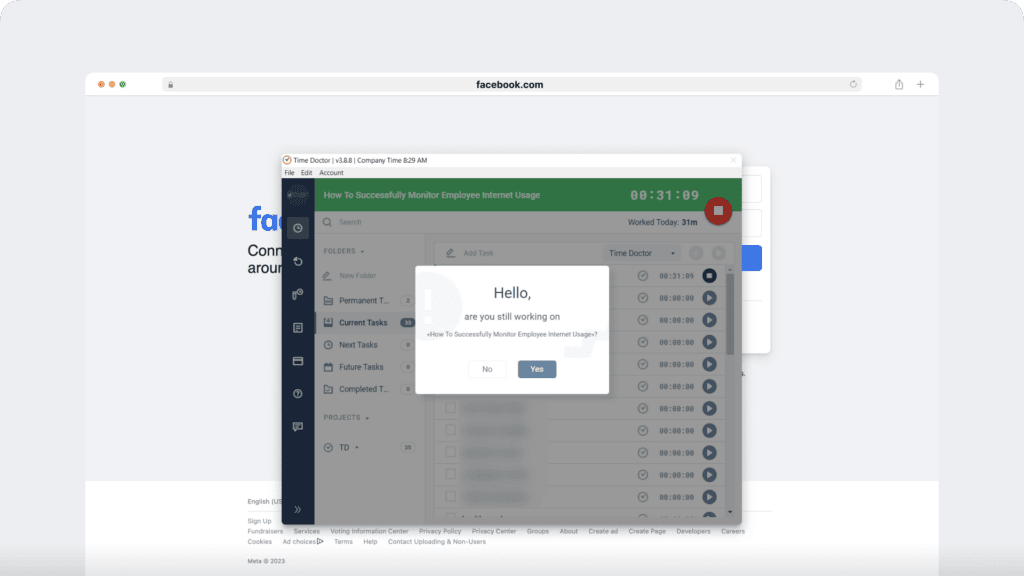
Worried about employees logging idle time as work hours? Time Doctor’s built-in inactivity tracker ensures productive work hours by detecting periods of inactivity.
- The software automatically pauses tracking after three minutes of no mouse or keyboard activity.
- Employees must actively work to ensure accurate time logs.
- Unlike keystroke loggers, Time Doctor does not track specific keys pressed—it only detects whether activity occurred.
This helps businesses eliminate time fraud and maintain accurate attendance records without invading employee privacy.This helps businesses eliminate time fraud and maintain accurate attendance records without invading employee privacy.
4. Distraction management to keep employees focused
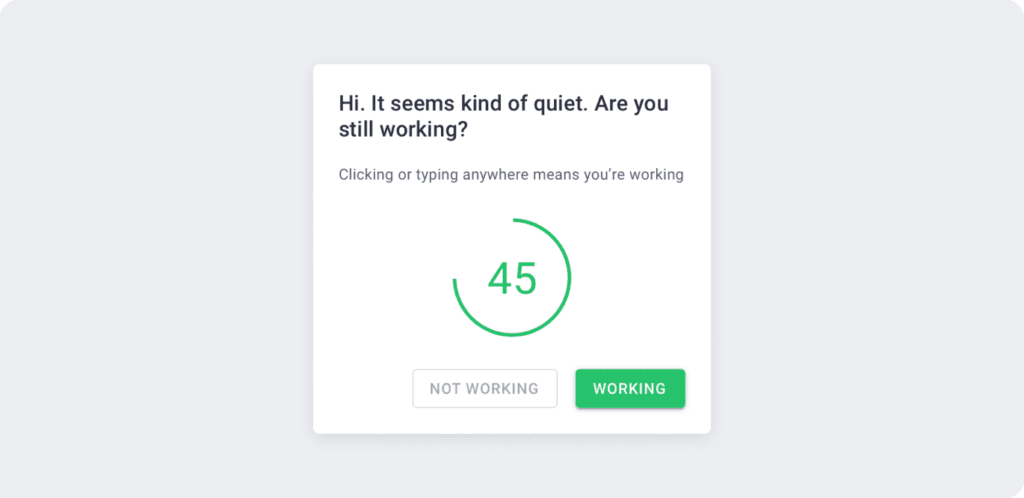
In today’s digital work environment, distractions are inevitable. Social media, entertainment websites, and other non-work-related activities can reduce productivity.
Time Doctor helps keep employees on track with its distraction management feature:
- If an employee opens an unproductive site or app, Time Doctor displays a pop-up reminder asking if they are still working.
- This gentle nudge encourages employees to stay focused and avoid distractions.
Businesses can improve employee productivity and attendance engagement by reducing time spent on non-work activities.Businesses can improve employee productivity and attendance engagement by reducing time spent on non-work activities.
5. Analytics and Benchmarks AI for smarter decisions
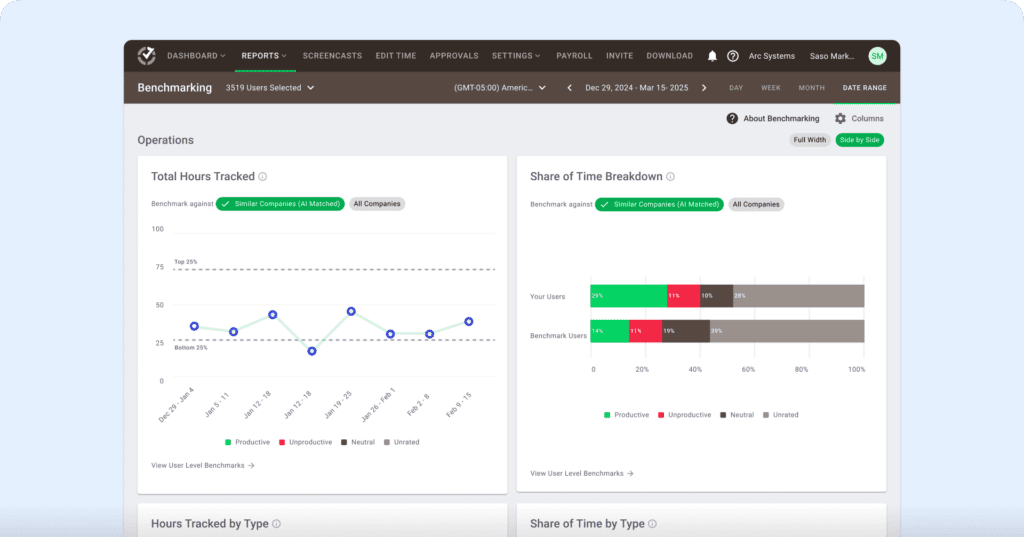
Where traditional attendance tools stop at “who worked when,” Time Doctor layers on analytics and AI:
- View work-life balance indicators like long days, frequent overtime, or irregular hours
- Compare time and attendance patterns across teams, locations, or roles
- Use Benchmarks AI to spot outliers—teams that are overextended, at risk of burnout, or consistently underutilized
- Pull compliance-ready reports for audits, client reviews, or leadership reporting
This gives HR and operations leaders an early-warning system for issues like burnout, unfair workloads, or chronic absenteeism—and a fair, data-backed way to make decisions about staffing, coaching, or process changes.
6. Comprehensive reports for productivity insights

Time Doctor provides access to seven types of reports, helping managers track:
- Employee attendance trends
- Total work hours logged per employee
- Project and task-specific time tracking
- Productivity metrics based on active vs. idle time
These reports help businesses optimize workforce efficiency, improve work scheduling, and ensure compliance with labor laws.
Why do businesses choose Time Doctor for employee attendance tracking?
Companies choose Time Doctor because it offers:
- Empowered leadership, not micromanagement
Managers get clear visibility into attendance, workloads, and productivity patterns. That lets them plan capacity, remove bottlenecks, and support their teams—instead of chasing updates or hovering over every task. - Actionable visibility across remote, hybrid, and in-office teams
Time Doctor works just as well for distributed teams as for on-site staff. HR and operations leaders get a single source of truth for time, attendance, and productivity across roles, locations, and schedules, complete with a digital, audit-ready trail. - Trust and transparency built in
Time Doctor is explicit about what it tracks and provides privacy-first controls like optional screenshots, screenshot blurring, role-based access, and configurable settings by team or location. Employees understand how data is used, which helps build trust rather than resistance. - Lower IT burden and easy rollout
With straightforward deployment, cross-platform support, and an intuitive interface, Time Doctor reduces the strain on IT and HR teams. Integrations with payroll and project management tools help you fit attendance analytics into your existing tech stack instead of creating yet another silo.
For organizations that want accurate attendance data, healthier teams, and better decisions, Time Doctor offers more than a time clock. It’s a partner in building a transparent, data-driven way of working.
Final thoughts
What if you could stop guessing about employee attendance and actually see what’s happening in real time? How much time and money could you save if payroll errors, time theft, and buddy punching were no longer an issue?
Tracking employee attendance does more than just log work hours—it helps create a productive, accountable, and efficient workforce. But are outdated methods holding your business back?
- Are manual timesheets and keycards costing you more in errors and inefficiencies?
- Do biometric systems seem too intrusive or impractical for remote teams?
- Is there a smarter way to monitor attendance without micromanaging your employees?
The right employee attendance tracking software can provide the best balance of convenience, security, and automation—especially for remote and hybrid teams. But with so many options, how do you choose the best fit for your business?
If you’re looking for a way to track attendance effortlessly, reduce errors, and improve workforce efficiency, it’s time to explore a modern, automated solution.
Want to see how Time Doctor can help your business take attendance tracking to the next level? Let’s find out.
See Time Doctor in action! Request a demo today and discover how effortless attendance tracking can be.
Frequently asked questions (FAQs)
Employee attendance refers to tracking when employees start and end work, along with absences, late arrivals, and overtime. It helps businesses understand who is working and how consistently schedules are followed.
Keep the conversation supportive and based on clear data. You might say, “I noticed a pattern of late starts over the past week. Is there anything affecting your schedule, and how can we fix this together?” Time Doctor helps make these conversations easier because managers and employees can review the same attendance data and focus on solutions instead of assumptions.
The best approach is to establish a clear attendance policy, use a consistent tracking method, and review attendance regularly. Reliable tracking and routine review make attendance management transparent and reduce guesswork.
Give concrete examples and explain how consistency benefits the team. For example: “You’ve had excellent attendance this quarter, and that reliability has kept our projects on schedule—thank you.” Highlighting accurate attendance trends makes recognition feel sincere and deserved.
You can measure attendance with metrics like attendance rate, punctuality, absenteeism, and schedule adherence. Recording actual work hours and generating real-time attendance and productivity reports produces a clear, accurate view of attendance performance across teams.



Liam Martin is a serial entrepreneur, co-founder of Time Doctor, Staff.com, and the Running Remote Conference, and author of the Wall Street Journal bestseller, “Running Remote.” He advocates for remote work and helps businesses optimize their remote teams.