
Looking for the best timesheet app for your company?
If you manage a large team of remote and/or in-house workers, you have a lot on your plate. You’re in charge of assigning projects, tracking progress, approving time cards, sending invoices, tracking billables, and more.
If you feel overwhelmed, that’s normal.
However, with the help of a timesheet app for employees, you can automate mundane processes, alleviate time management issues, and get back to doing what you love at work.
With a click of a button and a quick glance, a timesheet app for multiple employees will give an employer insights into questions like:
- How long did a project take?
- How many hours are specific employees working on certain projects?
- Which employees are working today?
- Are there any employees that are using time poorly?
- Which websites and apps are employees using most often?
- How much should you bill your clients on a certain project?
- In which ways can our company improve efficiencies?
- And more!
With the help of a timesheet app, you can manage multiple employees more effectively.
But which timesheet app is the best for your organization?
In this post, we’ll look at the 7 best timesheet apps including their key features, compatible platforms, and pricing.
By the end of this article, you’ll be ready to select the timesheet app that best suits the needs of your organization.
Table of Contents
- The 7 best timesheet apps
- 2. ClickTime
- 3. Hubstaff
- 4. Zoho Projects
- 5. Toggl Track
- 6. TSheets
- 7. Office 365 Timesheet App
The 7 best timesheet apps
Here are the 7 best timesheet apps:
1. Time Doctor

Time Doctor is a workforce analytics platform with a user-friendly interface that gives leaders real-time visibility into how work happens across remote teams, without micromanagement.
It combines time tracking, productivity analytics, and AI-driven insights to help organizations make smarter, faster decisions.
A. Key features
1. Interactive time tracking
Time Doctor is a workforce analytics platform that gives you flexible time tracking so employees can record their hours in a way that fits how they work. The platform captures work activity in real time and transforms it into clear visibility for teams, helping leaders understand how work happens while keeping the experience simple for employees.
In manual/interactive mode, employees simply open the app, select their current task, and start the timer. Time Doctor runs in the background and tracks the apps and websites used during work. When they’re finished or want to take a break, they can stop the timer with a single click.

In automatic mode, Time Doctor can start tracking time when employees turn on or log into their work devices. This mode helps improve accuracy and reduces the need for manual edits or forgotten time entries.
Both modes are designed to provide clear visibility for managers and employees while minimizing disruption to the workday.
2. Screenshots and recording
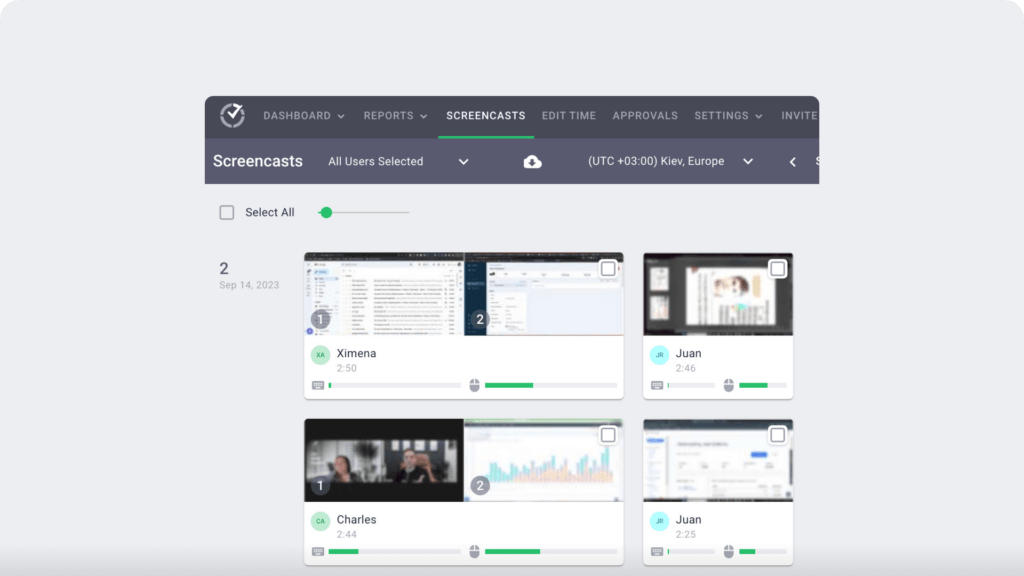
Time Doctor’s timesheet software can take screenshots of your employees’ screens in custom intervals once you enable it. The app can even record three minute videos of their screen.
However, it can only do so when the timer is running. To safeguard privacy, employees can delete/blur screenshots in case they contain personal information.
3. Productivity reports
Time Doctor tracks several data points related to employees activity. You can access a wide range of reports generated in real-time.
Here’s a quick look at these reports :
- Activity summary report: See active seconds, minutes, unproductive, manual, and mobile time for each employee over a selected time period.
- Attendance report: See if an employee is present, absent, partially absent, or late in real-time.
- Hours tracked report: View the total number of hours tracked by employees for any date range.
- Projects & tasks report: See the time spent on projects as well as individual tasks.
- Timeline report: Look at the time spent on tasks and breaks in a day or the whole week.
- Custom export report: Customize the fields you’d like to include in one single report.
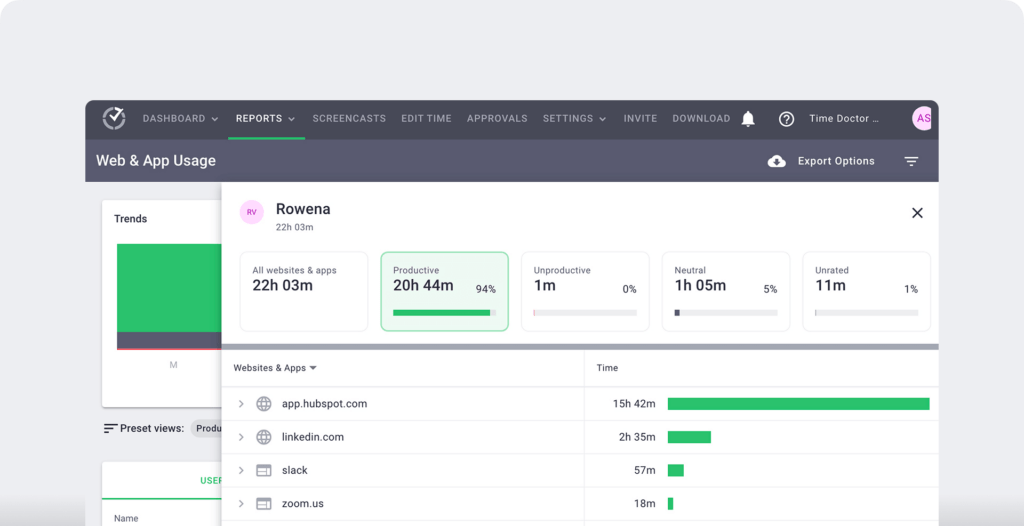
- Web and app usage report: View the time spent by an employee on each app and website during work hours.
4. Integrations
What good is an employee timesheet app if it doesn’t integrate with project management tools?
Time Doctor Integrates with tools like Jira, Asana, Slack, Google Workspace, and options for gps tracking or mobile time logging for field staff to connect productivity data across workflows.

Platforms
Linux, Mac, Windows, Android.
Pricing
- Basic: $6.67/user per month – offers time tracking + task management + activity tracking + unlimited screenshots.
- Standard: $10/user per month – includes “Basic” features + integrations + payroll and invoicing.
- Premium: $20/user per month – includes “Standard” features + executive dashboard + client login access.
2. ClickTime
ClickTime is an automatic timesheet app that focuses on driving better performance at work. They make time tracking easy, so you can reduce costs, stay on budget, and get visibility into project progress.
Employees can track time on their phones or laptops and managers can use the same tools to approve employee hours and look into reports. The user interface offers maximum ease of use — making time tracking a delight for everyone involved.
This tracking tool also focuses on using time to drive better business results and answer important business questions.
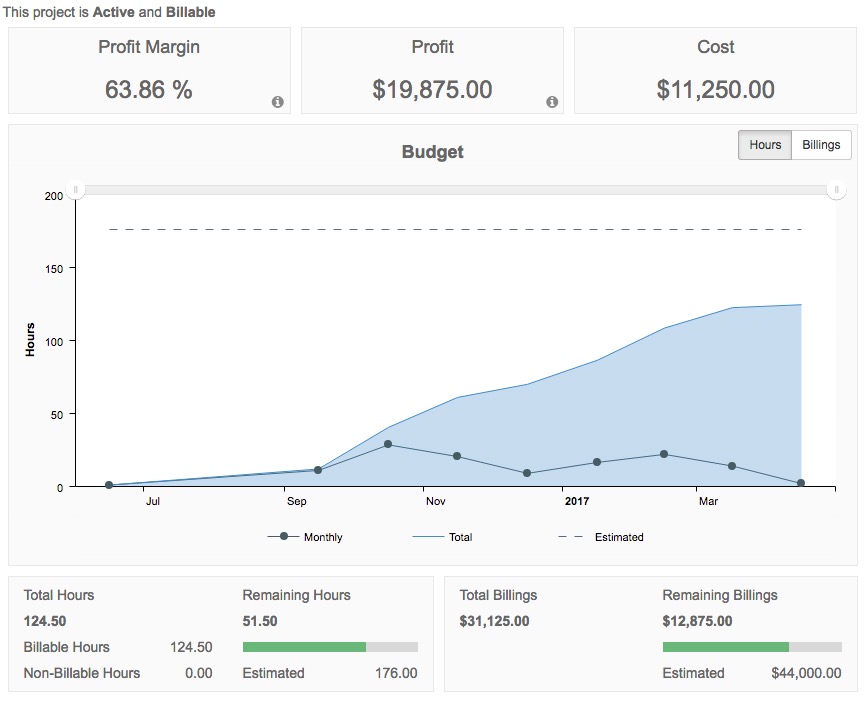
By drilling down into the reports, you can see whether a project is over budget, if you need to hire more employees, what are the billable hours, and more. Such insights help increase workplace efficiency.
A. Key features
1. Intuitive timesheets
There is virtually no learning curve with the ClickTime timesheet app. As soon as you log in to the platform, it’s easy to understand how it operates, how to track time, how to generate a report, and more.
2. Project insights
ClickTime also helps manage project budgets. You can gain insights into project and employee performance, and optimize your business. Its Project Insights module is an end-to-end budgeting platform designed exclusively for businesses that track time.
3. 80+ reports
ClickTime also has a wide-range of reports. These reports go above and beyond time tracking, so if you’re just looking for a timesheet app, then ClickTime may offer more than you need.
Reports include Project Budgeting, Timesheet Management, Employee Utilization & Billable Hours, and more.
In summary, ClickTime is a great tool if you’re looking to understand the overall productivity of your company.
B. Platforms
Clicktime is available for web, desktop and mobile.
Platforms include Windows, Mac, Linux, iOS, Blackberry and Android.
C. Pricing
Plans start at $9. All plans have a free 14-day-trial period.
3. Hubstaff

Hubstaff is another solid option if you’re looking for a timesheet app for employees. The Hubstaff software includes employee time tracking software with screenshots, time off, reporting, and automated payments.
Hubstaff also offers more robust task management and geofencing tools than some other competitors.
Check out our comprehensive Hubstaff review for more information.
A. Key features
1. Time tracking
Hubstaff’s time tracking feature lets you track time wherever and whenever your team works. It’s also easy to generate accurate timesheets, to create invoices for clients and to pay your team.
2. Online timesheets and offline time tracking
You don’t ever have to worry about setting a timesheet reminder. It’s easy to record employee hours and view reports. Hubstaff also allows you to track offline. Once you get back online, the app will sync properly.
3. Productivity monitoring
Do you need to see work unfold in real time?
With optional screenshot as well as app and URL tracking, you can monitor productivity. If you don’t like the functionality, then you can opt to turn it off.
4. GPS tracking
Employees can track time while they are on the road and at work sites with mobile-based time tracking. Your team can clock in and clock out from anywhere.
5. Payroll and invoicing
Hubstaff helps you set up pay rates once for each member of your team or project, so payments are automatically sent based on hours worked during that pay period. Invoicing is also automated for your convenience.
6. Team scheduling and task management
The online scheduling app provides you with a simple employee attendance tracker and staff scheduler. This helps you see who’s working when at any time. You can also drill down into projects by tracking time against specific tasks.
B. Platforms
Windows, Chrome, Mac, Android, and iOS.
C. Pricing
HubStaff has a forever Free version. Its basic paid plan starts from $4.99/month per user.
4. Zoho Projects

Consider Zoho Projects if you are a highly project-oriented team, specifically a team of developers.
Zoho Projects helps you track milestones, task lists, and tasks help you organize complex projects into easily manageable units. Not only does it have smart time tracking features, but it’s also a great tool if you need to comprehensively manage projects.
A. Key features
1. Time tracking
Zoho Projects has several tools that help you stay on schedule, coordinate work, and account for every hour of work. These tools include timesheets to help you log billable and non-billable hours, either manually or with an automatic timer.
You can also dig into and view detailed time reports. Additionally, you can generate invoices, estimate the hours it will take to complete projects based on past data, and look at tasks via a calendar view.
2. Task management
Do you need a better view into tasks?
Zoho Project lets you break up a large project into easily manageable parts and assign work as needed.
You can also set up start and end dates. If you want to automate regular tasks, you can do this by using Blueprints. And finally, you can review progress within the app.
3. Social project management
Another fun feature of Zoho Projects is the social element. Not only can you track milestones, tasks, and events, but you can also engage with them via chat and other social methods. If projects need a lot of feedback in a centralized location, this social element is helpful.

4. Charts and reports
Zoho can help you with anything from taking a broad view of the project to drilling down to a specific case. You can quickly view dashboards, charts, and reports as needed to give you the insights needed to make better management decisions.
5. Issue tracking and workflow
When you work for a large organization, it’s possible to run into issues.
Luckily, Zoho lets you organize any issues by severity or due date to help you resolve them. You can also customize many features and set up notifications and automate processes with this feature.
Zoho Projects has a timesheet app built into the larger project management tool.
If you are in need of not only tracking time, but collaborating on projects and managing tasks from a broader view, then take a look at Zoho.
B. Platforms
Mac, Windows, iOS, and Android.
C. Pricing
Zoho Projects has a free plan for small teams supporting three users and two projects.
Its Premium plans start from $35/user/month.
You can also check out our in-depth look at Zoho Projects.
5. Toggl Track

Toggl’s Toggl Track tool is a time tracking app that suits businesses of all sizes. Available as both a web and mobile app, this time tracking tool offers an easy to use interface to stay on top of your tasks.
If you want a detailed review on Toggl, check it out right here.
A. Key features
1. Time tracking
Time Tracking in Toggl includes One-Click Timers, websites and apps auto-trackers, idle trackers, and automated time entry suggestions. It also offers 100+ app integrations ranging from project management tools to CRMs.
2. In-depth reporting
Toggle offers summary, detailed and weekly timesheet reports that you can obtain in CSV and PDF formats. Its Saved Reports feature even allows you to customize and add new required fields in your reports that your employees can fill.
3. Project and revenue tracking
Get a detailed overview of clocked hours, billable hours, budget and timeline forecast, etc in Toggl’s detailed Project Dashboard. Toggl also provides project estimate alerts whenever a project is reaching its estimated end and also offers profit and labor cost comparison.
4. Team scheduling and management
Toggl’s Team Dashboard gives you a complete overview of your team’s productivity along with the members having the highest and lowest productivity. Its automated Email Tracking Reminders even remind your team members to track time.
B. Platform
Mac, Windows, iOS, and Android.
C. Pricing
Toggl’s free plan supports up to 5 users. Paid plans start at $10/user per month.
6. TSheets
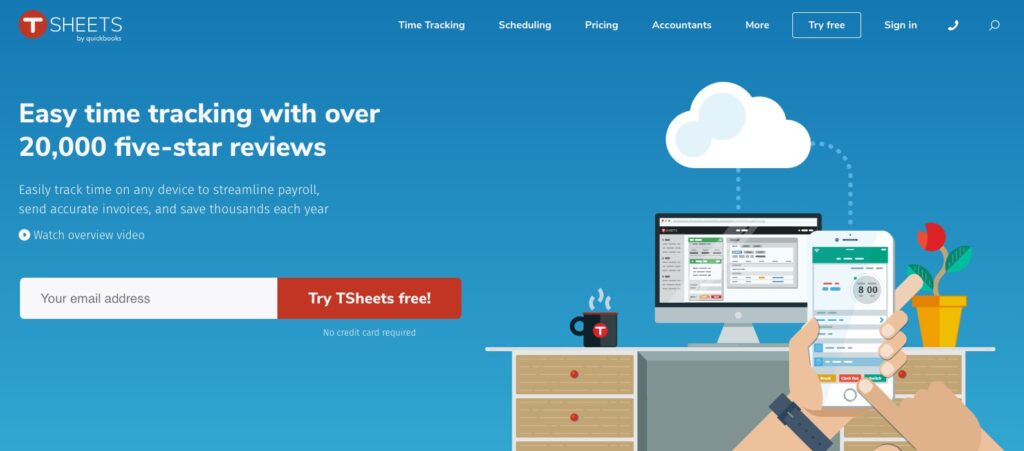
TSheets is an easy to use time tracking software with multiple features and integrations. Apart from its desktop app, its mobile timesheet app also allows timesheet tracking and is compatible with any mobile device including iPhone.
A. Key features
1. Timesheet management
The TSheets mobile app functions in areas without network coverage and allows you to manage multiple mobile timesheets simultaneously. You can even view the locations your employees are working from in the Who’s Working window.
2. GPS and Geofencing
The time tracking app of TSheets also offers GPS and Geofencing features that allow employers to check employee location data in real-time.
3. Scheduling
In TSheets you can create schedules on the basis of shifts, jobs or tasks. In case of newly published or changed schedules, employees get instant notifications once updated. You can also sync these schedules with Apple iCal, Microsoft Outlook and Google Calendar.
4. Time Clock Kiosk
TSheets’ Time Clock Kiosk runs both on computer and tablet and is best suited for in-house teams. They can use it to clock in and clock out whenever they need via four digit pins for punch-ins as well as biometric facial recognition.
5. Customizable reports
In TSheets you can get automated and custom-made timesheet reports on payroll, projects and employee wage. You can export timesheet reports in CSV, PDF and Excel formats.
B. Platform
Mac, Windows, iOS, and Android.
C. Pricing
Pricing plans start from $8/user per month with a monthly base fee of $20.
7. Office 365 Timesheet App

Office 365 Timesheet App is an easy to use timesheet app that offers unlimited projects and an effortless integration with the SharePoint ecosystem.
A. Key features
1. Project management
You can create unlimited projects and tasks on the Office365 Timesheet app. All projects and tasks in the app can be created by assigned managers and employees. However, other employees can add subtasks which are subject to approval.
2. Reports
Using the timesheet app, employees can create and send weekly reports to their managers. They can even alter the timesheet data according to their work before submission. These reports also have billable and non-billable filters that help managers determine increments and manage payroll.
3. Email notifications
Employees and managers get instant notifications regarding any change or update made in any report. From new report submission to timesheet approval status and revised report submission, everything gets notified via email through this employee timesheet software.
B. Platform
Mac, Windows, iOS, and Android.
C. Pricing
It has a forever free plan and paid plans start at $499 paid annually.
Wrapping up
There are hundreds of time tracking methods and several options on the market for timesheet apps. What you end up selecting will depend on your needs, your budget, your company size, the amount of remote workers you have, and what you need the software to do.
The timesheet apps featured here represent a wide and diverse range of what you can get from a timesheet app. After reviewing these apps, you’ll have a better idea of what type of timesheet app you need and what fits in with your budget and company goals.
If a simple timesheet template is all that you need, check out our free timesheet templates available in different formats.

