
Quick overview
Some employees try to cheat time-tracking systems using tricks like keyboard jamming, mouse jigglers, task switching, or remote desktop manipulation. However, these tactics rarely work against workforce analytics platforms designed to analyze real work patterns. In this article, you’ll learn the most common methods used to try to cheat Time Doctor and why they fail in the long run.
What happens when productivity looks real, but the work behind it isn’t?
Time Doctor is a workforce analytics platform that helps you lead with trust, not control, by giving clear visibility into how work actually happens. Still, some employees attempt to simulate productivity using shortcuts.
So what tricks do people use to try to cheat, and can those tactics really fool a platform like Time Doctor, which is designed to reveal how work actually happens?

Keyboard jamming to simulate typing activity
Leaders managing remote and hybrid teams increasingly face a new challenge. Distinguishing real productivity from artificial activity becomes harder as distributed work expands.
In some cases, employees attempt shortcuts that create the appearance of work without producing meaningful output.
One tactic gaining attention is keyboard jamming. This method involves repeatedly pressing keys or placing objects on a keyboard to simulate typing activity. The intention is to keep systems detecting constant input even when no real work is being done.
A widely reported case shows how serious this behavior can become. According to a Daily Mail report, “Dozens of police officers and staff faked activity on keyboards while working from home.”
More than 50 police officers and civilian staff were dismissed after investigators discovered that employees had been faking keyboard activity while working from home.
Some reportedly pressed the same keys repeatedly. Others placed objects such as staplers or drink cans on keyboards to keep keys held down.
While this may create keyboard activity, it does not reflect real work patterns. Time Doctor analyzes multiple signals such as application usage, screenshots, and productivity reports, which makes it difficult for artificial typing patterns to appear consistent with real work activity.
Mouse jiggler software that simulates activity
One of the most popular methods for cheating Time Doctor is using mouse jiggler software. These tools simulate constant mouse movement to prevent the system from logging idle time. However, while a mouse jiggler may trick Time Doctor’s idle detection, it cannot simulate real productivity. Time Doctor’s screenshot feature, for instance, will show whether or not actual work is being done during this period.
How employees use mouse jigglers to trick Time Doctor’s idle time tracking
Mouse jiggler tools work by moving the cursor at intervals to create the illusion of activity. Employees use these tools to avoid being marked as idle when they are away from their computers. However, Time Doctor can track not only mouse movement but also keystrokes and application usage, making it difficult to sustain this trick without being caught.
Task switching and automation scripts
Another common method involves using task switching or automation software to trick Time Doctor into logging more time than actually worked. By toggling between tasks or applications, employees try to create the appearance of continuous work. Automation tools can also be used to perform basic tasks while the employee is away from the desk.
Task switching to manipulate Time Doctor’s time tracking
Some employees attempt to manipulate Time Doctor by frequently switching between tasks or applications. For example, they may open multiple windows and switch between them to simulate multitasking. However, Time Doctor’s ability to track specific tasks and categorize them by activity level makes this an unreliable method. Additionally, prolonged inactivity on primary work applications will still trigger idle time alerts.
Remote desktop tricks used to manipulate screenshots
Some employees use remote desktop tools or screenshot manipulation techniques to falsify screenshots taken by Time Doctor. They may use screenshots from past work sessions or even use a remote connection to control the work environment without being physically present.
How employees use remote desktop tools to bypass Time Doctor’s screenshot monitoring
Remote desktop tools allow employees to control their work environment from a separate device. This trick can potentially fool Time Doctor into thinking they are active at their workstation. However, the software can still detect idle time through lack of keystrokes or mouse movements on the host computer, which often leads to detection.

Manipulating mobile time tracking
Time Doctor offers mobile app tracking to ensure employees working remotely or on the go are still productive. Some users try to cheat the system by pausing the mobile app or inputting inaccurate data manually to log work time that wasn’t actually spent on productive tasks.
Exploiting gaps in Time Doctor’s mobile tracking features
Employees sometimes attempt to manipulate Time Doctor’s mobile app by pausing tracking during breaks or falsely logging time after tasks are completed. However, as with the desktop version, Time Doctor tracks real-time activity, and discrepancies between task times and actual work can lead to suspicion.
How Time Doctor detects unusual activity patterns
Without advanced tools, identifying time tracking fraud can be challenging, requiring manual investigation. Time Doctor’s Unusual Activity Report automates this process using AI and machine learning. It analyzes typical work patterns, detecting anomalies automatically, and flagging suspicious behavior.
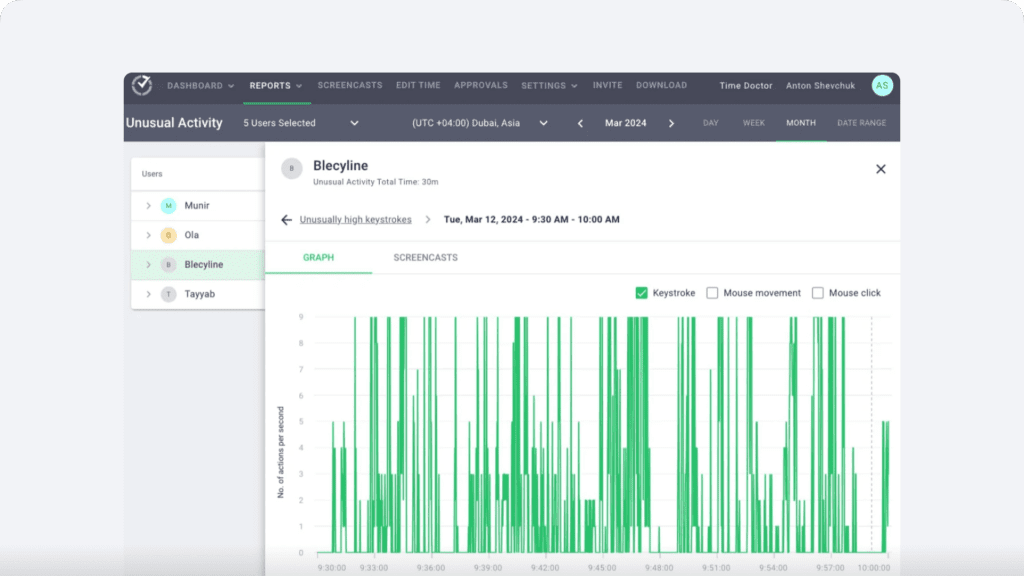
How Time Doctor detects unusual activity
Time Doctor’s Unusual Activity Report monitors various signs of potential cheating, including:
- Excessive typing or high keystrokes per second.
- Long periods of mouse movement without clicks.
- Sudden increases in mouse click activity.
- Repeated, consistent patterns of mouse movements or keystrokes.
- Extended periods of keystrokes without any mouse movement.
Time Doctor isn’t a keystroke logger; it tracks the level of keyboard activity without recording specific keys. The Unusual Activity Report provides timestamps of unusual behavior and a visual breakdown, allowing employers to quickly spot and act on suspicious patterns.
Why cheating on Time Doctor can lead to long-term consequences
While these methods may seem like clever tricks to cheat Time Doctor’s tracking features, they often lead to more issues than solutions. Employers increasingly rely on time-tracking tools to ensure transparency and productivity. When employees try to game the system, it can result in disciplinary action, job loss, and mistrust between employers and staff.
Ethical concerns of cheating Time Doctor and productivity tools
Beyond the technical aspects, cheating time-tracking software like Time Doctor raises ethical concerns. It undermines the trust employers place in their employees and can create a toxic work environment. Ultimately, cheating time-tracking systems reflects poorly on employees and can damage their professional reputation.
Conclusion: Can you really cheat Time Doctor?
While there are various methods people attempt to use to cheat Time Doctor, such as keyboard jamming, mouse jigglers, or automation software, these tactics are rarely effective in the long term. As a workforce analytics platform, Time Doctor analyzes multiple signals across how work actually happens, including screenshots, application activity, and productivity patterns. This makes it difficult for artificial activity to appear consistent with real work. Ultimately, the risks far outweigh any perceived benefits, and employees are better off focusing on transparency and genuine productivity rather than trying to cheat the system.
View a demo to see how Time Doctor’s workforce analytics help teams maintain transparency and accountability.
Frequently asked questions (FAQs)
Organizations prevent keyboard jamming by analyzing more than just keyboard activity. Workforce analytics platforms such as Time Doctor monitor broader work signals, including application usage, screenshots, and productivity patterns. When activity appears repetitive or disconnected from real tasks, artificial typing patterns become easier to identify.
Abnormal keystroke behavior refers to typing patterns that do not match natural human work activity. Examples include extremely high typing speeds, repeated keystrokes for long periods, or typing activity without mouse movement or application interaction. Time Doctor’s Unusual Activity Report can flag these patterns, helping managers detect potential attempts to simulate activity.
Yes. Mouse jigglers simulate cursor movement to prevent systems from detecting idle time. However, modern workforce analytics tools analyze more than mouse movement. Platforms like Time Doctor track application usage, screenshots, and activity patterns, making it easier to detect artificial mouse activity.
A mouse jiggler is a tool or device that automatically moves a computer cursor at intervals. Its purpose is to prevent systems from marking a user as idle. While this may create the appearance of activity, it does not generate real work activity in applications or workflows.
Some people attempt to cheat Time Doctor using tactics like keyboard jamming, mouse jigglers, or automation software. However, these methods are difficult to sustain because Time Doctor analyzes how work actually happens across tools, tasks, and workflows. By combining activity monitoring, screenshots, and productivity analytics, the platform helps organizations identify artificial activity patterns.
Frequent task switching can sometimes be used to simulate continuous activity. Workforce analytics platforms detect this behavior by analyzing application usage patterns, task duration, and workflow consistency. When activity jumps rapidly between tools without meaningful progress, reports from platforms like Time Doctor can highlight the pattern for review.
Keyboard jamming itself is not always illegal, but it can violate company policies and employment agreements. When employees intentionally simulate activity to appear productive, organizations may treat it as misconduct or time tracking fraud. Workforce analytics platforms such as Time Doctor help companies identify suspicious activity patterns so leaders can address the issue transparently and fairly.
Some employees attempt to cheat time tracking tools because they believe activity signals are the only thing being measured. Tactics like mouse jigglers, automation scripts, or keyboard jamming aim to simulate computer activity. However, workforce analytics platforms such as Time Doctor analyze broader work patterns, making it difficult for artificial activity to appear consistent with genuine productivity.
Yes. Workforce analytics helps leaders understand how work actually happens across tools, tasks, and workflows. When teams have clear visibility into productivity patterns, conversations about performance become more objective and transparent. Platforms like Time Doctor support this approach by giving managers data-driven insights while encouraging trust and accountability.


Liam Martin is a serial entrepreneur, co-founder of Time Doctor, Staff.com, and the Running Remote Conference, and author of the Wall Street Journal bestseller, “Running Remote.” He advocates for remote work and helps businesses optimize their remote teams.