How Rippling and Xero AU payroll integrations eliminate the manual work from every pay cycle
Quick overview
Manual timesheet handoffs are where payroll errors, disputes, and wasted hours come from. Time Doctor’s native payroll integration with Rippling and Xero AU syncs approved time data directly to your payroll platform. No export file, no reformatting, no re-keying. That means every pay run is built on the hours your team has already tracked and approved.
Every pay period, it starts the same way.
Someone pulls the timesheet export, spends an hour reformatting columns, re-keys the numbers, and waits for the one figure that never quite matches.
What started as a routine task becomes a morning of back-and-forth, and somewhere in that process, someone gets paid wrong.
The data was never the problem. The hours were tracked, and the timesheets were already approved. The issue was always the gap between two systems that were never connected, and that gap is where every payroll error enters.
Time Doctor’s native payroll integrations with Rippling and Xero AU close that gap. Tracked time flows directly into your payroll platform, so the export, the reformatting, and the re-keying disappear entirely. What remains is an accurate, on-time payroll built on hours your team has already approved.
Table of Contents
- What is the hidden cost of manual payroll?
- What changes when tracked time flows straight to payroll?
- You stay in control of every pay run
- Which payroll platforms does Time Doctor connect with?
- Time Doctor works with the payroll platform you already use
- A payroll capability that your other tools do not have
- How do you stop payroll errors from happening every pay cycle?
- Final thoughts
- Frequently asked questions(FAQs)
What is the hidden cost of manual payroll?
Manual payroll handoffs do not just waste time. They introduce errors that compound with every pay cycle, and those errors carry a real price tag that most ops and finance teams do not see until it is too late.
The numbers paint a clear picture. A 2022 Ernst and Young study found that:
- The average organization loses 29 workweeks per year correcting the most common payroll errors
- Time and attendance mistakes cost organizations an average of $71,700 per 1,000 employees annually
- Those errors occur more than once per employee per year on average
- One in five payrolls across organizations using traditional processes contains at least one error
And the problem has not gotten smaller. In 2024 alone, businesses paid $2.8 billion in payroll penalties for incorrect or missed employee payments. As recently as 2025, Remote’s State of Payroll Report found that 49% of HR teams spent 5 or more hours per month just correcting payroll errors.
Every time a person manually transfers time data between systems, they carry that risk with them. A missed row, a transposed digit, a timesheet approved after the export already ran. Any one of these is enough to throw off a pay run.
The downstream effects extend beyond the spreadsheet. When the hours in the payroll system do not match what an employee believes they worked, there is no single source of truth to point to.
Did the export capture PTO? Was the late timesheet included? The Workforce Institute at UKG found that 49% of employees begin looking for a new job after just two payroll mistakes.
Incorrect pay is not just an administrative problem. It is a trust problem, and trust is far harder to recover than a spreadsheet error.
What changes when tracked time flows straight to payroll?
Connecting time tracking directly to payroll eliminates the manual export step, and with it, the errors, disputes, and reconciliation work that step creates.
When Time Doctor’s native payroll integrations are active, approved timesheet data is sent directly to your payroll platform. It arrives in Rippling or Xero AU already structured for payroll processing, covering everything your pay run needs:
- Total hours tracked for each included employee
- A full breakdown of hours by day
- Accurate time and attendance data, including PTO and leave days
- Data scoped exactly to the users or groups you select for that run
No export file, no reformatting pass, no manual entry on the other side.
This matters because both systems draw from the same source. The time data your managers reviewed and approved in Time Doctor is identical to what is sent to payroll.
One source of truth means nothing to reconcile. If a question comes up about hours worked, both the employee and the payroll processor are looking at the same numbers. The dispute that used to require chasing emails and comparing exports simply does not happen anymore.
This is the same tracked-time data your workforce analytics already runs on. It is the data your team already trusts. Payroll just becomes one more place it lands, with no manual step in between.
You stay in control of every pay run
With Time Doctor’s payroll integrations, every sync is manually triggered. That is not a limitation. It is exactly how payroll should work.
Before each sync, you choose the date range, select the users or groups to include, and review what will be sent. You initiate the sync when you are ready. Payroll does not move without a deliberate action from the person responsible for running it.
That level of control matters more than most teams realize. Here is what it means in practice:
- The date range is set before anything is sent
- Only the selected employees or groups are included in each run
- Data is reviewed before it reaches the payroll platform
- Nothing moves in the background, and nothing syncs before a late timesheet is approved
Payroll should always have a human checkpoint, and this is it.
Which payroll platforms does Time Doctor connect with?
If your team runs payroll in Rippling or Xero AU, Time Doctor connects directly with no file in between.
Time Doctor’s payroll integrations launch with two platforms:
Rippling
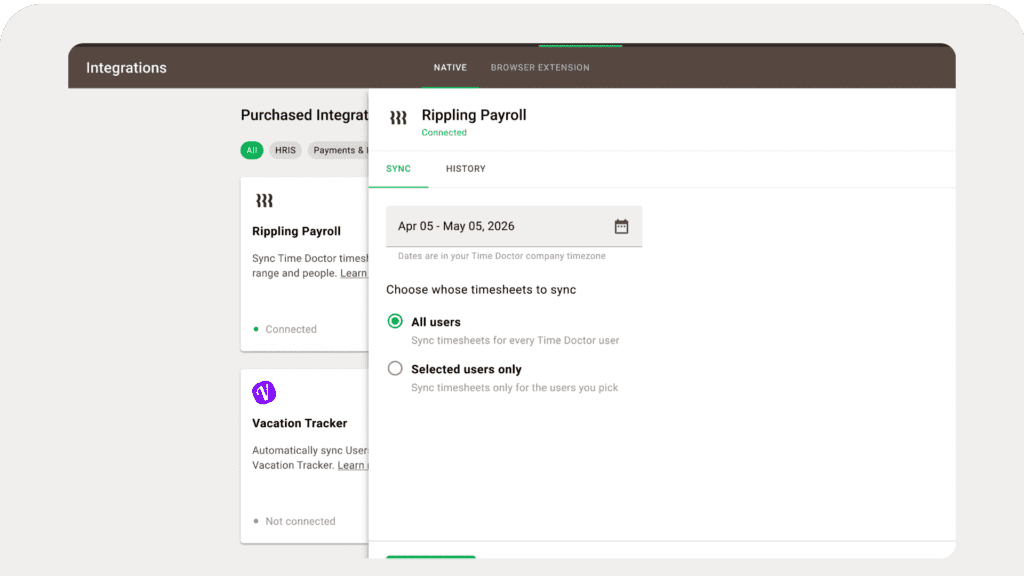
Timesheets sync directly into Rippling Payroll. By the time you are ready to process pay, the hours are already there. No export file, no upload step, no reformatting. Full details on the Rippling payroll integration page.
Xero AU
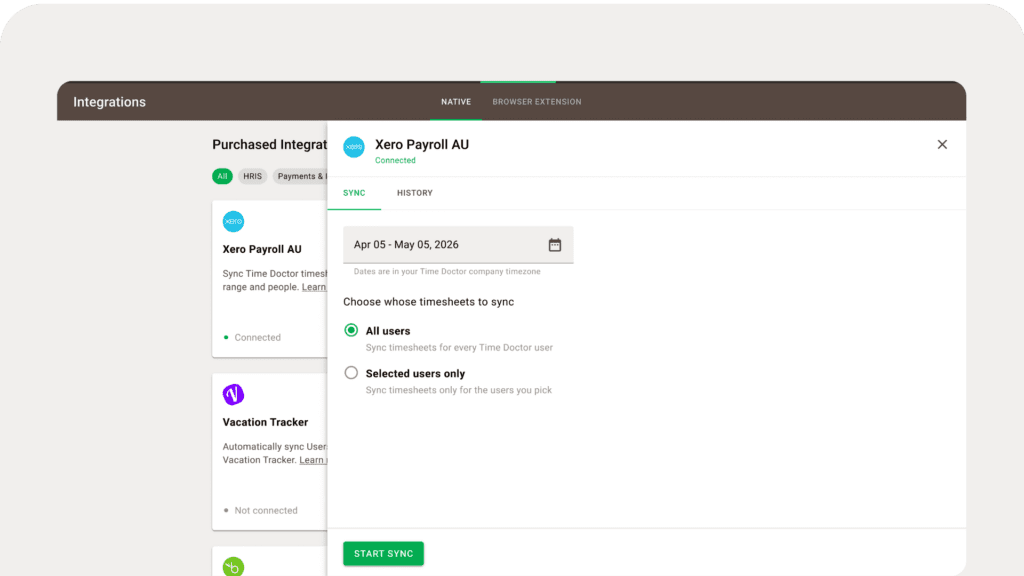
For teams running Australian payroll through Xero, tracked time flows from Time Doctor directly into Xero AU Payroll, ready for your pay run. Note that this integration covers Australian payroll specifically, not global Xero. Full details on the Xero AU payroll integration page.
Both integrations are available as add-ons across all plans that include the Payroll feature, at $200/month per integration. Running both? That is $400/month combined.

Time Doctor works with the payroll platform you already use
Time Doctor supports several paths from tracked time to payroll, and the right one depends on which platform your team already uses.
Here is a quick breakdown to help you find your fit:
- ADP, Gusto, Payoneer, PayPal, or Wise — Time Doctor generates a formatted timesheet export, ready to upload directly into whichever of these tools you use for payment
- Deel — Approved payroll data goes straight into Deel through a direct connection. No file, no upload step
- Rippling or Xero AU — Tracked time syncs directly into your payroll platform with no file at any step. This is the most direct path from approved timesheets to a processed pay run
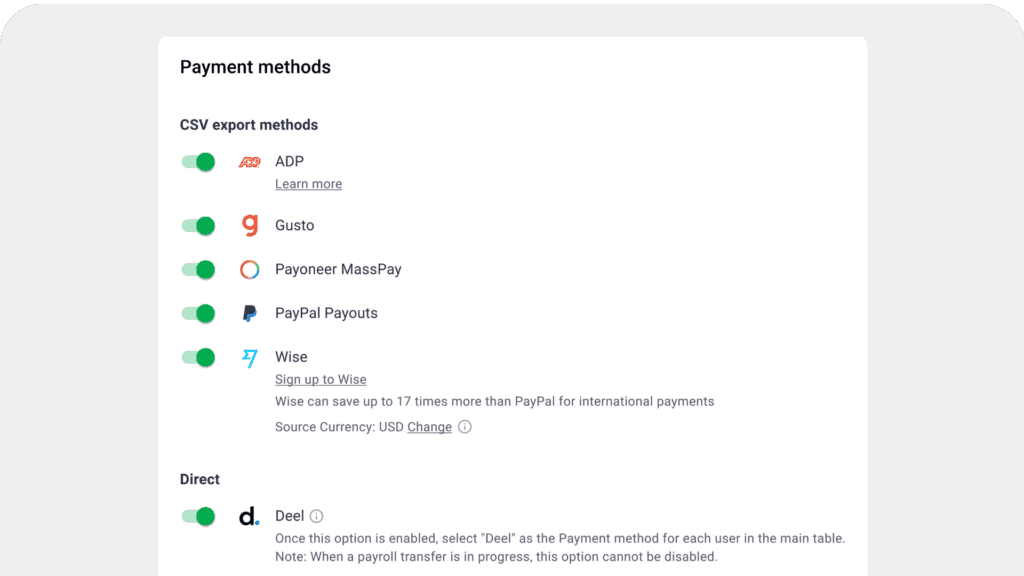
The Rippling and Xero AU native integrations are the newest addition to Time Doctor’s payroll options and the only ones that connect tracked time directly to a payroll platform without any manual steps in between.
If you are still figuring out which option best fits your team, Time Doctor covers every available path, from tracked time to payroll, so you can find the right fit for the platform you already use.
A payroll capability that your other tools do not have
Most employee monitoring and time tracking tools stop at the timesheet. What happens after the timesheet is approved has always been left to the ops or finance team to handle manually, and that manual step is where payroll errors enter.
Time Doctor is different. The native payroll integrations with Rippling and Xero AU mean that tracked time does not just live in a report. It lands directly in your payroll platform, ready for processing, with no manual handoff in between.
That is a capability none of Time Doctor’s primary competitors currently offer. ActivTrak, Insightful, Teramind, and Hubstaff all stop at the timesheet. For teams where a single payroll error means an hour of cleanup, an employee dispute, or a missed pay deadline, that gap matters.
Closing it means accurate, on-time pay every cycle. That is what payroll integration is built to do, and it is where tracked time finally pays off in the most direct sense possible.
How do you stop payroll errors from happening every pay cycle?
The answer is not a better spreadsheet or a more careful export process. It is removing the manual step entirely.
When tracked time flows directly into your payroll platform, the errors, disputes, and reconciliation work that come with manual handoffs stop existing. The hours your team tracked, reviewed, and approved are the same hours that show up when you process pay. One source of truth, no cleanup, no chasing the number that does not match.
Time Doctor’s native integrations with Rippling and Xero AU make that possible today. And for teams using ADP, Gusto, Deel, Payoneer, PayPal, or Wise, Time Doctor’s other payroll options are built to cover you too.
If you are ready to see which path fits your payroll setup, Time Doctor makes it easy to find out if your payroll platform is supported. And if you would rather walk through it with someone, the team is happy to take a look at your setup together with no pressure and no hard sell.
Accurate, on-time payroll starts with the time data your team already trusts. Everything else follows from there.
Final thoughts
Most payroll problems are not payroll problems. They are handoff problems. The moment someone has to manually move time data between two systems, the risk of getting it wrong enters. Time Doctor removes that moment entirely. Tracked time flows straight into Rippling or Xero AU, and payroll runs on hours your team has already approved. That is the whole fix.
See if your payroll platform is supported — or talk to the team if you would rather walk through it first.
Frequently asked questions(FAQs)
A payroll integration is a direct connection between your time tracking tool and your payroll platform. Instead of manually exporting timesheets, reformatting them, and re-entering data into payroll, the integration moves approved time data automatically from one system to the other. The result is an accurate, on-time payroll with no manual steps in between.
Time Doctor syncs approved timesheet data directly to your connected payroll platform on demand. Before each sync, you select the date range and the users or groups to include. When you are ready, you trigger the sync manually. The approved hours are already in Rippling or Xero AU, structured for payroll processing — no export file, no reformatting, no re-keying required.
Yes. Time Doctor connects natively with Rippling Payroll. Approved timesheets sync directly into Rippling, so the hours are already there by the time you are ready to process pay.
Time Doctor integrates with Xero AU Payroll specifically, which covers Australian payroll. This integration is not available for global Xero. If your team runs payroll through Xero AU, tracked and approved time flows directly from Time Doctor into your Xero AU Payroll account.
The sync is manually triggered. You initiate each sync when you are ready, after selecting the date range and the users or groups to include. Payroll does not move without a deliberate action from the person responsible for running it. This is intentional. It maintains a human checkpoint before any data reaches your payroll platform.
Each payroll integration is available as an add-on for $200 per month across all plans that include the Payroll feature. If you connect both Rippling and Xero AU, the combined cost is $400 per month.
Time Doctor sends the total hours tracked per employee, broken down by day, for the selected users or groups and the selected date range. It also includes accurate time and attendance data, such as PTO and leave days. Only time tracked in Time Doctor is included — the sync is one-way, from Time Doctor to your payroll platform.
None of Time Doctor’s primary competitors — ActivTrak, Hubstaff, Insightful, or Teramind — currently offer a native payroll integration. Most workforce monitoring tools stop at the timesheet and leave the payroll handoff as a manual step.